

Authorization for Electronic Deposit
The State of Kansas requires all state agencies, including universities, to process and submit the Authorization for Electronic Deposit (DA-130) form via DocuSign. All DA-130 requests must originate from authorized users in the state’s financial management system. At WSU, these authorized users are Financial Services staff responsible for vendor maintenance.
This page provides step-by-step instructions for notifying our vendor maintenance team when a vendor requests ACH setup or needs to update an existing ACH setup. Please select one of the six scenarios below that best matches your transaction.
Important Notes:
- The DA-130 form cannot be used for WSU employees (including student employees) or foreign vendors. Please refer to the section for employee set-up below.
- Wire payments (typically used for foreign suppliers) are a separate function from ACH/direct deposit setups. For assistance with wire payments, email accountspayable@wichita.edu.
Scenarios
Emburse Enterprise (Chrome River) Employee Reimbursement - New Vendor Profile Request
Employee - Authorization for Electronic Deposit
Wu-Buy New Vendor Requests with ACH Add-On
Wu-Buy Existing Vendor Requests with ACH Add-On or Bank Change
Emburse Enterprise (Chrome River) New Vendor Requests with ACH Add-On or Bank Change
Emburse Enterprise (Chrome River) Existing Vendor Requests with ACH Add-On or Bank Change
Emburse Enterprise (Chrome River) Employee Reimbursement – New Vendor Profile Request
All employees should be submitted via Emburse Enterprise (Chrome River). Do not use Wu-Buy.
- Create a Emburse Enterprise (Chrome River) Invoice utilizing the “Create Temp Address” process.
- Enter the first name, last name, and myWSU ID of the employee or student-employee in the comments section of the Emburse Enterprise (Chrome River) Invoice.
- Financial Services creates a vendor profile, utilizing the banking information recorded in the “WSU Employee Travel/Reimbursement Direct Deposit Distribution” section in lieu of the DA-130 form.
Note: If banking information has not been supplied, Financial Services places the reimbursement request on hold until the banking information is provided. The employee is sent an email reminder to complete this section.
Employee - Authorization for Electronic Deposit
The W9 and DA-130 forms are not required to establish a vendor profile for active employees or student-employees. However, employees and student-employees must provide their direct deposit banking information by accessing the “Direct Deposit Information” link housed on myWSU.
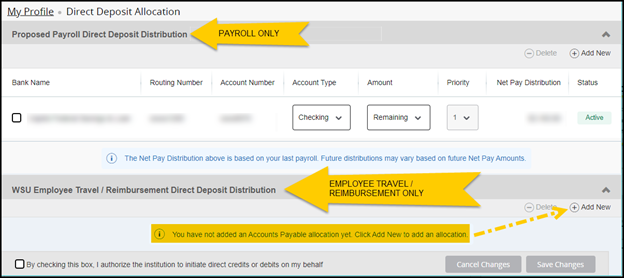
To speed up the reimbursement process employees should ensure their banking information has been correctly recorded in the “WSU Employee Travel/Reimbursement Direct Deposit Distribution” section in the image above.
Wu-Buy New Vendor Requests with ACH Add-On
This section applies to new vendors you need set-up for Purchase Orders, Requisitions, or Invoice. NOT employee set ups.
Wu Buy is the preferred platform for all vendor requests, except employee requests. It is a secure way to submit a vendor request and supply secure information to vendor maintenance.
Note: Due to Financial Services offering two options for vendor set up and vendor communication, the use of DROPBOX and email for supplier requests has been eliminated.
If you submit a request via Wu-Buy do not submit it via Emburse Enterprise (Chrome River).
- Contact the perspective vendor and obtain the following:
- Completed and signed W9.
- First name, last name, and email address of the individual at the vendors company responsible for providing ACH/Direct Deposit/Electronic Deposit banking information. The contact person should be a verified employee of the company and the person authorized to sign and provide banking information for their organization.
- Create a Wu-Buy Supplier Request using the Supplier Portal guide.
- Attach the W9 in your Supplier Request. In the Request Reason section, add a comment notating that the vendor would like to be set up for ACH/Direct Deposit/Electronic Deposit. Include the first name, last name, and email address obtained in step 1b.
- Financial Services sends the supplier a Wu-Buy registration invitation based on the information provided.
- Financial Services sends the vendor a link to the DA-130 via Docusign using the information provided. Note: Please let your supplier know they will receive instructions from our email address supplier-requests@wichita.edu. They will receive a Docusign link from the Kansas Department of Administration. Ask them to check spam or quarantine email boxes for communication from us.
- Once the vendor has completed the DA-130 process via DocuSign, Financial Services will work with the State of Kansas to add ACH/Direct Deposit/Electronic Deposit to the vendor profile for future payments. No further action is needed unless Financial Services reaches out to your department for assistance in contacting the vendor.
Wu-buy Existing Vendor Requests with ACH Add-On or Bank Change
This section applies to existing vendors that want to stop paper check reimbursement and add ACH or request a bank change. NOT employee set ups.
Note: Due to Financial Services offering two options for vendor communication, the use of DROPBOX and email for supplier requests has been eliminated.
Wu-Buy is the preferred platform for all vendor requests, except employee requests. It is a secure way to submit a vendor request and supply secure information to vendor maintenance.
If you submit a request via Wu-Buy do not submit it via Emburse Enterprise (Chrome River).
- Contact the existing vendor and obtain the following:
- First name, last name, and email adddress of the individual at the vendors company responsible for providing ACH/Direct Deposit/Electronic Deposit banking information. The contact person should be a verified employee of the company and the person authorized to sign and provide banking information for their organization.
- Create a Wu-Buy Supplier Request using the Supplier Portal guide.
- Provide the supplier name and Banner X id. In the Request Reason section, add a comment notating that the vendor would like to be set up for ACH/Direct Deposit/Electronic Deposit or they need to update their existing bank on file. Include the first name, last name, and email address obtained in step 1a. The information is reviewed by vendor maintenance and they will contact the vendor.
- Financial Services sends the vendor a link to the DA-130 via DocuSign using the information provided. Note: Please let your supplier know they will receive instructions from our email address supplier-requests@wichita.edu. They will receive a Docusign link from the Kansas Department of Administration. Ask them to check spam or quarantine email boxes for communication from us. The vendor will not receive communication through Wu-Buy on ACH set ups.
- Contact your supplier and inform them that pending transactions can be affected while bank changes are taking place. Due to timing issues of these changes, current payments can issue to the current bank on file or by paper check.
- Once the vendor has completed the DA-130 process via DocuSign, Financial Services works with the State of Kansas to update the ACH/Direct Deposit/Electronic Deposit information on the vendor profile for future payments. No further action is needed unless Financial Services reaches out to your department for assistance in contacting the vendor.
Emburse Enterprise (Chrome River) New Vendor Requests with ACH Add-On or Bank Change
This section applies to new vendors that want to stop paper check reimbursement and add ACH or request a bank change. NOT employee set ups.
Note: Financial Services now offers two options for vendor set up and vendor communication, the use of DROPBOX and email for supplier requests has been eliminated.
Emburse Enterprise (Chrome River) is the method used for employee set ups for direct reimbursements and travel reimbursements. It is also the method for specific vendors invoice payments.
If you submit a request via Emburse Enterprise (Chrome River) do not submit it via Wu-Buy.
- Contact the perspective vendor and obtain the following:
- Completed and signed W9.
- First name, last name, and email address of the individual at the vendors company responsible for providing ACH/Direct Deposit/Electronic Deposit banking information. This contact person should be a verified employee of the company and the person authorized to sign and provide banking information for their organization.
- Create a Emburse Enterprise (Chrome River) Invoice utilizing the “Create Temp Vendor” process.
- Attach the completed and signed W9 along with the invoice.
- Add a comment to the Emburse Enterprise (Chrome River) Invoice indicating the vendor would like to be set up for ACH/Direct Deposit/Electronic Deposit. Include the first name, last name, and email address obtained in step 1b.
- Financial Services sends the vendor an invitation link to the DA-130 via DocuSign. Note: Please let your supplier know they will receive instructions from our email address supplier-requests@wichita.edu. They will receive a Docusign link from the Kansas Department of Administration. Ask them to check spam or quarantine email boxes for communication from us.
- Financial Services establishes the vendor profile once the supplier completes registration, and the vendor is set up for paper check reimbursement. This is to ensure there are no processing delays while waiting for the vendor to respond to ACH set up.
- Once the vendor has completed the DA-130 process via DocuSign, Financial Services works with the State of Kansas to add ACH/Direct Deposit/Electronic Deposit to the vendor profile for future payments. No further action is needed unless Financial Services reaches our to your department for assistance in contacting the vendor.
Emburse Enterprise (Chrome River) Existing Vendor Requests with ACH Add-On or Bank Change
- Contact the existing vendor and obtain the following:
- First name, last name, and email address of the individual at the vendors company responsible for providing ACH/Direct Deposit/Electronic Deposit banking information. This contact person should be a verified employee of the company and the person authorized to sign and provide banking information for their organization.
- Create a Emburse Enterprise (Chrome River) Invoice, selecting the appropriate existing vendor.
- Select “Create Temp Address” in the Chrome River Vendor Address field to route the document to the vendor maintenance team.
- Add a comment to the Emburse Enterprise (Chrome River) Invoice indicating the vendor would like to be set up for ACH/Direct Deposit/Electronic Deposit. Include the first name, last name, and email address obtained in step 1a.
- Financial Services sends the vendor an invitation link to the DA-130 via DocuSign. Note: Please let your supplier know they will receive instructions from our email address supplier-requests@wichita.edu. They will receive a Docusign link from the Kansas Department of Administration. Ask them to check spam or quarantine email boxes for communication from us.
- Contact your supplier and inform them that pending transactions can be affected while bank changes are taking place. Due to timing issues of these changes, current payments can issue to the current bank on file or by paper check.
- Once the vendor has completed the DA-130 process via DocuSign, Financial Services works with the State of Kansas to update the ACH/Direct Deposit/Electronic Deposit information on the vendor profile for future payments. No further action is needed unless Financial Services reaches out to your department for assistance in contacting the vendor.