

myPerformance
Evaluation Cycle Timeline Summary
Non-Teaching Employee Performance Evaluations
March 1-31, 2026
2026-2027 Planning
Managers
- PLAN Expectations, Competencies, and Goals
- SAVE and SUBMIT Evaluation
- PROVIDE a Copy of Evaluation to Employee
- MEET with Employee to Review Planning
September 1-30, 2026
2026-2027 Mid-Review
Managers
- UPDATE Expectations, Competencies, and Goals
- SAVE and SUBMIT Evaluation
- PROVIDE a Copy of Evaluation to Employee
- MEET with Employee for Mid-Review
January 1-31, 2027
2026-2027 Employee Self-Evaluation
Employees
- ENTER Job Performance Info and Accomplishments
- SAVE and SUBMIT Evaluation
February 1-28, 2027
2026-2027 Manager Review
Managers
- PROVIDE SUMMARY Comments
- SELECT RATING for Competencies
- SAVE and SUBMIT Evaluation
- PROVIDE a Copy of Evaluation to Employee
- MEET with Employee to Review
March 1-7, 2027
2026-2027 Employee Signature
Employees
- ADD Additional/Final Comments
- Electronically SIGN, SAVE, and SUBMIT Evaluation
March 8-14, 2027
2026-2027 Manager Signature
Managers
- REVIEW Employee Comments
- ADD Additional/Final Comments
- Electronically SIGN, SAVE, and SUBMIT Evaluation
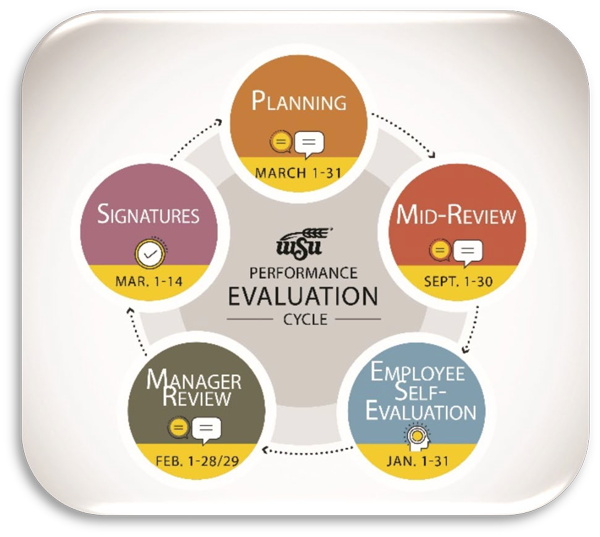
Performance evealuation cycle
March 1-31: Planning
Managers
- Managers have unlimited access to their Direct Report evaluations through December 31 to continuously update performance and goals throughout the year.
- Employees do not have access to their current year evaluations until January 1.
September 1-30: Mid-Review
Managers
- Managers have unlimited access to their Direct Report evaluations through December 31 to continuously update performance and goals throughout the year.
- Employees do not have access to their current year evaluations until January 1. AUTOMATIC ROLLOVER TO NEXT STEP?
- Yes. myPerformance will automatically rollover to the Employee Self-Evaluation step on January 1.
January 1-31: Employee Self-Evaluation
Employees
- Employees have unlimited access to their current year evaluation during the Employee Self-Evaluation step from January 1-31.
- Managers will not have access to their Direct Report evaluations during the Employee Self-Evaluation step. AUTOMATIC ROLLOVER TO NEXT STEP?
- Yes. myPerformance will automatically rollover to the Manager Review step on February 1.
February 1-28/29: Manager Review
Managers
- Managers have unlimited access to their Direct Report evaluations throughout the entire month of February to complete the Manager Review step.
- Employees do not have access to their current year evaluations again until the Employee Signature step on March 1. AUTOMATIC ROLLOVER TO NEXT STEP?
- NO. Manager action is required for the evaluation to push to the Employee Signature step on March 1.
March 1-7: Employee Signature
Employees
- Employees have access to their current year evaluation for Employee Signature on March 1, provided that the Manager Review step has been completed. Provided that the Manager Review step has been completed and submitted.
- Managers do not have access to their Direct Report evaluations during this step. Managers will have access to these evaluations again for Manager Signature on March 8, provided that their Direct Report has completed and submitted the Employee Signature step. AUTOMATIC ROLLOVER TO NEXT STEP?
- NO. Employee action is required for the evaluation to push to the Manager Signature step on March 8.
March 8-14: Manager Signature
Managers
- Managers have access to their Direct Report evaluations for Manager Signature on March 8, provided that the Employee Signature step has been completed and submitted.
- Employees do not have access to their evaluations during this step. Employees will have access to this evaluation again once Manager Signature has been completed and submitted. AUTOMATIC ROLLOVER TO NEXT STEP?
- NO. Manager action is required for the evaluation to push to Completed status.
Who Has Access To Current Cycle Myperformance Evaluations, And When?
Indirect Managers have access to view evaluations throughout the entire evaluation cycle. No action is required.