

Fall 2023 edition (sixteenth edition). Graduate School, Wichita State University, 107 Jardine Hall.
Graduate School Office: (316) 978-3095 (option 2). Degree Audit Specialist: (316) 978-6247.
This is the web edition of the Graduate School Guide to the Preparation of Theses and Dissertations. Chapters 1 through 6 give the formatting rules and the electronic submission process; Chapter 7 reproduces the full-sized sample pages as images, with the formatting callouts from each sample written out beneath it.
Preface
This manual is designed to be a basic source of information for Wichita State University (WSU) graduate students who are writing a master’s thesis or doctoral dissertation. All theses and dissertations must be submitted electronically. The Electronic Thesis/Dissertation (ETD) is submitted to the Graduate School by converting the document to a Portable Document Format (PDF) file. Once approval has been given by the Graduate School, the PDF file will be uploaded to the Blackboard Learning System. The final copy will also be forwarded to University Libraries. Bound copies are no longer required. However, if a copy is requested by the department or committee chair, then students may choose to provide a duplicate copy on low-cost, non-archival paper and bound using any low-cost binding method. The ETD process will contribute to world-wide graduate education as WSU builds a Networked Digital Library of Theses and Dissertations (NDLTD) in collaboration with other scholarly institutions.
This manual establishes the technical parameters within which all students should work to produce a thesis or dissertation, such as production tools, font, margins, spacing, pagination, and page sequencing. It also provides full-sized sample pages. Students viewing this manual from the Graduate School’s website are advised to print it out prior to preparing their thesis or dissertation, since headings, subheadings, and spacing can appear differently when viewed on the computer screen than in printed format. Reading this document in its entirety, not just the sample pages, should facilitate an understanding of the required format. However, once the thesis or dissertation is completed, comparing the completed work to the sample pages should ensure a uniform document that conforms to Graduate School guidelines.
Viewing the style of other theses or dissertations on file in University Libraries is a common practice, but students must understand that mere duplication of another document’s style may not be acceptable. The existence of a particular style or usage in a previously accepted thesis or dissertation does not establish a precedent for its continuation. Graduate students are responsible for meeting the regulations in this guide and are encouraged to consult with their committee advisors regarding the implementation of these regulations.
Once students are familiar with these guidelines, they should consult the current style manual recommended by their department or discipline for all other issues of form and content, particularly the style for references. A list of WSU graduate programs requiring a thesis or dissertation and the recommended manuscript style is found here in Appendix A. The goal is to strive for consistency throughout the entire thesis or dissertation; however, when approaches differ from one another, regulations from the Graduate School take precedence over rules found in other style manuals.
This publication guide was adapted from several sources, including the Tennessee Conference of Graduate Schools Guide to the Preparation of Theses and Dissertations, the Office of Degree Requirements at the University of Massachusetts, the Kansas State University Graduate Handbook, and Kate Turabian’s Manual for Writers of Term Papers, Theses, and Dissertations. The guide itself has been set up to illustrate some of the required formatting styles of a thesis or dissertation; however, to conserve space here, bullets are used extensively, and most of the text is single-spaced rather than double-spaced (double-spacing is required for the main text of a thesis or dissertation).
The 2023 printing of this manual is the sixteenth edition, edited by Kristie Bixby, Publications Editor for Wichita State University.
Chapter 1. Introduction
The purpose of a thesis or dissertation is to contribute to a student’s field of study through the pursuit of research and scholarship. The Wichita State University (WSU) Graduate School encourages and upholds WSU’s standards of accuracy and soundness of research, as well as the requirements of individual graduate programs regarding the master’s thesis and the doctoral dissertation. WSU is committed to assisting graduate students and faculty members in meeting the goals of consistency, logical organization, attractiveness, and correctness in theses and dissertations.
Regardless of the style and format used, a thesis or dissertation must be sufficiently complete to allow an independent investigator to repeat or verify all of the work leading to the author’s results and conclusions. In certain cases, when a manuscript prepared for publication is to be used, the terseness or page restrictions required by professional journals may prevent an author from meeting this condition with the publishable manuscript alone. In such cases, the thesis or dissertation must include additional materials that ensure independent reproducibility tables, descriptions of unproductive or unsuccessful explorations, derivations, and so forth (quoted from Kansas State University Graduate School website: www.k-state.edu/grad/graduate-handbook/appendixb.html).
Since conferral of a graduate degree implies personal integrity and knowledge of scholarly methods, there are three areas in which graduate students should be particularly cautious: (1) proper acknowledgment of cited works, (2) use of copyrighted material, and (3) compliance reporting associated with applicable federal, state, and university regulations and policies. If copyrighted material is used in a limited way, then permission to quote it is usually not necessary. However, if extensive material from copyrighted work is to be used such that the rights of the copyright owner might be violated, then permission of the owner must be obtained. In determining the extent of a written work that may be quoted without permission, the student should consider the proportion of the material to be quoted in relation to the substance of the entire work. In no case should a standardized test or similar material be copied and included in a thesis or dissertation without written permission.
In recent years, with the increased use of the Internet for research, some students have struggled with the proper manner in which to cite certain content. Some have used Wikipedia as a reference. Wikipedia is not an acceptable reference, because it can be edited by anyone at any time, with no validation of the information. However, at the bottom of many Wikipedia pages, there are reference sources for the material quoted in the document. Rather than citing Wikipedia, it is recommended that students investigate those sources, which are usually linked, and review the information from them; if the material is acceptable and relevant to the work in the thesis or dissertation, then students can cite the actual source.
There is often confusion over what content is required to be cited. Insufficiently cited content can lead to concerns of plagiarism, which can call into question the entirety of a student’s thesis or dissertation research. In order to check a thesis or dissertation for sufficient citation of content, the use of SafeAssign is recommended. This tool, offered by Blackboard, can help students and faculty ensure that any borrowed content is properly attributed. It is suggested that all students work with their thesis or dissertation advisor to have their work reviewed through SafeAssign to ensure proper citation of all borrowed work.
Compliance with federal regulations governing the use of human subjects, animal care, radiation, legend drugs, recombinant DNA, or the handling of hazardous materials in research is monitored by a number of federal agencies. Because of these regulations, research compliance is another area of importance to graduate students and how their research is conducted. If they are unfamiliar with compliance, then graduate students and their faculty advisors who are planning research that involves any of the areas mentioned should contact the Office of Research before beginning their project. The goal of the WSU Graduate School, as well as the student’s thesis or dissertation committee, is to ensure that the manuscript will reflect credit on the student, the student’s committee, the department, the Graduate School, and ultimately Wichita State University.
All graduate degrees are awarded by the Kansas Board of Regents upon recommendation of the faculty and the dean of the Graduate School, who reserve the right to reject theses and dissertations that do not conform to the regulations stated in this manual. In addition, the Graduate School provides assistance in the preservation and circulation of students’ manuscripts through the University Libraries System.
The chapters that follow provide basic guidelines/instructions for preparing a thesis or dissertation. Small sample pages showing placement of information accompany some of the descriptions of these instructions. An entire section of full-sized sample pages follows in Chapter 7. Following each full-sized sample page is an identical page that shows how to format that page according to Graduate School guidelines, including various “callout” frames containing important formatting information.
Chapter 2. Preparation and Format
2.1 Production Tools
- Remember that every thesis and dissertation is produced electronically and becomes part of the Wichita State University Libraries collection as an electronic document; therefore, the final presentation must meet the highest standards of clarity, legibility, uniformity, and reproducibility.
- Produce the manuscript using a computer application suitable to the discipline and capable of being transmitted electronically to Blackboard. Typically, manuscripts are produced with Microsoft Word, although LaTeX, a high-quality typesetting system that includes features designed for the production of technical and scientific documentation, is also acceptable. Because LaTeX is not a word processor and primarily focuses on accurate content, pages formatted in LaTeX often look very different than those shown in the guidelines. Therefore, if LaTeX is the application of choice, then ensure that the preliminary pages match the sample pages here in this preparation guide. This may require creating the preliminary pages in Word and then combining them with the text and any appendices into one PDF file before final submission.
- Since Blackboard can be accessed through the Internet, ensure that you have access to an Internet connection and browser.
- Use the following Web address to access Blackboard: blackboard.wichita.edu.
- Refer to Chapter 5 for steps in the electronic thesis/dissertation (ETD) process.
- Direct any questions about the acceptability of the draft document to the committee chair and/or members.
2.2 Margins
- Assume a standard page size of 8½ by 11 inches. Use one-inch margins for ALL pages (including preliminary pages, text, pages with tables and figures, references/bibliography, and appendices, and keep all type-written text within the text area of 6½ by 9 inches. Insert page numbers in the footer area of the page at the bottom ½-inch margin.
- Either “justify” (flush left and right margins) or “left-align” (flush left and ragged right margins) margins, but be consistent throughout the entire document, and do not use a mixture of the two. Before submitting the manuscript, re-check the margins on all pages to ensure consistency throughout the document.
2.3 Font
- Choose a font image that is clear and distinct, shows high-quality contrast, and has
true descenders (parts of letters that normally extend below the line, such as p,
q, and y). Examples of appropriate fonts are Times New Roman, Arial, and Courier.
This page shows a justified margin where spacing between words varies but all words line up on the right one-inch margin. Each new paragraph is indented. The font shown here is Times New Roman.
This page shows a left-aligned margin where spacing between words is equal, but words vary in distance from the right one-inch margin. Each new paragraph is indented. The font shown here is Arial.
This page also shows a left-aligned margin where spacing between words is equal, but words vary in distance from the right one-inch margin. Each new paragraph is indented. The font shown here is Courier.
- Use either a 12-point or 10-point font, meaning 12 or 10 characters to the inch, respectively.
- Keep the same font consistent throughout the main text of the manuscript. However, if necessary, vary the style and size of the font in tables, inner legends of figures, equations, and appendices, but keep the varied font consistent throughout those sections of the document. Also, if desired, use different fonts for poetry, dialogue, or other special circumstances.
- Use FULL CAPITAL LETTERS (like this) for the titles of all major headings in the preliminary pages, all chapter headings listed in the Table of Contents and in the body of the paper, and reference and appendix headings. Such titles include the following: FULL TITLE (on Title Page and Committee Identification Page), DEDICATION, ACKNOWLEDGMENTS, ABSTRACT, PREFACE, TABLE OF CONTENTS, LIST OF TABLES, LIST OF FIGURES, LIST OF PLATES, LIST OF ABBREVIATIONS/NOMENCLATURE, LIST OF SYMBOLS, CHAPTER HEADINGS, REFERENCES/BIBLIOGRAPHY, and APPENDICES.
- For the titles of subheadings, use one of the following two styles consistently: Headline Style (also called Initial Capitals) is preferred and looks like this:
Capitalize All Words Except for the Following—articles (a, an, the); coordinating conjunctions (such as and, but, or, so, yet, nor, etc.); and prepositions fewer than five letters (such as to, for, as, with, in, of, over, on, than, etc.)—Unless They Come at the Beginning or End of the Heading
Sentence style looks like this:Capitalize only the initial letter of the subheading and any proper nouns or proper adjectives like Wichita State University.
- If preferred, use a boldface font for chapter titles, headings, and subheadings, but be consistent in using this style throughout the document. However, do not bold headings in the front matter (preliminary pages), figure and table captions in the text, and back matter (references and any appendices).
- Italicize (like this) the titles of printed materials such as books, periodicals, microfilm publications, and proceedings and transactions titles; otherwise, use italics sparingly in the text and only for special emphasis, foreign words, technical terms, and mathematical expressions.
2.4 Spacing
- Remember the meaning of the following types of spacing in line typing:
- Single-space
- No blank lines between each line of text.
- Double-space
- One blank single line between each line of text.
- Triple-space
- Two blank single lines between each line of text.
- Do not insert “points” (extra spacing) before and after lines of text. That is, under the “Paragraph” menu in Word, set the “Spacing” to “0 pt” before and “0 pt” after lines of text throughout the entire document so that line spacing is exactly single or double, depending on the section of the paper.
- In the preliminary pages—those pages preceding the text material (see the full-sized sample pages, beginning with the Title Page)—follow the preferred format (single-spacing or double-spacing) as shown in the examples of Title, Copyright, Committee Identification, Dedication, and Epigraph pages. However, double-space text lines of the Acknowledgments, Abstract, and Preface, and indent (typically one-half inch) the first line of each new paragraph on these pages, keeping the amount of indentation consistent here as well as in the text material. Leave a triple-space between any heading that begins at the top one-inch margin and the text that follows.
- In the Table of Contents, place the title “TABLE OF CONTENTS” in all capital letters on the one-inch top margin and triple-space between this title and the page subheading containing the words “Chapter” and “Page” flush on the left and right margins, respectively. Repeat this heading/subheading at the top of every page of the Table of Contents. Double-space after the “Chapter”/“Page” subheading to begin listing the first chapter number on the left margin, followed by the CHAPTER TITLE (in all capital letters like this) indented about a half inch. Double-space before and after chapter headings. Align subheadings under the first word of the CHAPTER TITLE, and single-space all subheadings. Also single-space chapter headings and subheadings longer than one line, with subsequent lines indented and aligned under the first word of the heading/subheading. Refer to the full-sized Table of Contents Page samples (from the Table of Contents (two-page, first page) through the Table of Contents (one page)) for placement of this information.
- In the List of Tables, List of Figures, and List of Plates, follow the same page setup as for the Table of Contents: place the title on the one-inch top margin and triple-space between the page title (e.g., LIST OF TABLES) and the appropriate page subheading (e.g., “Table” | “Page” or “Figure” | “Page” or “Plate” | “Page”). Begin listing the first table/figure/plate number on the left margin, followed by its caption indented about a half inch. Double-space between captions, but single-space captions longer than one line. Align subsequent lines of a multiline caption under the first word of the caption. Refer to the full-sized List of Tables, List of Figures, and List of Plates Page samples (from the List of Tables Page through the List of Plates Page) for placement of this information.
- In the List of Abbreviations/Nomenclature or Symbols, follow the same page setup as for the Table of Contents: place the title on the one-inch top margin and triple-space between the page title and the beginning of their respective lists. Begin listing the first abbreviation (in alphabetical order) on the left margin, followed by its definition indented an appropriate distance to take into consideration the longest abbreviation so that all definitions line up on the same indent. Double-space between entries, but single-space definitions longer than one line. Align subsequent lines of a definition under the first word of the definition. Refer to the full-sized List of Abbreviations/Nomenclature and List of Symbols Page samples (from the List of Abbreviations Page through the List of Symbols Page) for placement of this information.
- In the text, double-space throughout the entire document, and indent (typically one-half inch) the first line of each new paragraph, keeping the amount of indentation consistent throughout the document. If subheadings are bolded, then double-space consistently throughout the entire text, leaving no extra space (no points) between the text and subheadings. However, if subheadings are not bolded, then leave extra space between the end of one subheading’s text and the beginning of the next subheading in order to assist the reader in distinguishing where one subheading ends and another begins. Refer to the full-sized Text Page samples (from the Text Page with bolded subheadings through the Text Page with unbolded subheadings) for placement of this information.
- Separate the end of the text with the beginning of the References or Bibliography with a single “separation page” with the heading word REFERENCES or BIBLIOGRAPHY centered between all margins. On the next page, place that same heading in ALL CAPITAL LETTERS on the one-inch top margin, and triple-space between the page title and the first reference. Double-space between citations, but single-space citations longer than one line. Refer to the full-sized References and Bibliography Page samples (from the References Separation Page through the Bibliography Page) for placement of this information.
- Separate the end of the References/Bibliography section with the beginning of the Appendix section with another single “separation page” with the heading word APPENDIX (for only one appendix) or APPENDICES or APPENDIXES (for more than one appendix; either spelling is correct) centered between all margins. On the next page, place the first appendix heading in ALL CAPITAL LETTERS on the one-inch top margin, and triple-space between the page title and the beginning of the appendix. Single-space or double-space the content of appendices, but be consistent within each appendix. Refer to the full-sized Appendix Page samples (from the Appendix/Appendices Separation Page through Appendix D) for placement of this information.
- Single-space indented block quotations, and double-space between the text and the indented quotation (one blank line before and after the quotation). Indent (typically one-half inch) all block quotations the same distance from the left margin of the text, and indent any paragraph openings within the quotation an additional consistent distance.
- Separate tables, figures, graphs, and other illustrative materials from both the text and their captions with at least one double-space (one blank single line). Single-space captions that are longer than one line. For examples, see the samples from the Table Page (two-page table, first page) through the Figure Page.
- If desired in poetry and creative writing manuscripts, use irregular or single spacing.
2.5 Pagination
- Count every page of the thesis or dissertation, including separation pages and all appendices, in the pagination numbering.
- Assign consecutive lowercase Roman numerals to all preliminary pages (those pages preceding the text), beginning with the Title Page. Print a page number on every preliminary page except the first two (Title Page and Copyright Page, which are pages i and ii, respectively). The first page that shows an actual page number is the Committee Identification Page (page iii).
- Number ALL remaining pages after the preliminary pages (text, references, and appendices) with Arabic numerals (1, 2, 3, etc.), beginning with the first page of the text and running consecutively through the end of all appendices.
- DO NOT use page numbers with letter suffixes (10a, 10b), periods (10.1, 10.2), or hyphens (10-1, 10-2).
- Center page numbers in the middle of the 8½-inch width of the page one-half inch from the bottom edge of the paper, thus leaving at least two blank lines between the nearest line of text and the page number. Keep the text on each page within the remaining text area of 6½ by 9 inches, and do not let the text intrude into the one-inch bottom margin that contains the page number.
- For pages containing tables and figures that are placed in landscape orientation (sideways), center the page number in the middle of the 11-inch page width, one-half inch from the bottom edge of the paper, with at least two blank lines below the edge of the table or figure.
- Insert a page break at the end of each chapter so that each new chapter begins on a new page.
- Continue text material as close to the bottom of each page as possible before beginning a new page, unless it ends a chapter. Do not leave a large amount of space at the bottom of a page in the middle of a chapter. Rather, adjust the text so this does not occur. A large amount of space signals the reader that the chapter is ending and a new one is beginning, which is not the case in the middle of a chapter.
- Avoid “widow/orphan” lines (one line of text in a paragraph) at the beginning of a page or at the end of a page. In other words, prevent the first and last lines of a paragraph from being separated across pages. To prevent widow/orphan lines from appearing alone on a page, first, place the cursor at the beginning of the paragraph that breaks across a page. In the Paragraph dialog drop-down menu, click the Line and Page Breaks tab, check the box that says Widow/Orphan control, and click OK.
- In the Table of Contents and in the List of Tables, List of Figures, and List of Plates, avoid splitting a long heading or caption across pages. If possible, complete the entire heading or caption on the same page; otherwise, move the entire heading or caption to a new page, even if this means leaving a little extra space at the bottom of the page.
- In the References or Bibliography section, avoid splitting a long citation across pages. If possible, complete the entire citation on the same page; otherwise, move the entire entry to a new page, even if this means leaving a little extra space at the bottom of the page.
Chapter 3. Elements and Style
3.1 Page Sequencing
- Remember that a thesis has three parts: front matter (preliminary pages), text, and back matter (references and any appendices). In a long paper, the text may consist of several chapters, each beginning a new page.
- Due to differences among various style manuals, use the following page sequencing, as required by the WSU Graduate School.
- Read the guidelines for preparing each component, and study the small sample pages within each section. Note that the small sample pages shown in this chapter vary in size in order to fit within the text; however, a more accurate view of these pages can be found in the full-sized samples in Chapter 7.
| Page or section | Master’s thesis | Doctoral dissertation | Page number assignment (centered at bottom one-half inch) |
|---|---|---|---|
| Title | Required | Required | Assigned lowercase Roman numeral i, not printed |
| Copyright | Required | Required | Assigned lowercase Roman numeral ii, not printed |
| Committee Identification | Required | Required | Assigned lowercase Roman numeral iii, printed |
| Dedication | Optional | Optional | Lowercase Roman numeral |
| Epigraph | Optional | Optional | Lowercase Roman numeral |
| Acknowledgments | Optional | Optional | Lowercase Roman numeral |
| Abstract | Required | Required | Lowercase Roman numeral |
| Preface | Optional | Optional | Lowercase Roman numeral |
| Table of Contents | Required | Required | Lowercase Roman numeral |
| List of Tables | When appropriate | When appropriate | Lowercase Roman numeral |
| List of Figures | When appropriate | When appropriate | Lowercase Roman numeral |
| List of Plates | When appropriate | When appropriate | Lowercase Roman numeral |
| List of Abbreviations/Nomenclature and List of Symbols | When appropriate | When appropriate | Lowercase Roman numeral |
| Text (body of document) | Required | Required | Arabic numerals (beginning with Chapter 1, page 1) |
| References/Bibliography | Required | Required | Arabic numerals (continuously numbered from end of text) |
| Appendix/Appendices | When appropriate | When appropriate | Arabic numerals (continuously numbered from end of references) |
3.2 Front Matter or Preliminary Pages
- Remember that preliminary pages (preliminaries) serve as a guide to the content and nature of the manuscript.
- Center and print all page numbers in lowercase Roman numerals consecutively at the bottom of all preliminary pages, except the Title Page and Copyright Page, which are counted as the first page “i” and second page “ii,” respectively. The first page with a number actually printed on it is page iii, the Committee Identification Page.
- Do not list any of the preliminary pages in the Table of Contents.
3.2.1 Title Page (required)
- Center and single-space the FULL TITLE OF THE THESIS OR DISSERTATION in full capital letters at the top one-inch margin of this page. Utilize the full width of the page within the prescribed margins. Single-space a title that is longer than one line. Do not bold this heading.
- Center all other information on this page, as shown below and in the full-sized samples (see the Title Page sample). Do not bold any of this information.
- For standard information on the remainder of this page, use the exact format, wording,
and capitalization, as shown here and in the full-sized samples. Include key words
in the title that will make it easier for people to locate it through the library’s
reference system. Substitute words for formulas and symbols in the title, such as
PERCENT for %, PI for π, DEGREE for °, MICRON for µ, etc. Include the following student-specific information:
- Designation as a thesis or dissertation.
- Student’s full legal name as it appears on his/her academic records. [Inform the WSU Registrar’s Office if this name has changed in any way, in order to have records changed officially.]
- Title of previous graduate degree(s) (if applicable) followed by institution and year of the award. Do not include degree major.
- Title of previous bachelor’s degree followed by institution and year of the award. Do not include degree major.
- Full name of department to which the thesis or dissertation is being submitted. If the student is in these programs—Aging Studies, Criminal Justice, Liberal Studies, or Nursing—then refer to Appendix B for the appropriate area to which the manuscript should be submitted. Direct any questions about the correct title of a department to the department’s graduate coordinator or the Graduate School, or consult the Graduate Catalog. Note that the name of a graduate program may differ from the name of the department.
- Correct degree conferred. Do not include major. For example:
- Master of Arts (not Master’s of Arts; not Master of Arts in __________)
- Master of Science (not Master’s of Science; not Master of Science in __________)
- Doctor of Philosophy (not Doctor of Philosophy in __________)
For a complete list of graduate degrees awarded at WSU, refer to Appendix C.
- Month of graduation (choose one of these four months depending on when you plan to graduate: December for fall semester graduation, May for spring semester graduation, or July or August for summer semester graduation; check with the Graduate School on the exact summer month for that year) and year of degree conferral, NOT the date of the oral defense, NOT the date the thesis or dissertation was submitted, and NOT the semester (fall, spring, or summer) in which the degree was completed. Omit the comma between the month and year (e.g., May 2000).
- Count this page as part of the preliminaries, but do not list it in the Table of Contents.
- Assign the Title Page lowercase Roman numeral “i,” but do not print the number on this page.
- Refer to the full-sized Title Page sample for placement of this information.
3.2.2 Copyright Page (required)
- Center the official copyright notice in Headline Style between the side margins and about three inches down from the top one-inch margin. Include the author’s name and year of degree completion in the format shown here. Do not bold this information.
- Include the Copyright Page after the Title Page.
- Count this page as part of the preliminaries, but do not list it in the Table of Contents.
- Assign the Copyright Page lowercase Roman numeral “ii,” but do not print the number on this page.
- Refer to the full-sized Copyright Page sample for placement of this information.
- Note that thesis and dissertation work is protected by copyright, with all rights reserved. Only the author has the legal right to publish, produce, sell, or distribute this work. Limited amounts of information that are cited, paraphrased, or summarized from the work may be used with proper citation of where to find the original work. However, author permission is needed for others to directly quote or summarize significant amounts of information in their own work.
3.2.3 Committee Identification Page (required)
- Center and single-space the FULL TITLE EXACTLY AS IT APPEARS ON THE TITLE PAGE, in full capital letters at the top one-inch margin of this page. Utilize the full width of the page within the prescribed margins. Single-space a title longer than one line. Do not bold this heading.
- For the remainder of the page, use the exact wording and format as shown in this section and in the full-sized samples (see the samples from the Copyright Page through the Committee Identification Page). Do not bold any information on this page.
- In the first paragraph, specify whether the paper is a thesis or dissertation.
- Specify the correct degree conferred, including major, if applicable. For a complete list of graduate degrees awarded at WSU, refer to Appendix C, and for a complete list of graduate majors at WSU, refer to Appendix D.
- Provide sufficient identification lines for all committee members, and follow each name with the words “Committee Chair” or “Committee Member.” Do not use professional titles (such as Dr. or Prof.) before their names, or degree titles (such as Ph.D.) after their names. Ensure that all names are spelled correctly.
- For doctoral dissertations only, include identification lines for the Academic College Dean and the Graduate School Dean, followed by their title, “Dean.”
- Keep in mind that signatures are not required on this page.
- Count this page as part of the preliminaries, but do not list it in the Table of Contents.
- Assign the Committee Identification Page number lowercase Roman numeral “iii,” and center and print it one-half inch from the bottom. Page iii is the first page number printed in the document.
- Refer to the full-sized Committee Identification Page sample for placement of this information.
3.2.4 Dedication Page (optional)
- Use the Dedication Page to dedicate the manuscript to someone or something.
- Center the heading DEDICATION in full capital letters at the top one-inch margin of this page. Do not bold this heading.
- Keep the dedication brief, and avoid extravagant and humorous statements.
- Center the first line of the dedication about three inches down from the heading in Sentence style, single-spaced, and without final punctuation.
- If the word “to” introduces the dedication, then capitalize it.
- Count this page as part of the preliminaries, but do not list it in the Table of Contents.
- Assign the Dedication Page a lowercase Roman numeral, and center and print the number one-half inch from the bottom of the page.
- Refer to the full-sized Dedication Page sample for placement of this information.
3.2.5 Epigraph Page (optional)
- Use the Epigraph Page to display a pertinent, self-explanatory inscription or quotation that suggests the theme of the thesis or dissertation.
- Do not title this page with the heading “Epigraph.”
- Center the epigraph about three inches down from the top one-inch margin in Sentence style, single-spaced, and with final punctuation.
- Do not italicize, underline, or enclose the epigraph in quotation marks.
- Count this page in the pagination of the preliminaries, but do not list it in the Table of Contents.
- Assign the Epigraph Page a lowercase Roman numeral, and center and print the number one-half inch from the bottom of the page.
- Refer to the full-sized Epigraph Page sample for placement of this information.
3.2.6 Acknowledgments Page (optional)
- Use the Acknowledgments Page to express professional and personal thanks to those who have helped in the process of obtaining the graduate degree, to give credit for quoted copyrighted material, and/or to acknowledge grants and special funding. Note that this page does not substitute for appropriate citation of research work within the document.
- Center the heading ACKNOWLEDGMENTS in full capital letters at the top one-inch margin of this page, and begin the content a triple-space below the heading. Do not bold this heading.
- Format this page like the first page of each chapter, that is, indent the first line of each new paragraph, and double-space the content.
- Count this page in the pagination of the preliminaries, but do not list it in the Table of Contents.
- Assign the Acknowledgments Page a lowercase Roman numeral, and center and print the number one-half from the bottom of the page.
- Refer to the full-sized Acknowledgments Page sample for placement of this information.
3.2.7 Abstract Page (required)
- Use the Abstract Page to provide a brief summary of the contents of the thesis or dissertation (this information may be used by libraries and various information services to organize materials by subject matter). This page is not required for poetry and works of fiction.
- Consider the following information as appropriate for inclusion in the abstract: (a) short statement concerning the area of investigation, (b) brief discussion of methods used to gather the data, (c) condensed summary of the findings, and (d) conclusions reached.
- DO NOT EXCEED ONE PAGE IN LENGTH.
- Center the heading ABSTRACT in full capital letters at the top one-inch margin of this page, and begin the content a triple-space below the heading. Do not bold this heading.
- Format this page like the first page of each chapter, that is, indent the first line of each new paragraph, and double-space the content.
- Count this page in the pagination of the preliminaries, but do not list it in the Table of Contents.
- Assign the Abstract Page a lowercase Roman numeral, and center and print the number one-half inch from the bottom of the page.
- Refer to the full-sized Abstract Page sample for placement of this information.
3.2.8 Preface Page (optional)
- Use the Preface Page to provide a personal statement about the project: motivation for the study, background of the project, scope of the research, and purpose of the paper. However, keep the tone academic and appropriate to a scholarly work.
- Center the heading PREFACE in full capital letters at the top one-inch margin of this page, and begin the content a triple-space below the heading. Do not bold this heading.
- Format this page like the first page of each chapter, that is, indent the first line of each new paragraph, and double-space the content.
- Count this page as part of the preliminaries, but do not list it in the Table of Contents.
- Assign the Preface Page a lowercase Roman numeral, and center and print the number one-half inch from the bottom of the page.
- Refer to the full-sized Preface Page sample for placement of this information.
3.2.9 Table of Contents (required)
Page Setup in Table of Contents
- Use the Table of Contents to list all parts of the text and back matter (not front matter), including chapter titles, chapter subheadings, references or bibliography, and appendices. The Table of Contents may vary in style and the amount of information included, since it displays major chapters, which are often divided into subheadings. Refer to the full-sized Table of Contents Page samples (from the Table of Contents (two-page, first page) through the Table of Contents (one page)).
- DO NOT LIST FRONT MATTER (PRELIMINARY PAGES) WITH LOWERCASE ROMAN NUMERALS IN THE TABLE OF CONTENTS.
- Center the heading TABLE OF CONTENTS in full capital letters at the top one-inch margin of this page, and place the page subheading with “Chapter” and “Page” in Headline Style letters a triple-space below the heading flush on the left and right margins, respectively. Do not bold this heading or separate the words with dot leaders (a line of spaced periods).
Chapter Headings in Table of Contents
- Two lines below the “Chapter/Page” subheading, list the number only of the first chapter on the left margin followed by a period (e.g., 1. or I., either Arabic or capital Roman numeral, depending on style). If the thesis or dissertation has an “Introduction,” then list this as the first chapter of the text.
- Follow the chapter number with its title, indented one-half inch from the left margin in full capital letters (e.g., INTRODUCTION).
- Follow the chapter title with its correct Arabic numeral page number below the “Page” subheading and flush on the right margin (with or without dot leaders). Leave at least one- half inch between the end of the title and the flush-right page number to ensure that the end of the title does not run into the page number. If this is not possible, as in the case of a long chapter title, then break the title and continue it to a new line, single-spaced and aligned on the first word of that heading, and then follow the last word of the chapter title with its page number flush on the right margin.
- Align all chapter numbers vertically on the left margin, align all chapter titles vertically on the first word of the chapter (including titles that are longer than one line), which is typically indented one-half inch from the left margin, and align page numbers flush on the right margin.
- Double-space (one blank line between) before and after chapter headings, but single-space chapter headings that are longer than one line, aligning the second line on the first word of the chapter title, i.e., separate the chapter heading from all of its subheadings.
Chapter Subheadings in Table of Contents
- Begin the first subheading a double space below the chapter heading under the first word of the chapter title. If subheadings are numbered, then place the subheading number under the first word of the chapter title, followed a half inch with the subheading title to ensure that the number does not run into the title.
- List each chapter subheading exactly as it appears in the text, using either Headline Style (preferred) or Sentence style. Choose one style, and use it consistently throughout the entire document.
- Indent and line up all next-level subheadings directly under the first word of the previous subheading title.
- Single-space all levels of subheadings and those that are longer than one line, aligning subsequent lines on the first word of the corresponding title.
- Follow the subheading title with the correct Arabic numeral page number below the “Page” subheading and flush on the right margin (with or without dot leaders). Leave at least one- half inch between the end of the subheading title and the flush-right page number to ensure that the subheading title does not run into the page number. If this is not possible, as in the case of a long subheading, then break the subtitle and continue it to a new line, single-spaced and aligned on the first word of that subheading, and then follow the last word of the subheading title with its page number flush on the right margin.
References/Bibliography and Appendix Headings in Table of Contents
- DO NOT ASSIGN CHAPTER NUMBERS TO REFERENCES OR APPENDICES. BEGIN THESE HEADINGS ON THE FAR LEFT MARGIN.
- In full capital letters on the far left margin, list the heading REFERENCES or BIBLIOGRAPHY (see the samples from the Table of Contents (two-page, second page) through the Table of Contents (one page)).
- Follow the heading title with the correct Arabic numeral page number of the separation page that begins either the references or the bibliography below the “Page” subheading and flush on the right margin (with or without dot leaders) (see the References Separation Page and Bibliography Separation Page samples).
- In full capital letters on the far left margin, list the heading APPENDIX for only one appendix or as APPENDICES (APPENDIXES is also acceptable) for more than one appendix (see the samples from the Table of Contents (two-page, second page) through the Table of Contents (one page)).
- Follow the heading title with the correct Arabic numeral page number of the separation page that begins the Appendix or Appendices below the “Page” subheading and flush on the right margin (with or without dot leaders) (see the Appendix/Appendices Separation Page sample).
- If there is more than one appendix, then designate each with a letter (Appendix A, Appendix B, etc.) and a title using Headline Style, and list them in the Table of Contents, two lines below the main APPENDICES heading and indented one-half inch. Single-space all appendix titles including any multiline titles, aligning the second line under the first letter of the appendix title, not the letter or number (see the Table of Contents (two-page, second page) sample).
- Do not designate an Appendix “A” unless there is an Appendix “B.” In other words, if there is only one appendix, then list it simply as APPENDIX in full capital letters, either alone or followed by its title (describing its content) in Headline Style two lines below the main APPENDIX heading and indented one-half inch (see the Table of Contents (one page) sample).
Other Considerations for Table of Contents
- If desired, to separate chapter headings, subheadings, or appendix titles from their page numbers and to make it easier for the reader to locate correct page numbers, use dot leaders (a line of spaced periods that looks like this ……. ). Dot leaders can be incorporated automatically into the text by designating a special right tab placed on the ruler at the 6½-inch right margin by accessing the “Paragraph” menu in Word, clicking on “Tabs,” selecting “right” alignment, and leader choice 2.
- Count the Table of Contents page(s) in the pagination of the preliminaries.
- For a long Table of Contents running more than one page, at the top one-inch margin of consecutive pages, repeat the heading in full capital letters, followed in parentheses by the word “continued” in lowercase letters: TABLE OF CONTENTS (continued). A triple space (two blank single lines) below this, repeat the subheading with the words “Chapter” and “Page” flush on the left and right margins, respectively. Continue listing contents a double-space below this subheading. Do not bold this heading and subheading.
- Refer to the full-sized second page of a two-page Table of Contents Page sample for placement of this information.
- Two different samples involving a two-page and a one-page Table of Contents with different styles and components follows here.
3.2.10 List of Tables, List of Figures, and List of Plates (when appropriate)
- Include separate lists of tables, figures, and plates when the paper incorporates two or more in any category, including those in any appendices. Follow the same heading and subheading placement and spacing format as used in the Table of Contents.
- Keep in mind that plates are a special section of pages of related figures, multiple photographs, or materials that are converted to a digital format, electronically incorporated into and readily accessible from the manuscript, including oversized maps, data on floppy disks, and videotape footage. Itemize these materials as a separate List of Plates, indicating the page numbers where they appear and can be accessed in the manuscript.
- Center the heading LIST OF TABLES, LIST OF FIGURES, or LIST OF PLATES in full capital letters at the top one-inch margin of the page. Do not bold these headings.
- A triple-space below the heading, in Headline Style, place the page subheading with the word “Table,” “Figure,” or “Plate” flush on the left margin, and the word “Page” flush on the right margin. Do not bold these subheadings, and do not separate them with dot leaders (a line of spaced periods).
- Assign tables, figures, and plates Arabic numerals followed by a period, and align these numbers vertically on their periods at the left margin. If this numbering is done consistently within chapters (e.g., 2.1, 2.2, 3.1, 3.2, etc.), then simply align the numbers on the left margin without any following period.
- Indent about one-half inch, and follow the caption number with the caption title. Align all caption titles on the first word.
- List each caption as it appears in the text, unless it is unusually long, in which case, shorten it in the list.
- List table and plate captions in Headline Style (capitalize the initial letter of the first word and all other words except articles, prepositions, and coordinating conjunctions).
- List figure captions in Sentence style (capitalize only the first letter of the subheading and any proper nouns or proper adjectives).
- Single-space multiline captions, and align the first word of the second line under the first word of the caption.
- Double-space between captions.
- Follow each caption with its correct page number flush on the right margin. Leave at least one-half inch between the end of the caption and the page number. That is, do not let the caption run into its corresponding page number. If this is not possible, as in the case of a long caption, then break the caption about a half inch before it runs into the right margin, continue it to a new line that is single-spaced and aligned on the first word of that caption, and follow the last word of the caption with the page number flush on the right margin.
- If desired to make it easier for the reader to locate correct page numbers, use dot leaders (a line of spaced periods that looks like this …… ) to separate caption titles from their page numbers. Dot leaders can be incorporated automatically into the text by designating a special right tab placed on the ruler at the 6½-inch right margin by accessing the “Paragraph” menu in Word, clicking on “Tabs,” selecting “right” alignment, and leader choice 2.
- For long lists of tables, figures, or plates running more than one page, follow the same procedure as for the Table of Contents. That is, at the top one-inch margin of consecutive pages, repeat the heading in full capital letters, followed in parentheses by the word “continued” in lowercase letters: e.g., LIST OF TABLES (continued). A triple-space (two blank lines) below this, repeat the appropriate subheading with the word “Table,” “Figure,” or “Plate” flush on the left margin and the word “Page” flush on the right margin. Continue listing captions a double-space below the subheading. Do not bold these headings and subheadings.
- Count these pages in the pagination of the preliminaries, but do not list them in the Table of Contents.
- Assign each page of the List of Tables, List of Figures, and List of Plates a lowercase Roman numeral, and center and print the number one-half inch from the bottom of the page.
- Refer to the full-sized List of Tables, List of Figures, and List of Plates Page samples (from the List of Tables Page through the List of Plates Page) for placement of this information.
3.2.11 List of Abbreviations/Nomenclature and List of Symbols (when appropriate)
- Keep in mind that lists of abbreviations/nomenclature and symbols help the reader who only looks at a portion of the paper.
- Include these lists to define specialized abbreviations, terms, or symbols, if they are devised instead of commonly accepted. Ensure that the title of the list reflects its content.
- Note that including the List of Abbreviations in the preliminary pages does not mean that an abbreviation does not need to be defined the first time it appears in the text. Regardless of whether a thesis or dissertation includes a List of Abbreviations, “define” the abbreviation the first time it appears in the text, that is, first provide the spelled-out version, followed by the abbreviation in parentheses. After that, when the abbreviation occurs again, use either the spelled-out version or the abbreviation, but not both. In other words, do not define an abbreviation more than once.
- Center the heading LIST OF ABBREVIATIONS, LIST OF NOMENCLATURE, or LIST OF SYMBOLS in full capital letters at the top one-inch margin of this page. Do not bold these headings. Begin the list of abbreviations or symbols a triple-space below its heading.
- List abbreviations/nomenclature in alphabetical order by the abbreviation itself, not the spelled-out definition.
- Capitalize each word of the definition.
- Begin listing the first abbreviation (in alphabetical order) or symbol on the left margin, followed by its definition indented an appropriate distance to take into consideration the longest abbreviation so that all definitions line up under each other on the same indent.
- Double-space between entries, but single-space definitions longer than one line, aligning multilined definitions directly under the first word of the definition.
- Do not separate an abbreviation or symbol from its definition with dot leaders (a line of spaced periods).
- For long lists of abbreviations or symbols more than one page in length, follow the same procedure as used for a lengthy Table of Contents, List of Tables, or List of Figures. That is, at the top one-inch margin of consecutive pages, repeat the heading in full capital letters, followed in parentheses by the word “continued” in lowercase letters: e.g., LIST OF ABBREVIATIONS (continued). Continue listing the abbreviations or symbols and their definitions a triple-space below the continuation heading.
- Count these pages in the pagination of the preliminaries, but do not list them in the Table of Contents.
- Assign each page of the List of Abbreviations/Nomenclature and/or List of Symbols a lowercase Roman numeral, and center and print the number one-half inch from the bottom of the page.
- Refer to the full-sized List of Abbreviations/Nomenclature and List of Symbols Page samples (from the List of Abbreviations Page through the List of Symbols Page) for placement of this information.
3.3 Text (required)
- Remember that the text is the main body of the thesis or dissertation that follows the preliminary pages and is usually separated into well-defined divisions such as chapters, parts, sections, and subsections.
- Number pages of the text separately from the preliminary pages, beginning with Arabic numerals (1, 2, 3, etc.) and continuing to the end of any appendix pages.
3.3.1 Chapters and Subheadings
- Use any logical system of chapters, sections, and subsections, but be consistent throughout the document.
- Make chapter heading numbers either Arabic (e.g., CHAPTER 1), uppercase Roman numerals (e.g., CHAPTER I), or spelled-out numbers (e.g., CHAPTER ONE), but keep the style consistent throughout the document.
- Maintain a consistent organizational scheme throughout the text. If a document begins with numbered decimal headings, then use decimal headings throughout; if subordinate headings are listed for one chapter, then use them for all chapters where they appear.
- Center each chapter heading with its number (e.g., CHAPTER 1, CHAPTER I, or CHAPTER ONE,) in full capital letters at the top one-inch margin of the page.
- Center the chapter title (describing its content) in full capital letters a double-space (one blank single line) below the numbered chapter heading, e.g.,
CHAPTER 1
INTRODUCTION - Begin the text a triple space (two single blank lines) following the chapter title.
- Typically, although not necessarily, begin the text portion of the paper with an introduction, which is not part of the preliminary pages and may be the first chapter.
- Count the first page of the first chapter as page 1.
- If headings and subheadings are bolded and numbered in the text to clearly emphasize the shift in subject material, then double-space consistently throughout, leaving no extra space before or after subheadings. However, if bolding is not used and there is no numbering system, then vary the heading appearance for each level of subheading—for example, begin the first subheading flush left, perhaps indent the next subheading, use italics for the subsequent subheading, etc. That is, use different forms of capitalization, indentation, italics, and underlining for various levels of headings, and leave extra space between subheadings to let the reader know that a new subheading follows.
- Ensure that the wording of each chapter title, heading, and subheading is identical to what appears in the Table of Contents. Use either Headline Style (preferred) or Sentence style. Whichever style is chosen, be consistent throughout the document.
- Begin a subheading on a new page only if the preceding page is filled or there is not room for the complete subheading and at least two lines of text at the bottom of the previous page.
- Begin each chapter on a new page, but number it consecutively from the previous page.
- Refer to the full-sized Text with Subheadings samples (from the Text Page with bolded subheadings through the Text Page with unbolded subheadings) for placement of this information.
3.3.2 References within Text
- Use the form, style, and content of references that is generally accepted in the field of study.
- Mark references within the text using either square brackets with numbers in the order in which they are referred to in the text (see the Text Page with bolded subheadings sample) or parentheses with author and date (see the Text Page with unbolded subheadings sample) to guide the reader to the corresponding entry in either the consecutively numbered reference section (see the References Page sample) or the alphabetically listed bibliography section (see the Bibliography Page sample).
- When authors are mentioned in the text, typically use last names only. For a reference with only one author, cite only that author’s last name, followed by either the reference in brackets, e.g., Smith [1] or the date of the work in parentheses, e.g., Smith (2002), depending on whether you are listing references or a bibliography at the end of the thesis/dissertation). For a reference with two authors, cite both authors’ last names, e.g., Smith and Jones [2] or Smith and Jones (2003). For a reference with three or more authors, cite the first author’s last name, followed by et al. (note the proper placement of the one single period in this expression, which is at the end, not after “et”), e.g., Taylor et al. [3] or Taylor et al. (2004).
- EXTREMELY IMPORTANT: If using the number-in-brackets reference method of citation in the text, then begin the referencing with [1] and follow consecutively as they are mentioned (i.e., then [2], then [3], and so on). If the same reference is mentioned again later in the text, then use the original number assigned to that reference.
- Use footnotes only occasionally. Footnotes (superscripted numbers) document information in the text and correspond to printed information at the bottom of a page). Generally, replace footnotes with references.
- Do not place references at the end of each chapter, unless you are using published journal articles to comprise the thesis or dissertation (see Chapter 4, Special Considerations).
3.3.3 Tables, Figures, and Plates
- Note the difference between tables, figures, and plates when designating them within a document: A table is a columnar arrangement of information, often numbers, organized to save space and convey precise information and relationships at a glance in a structured format. A figure is a graphic illustration such as a diagram, drawing, graph, chart, map, photograph, or material that does not fit into the restricted format for a table, and instead generally shows relationships or illustrates information rather than presents precise data. A plate is typically a related subgrouping of figures, multiple photographs, or drawings presented together, but a plate can also be oversized materials that are converted to a digital format, electronically incorporated into the document, and accessible from the manuscript.
- Assign a number to each table and figure in one of two ways: either consecutively from the beginning to the end of the document, regardless of the chapter in which they appear (Table 1, Table 2, Table 3, etc.; Figure 1, Figure 2, Figure 3, etc.), or consecutively within chapters (Table 2.1, Table 2.2, Table 2.3, etc.; Figure 2.1, Figure 2.2, Figure 2.3, etc.). DO NOT LABEL TABLES ONE WAY AND FIGURES ANOTHER. RATHER, MAINTAIN THE SAME STYLE OF NUMBERING FOR TABLES AS FOR FIGURES THROUGHOUT THE DOCUMENT.
- Mention tables and figures in the text in their numerical order.
- Preferably, place each table or figure on the same page after the paragraph in which it is mentioned, or as close as possible to that paragraph. If desired, incorporate a table or figure less than one-half page in length within a paragraph (see the samples from the Table Page (two-page table, first page) through the Figure Page), providing it follows the location where it is specifically mentioned, is in numerical order, is separated from the text by extra space (at least one blank line), and is not continued onto the following page. Then continue the paragraph beginning at the left margin. However, do not break up a sentence with a table or figure; that is, place it in the middle of a sentence. Ensure that both sentences before and after the table or figure are complete and end with a period.
- Capitalize the words “table” and “figure,” and mention them by their specific number (e.g., “Table 2 shows that . . .” or “The results plotted in Figure 4.1 indicate that . . .”). DO NOT use expressions that make reference to a non-specific table or figure, such as “the following table” or “the figure above.”
- If desired, put multiple tables or figures together on a page, separating them by about one-half inch (or at least one blank line) and placing them in the order mentioned.
- Manipulate line spacing within a table by adjusting the row height, not by designating the paragraph spacing. Typically, single-space lines within a table and adjust the row height so that the information falls within the middle of cells.
- Keep the font within the table the same size as the text, unless the table is unusually large, whereby adjust the font to accommodate the data to fit between the margins or on a page.
- For pages with full-size tables and figures, keep margins and the placement of page numbers the same as on other pages of the document. Ensure that tables and figures fit within the text area of 6½ by 9 inches, and include a page number centered at the bottom half-inch of the page. The same applies to tables and figures that are placed in landscape orientation: center the page number in the middle of the 11-inch width of the page, one-half inch from the bottom edge of the paper, and at least two lines below the edge of the table or figure. If possible, reduce large tables and figures to fit within the margins; a smaller font can be used in this case.
- Continue tables on as many pages as necessary. At the top one-inch margin of consecutive pages, repeat the table heading number only, not the title, followed in parentheses by the word “continued” in lowercase letters: e.g., TABLE 2.3 (continued). Also repeat the table’s header row for each page (see the Table Page (two-page table, second page) sample).
- When all tables and/or figures are in an appendix, state this fact in the body of the text in a footnote attached to the first mention of the tables or figures; do not repeat this fact thereafter. When some tables and figures are located in an appendix, clearly state their location when they are mentioned in the text (e.g., Table 1, Appendix A), unless the numbering scheme for tables and figures is obvious (e.g., Table A-1, Figure B-2) (preferred).
- Follow the style for various captions that is standard for the particular academic
discipline, and keep the format consistent throughout the document. As suggested in
Turabian’s A Manual for Writers, center table numbers and their captions in full capital letters above tables with no ending periods, e.g.,
TABLE 1
CAPTION TITLE IN FULL CAPITAL LETTERS CENTERED OVER TABLE - As suggested in Turabian’s A Manual for Writers, center figure headings and their captions in Sentence style below figures, with ending periods after both the figure numeral and the figure caption, e.g.,
Figure 1. Caption in sentence style centered below figure, single-spaced if more than one line long, and ending with a period.
- Keep the caption font the same as the text font; however, vary the size of the inner legends if necessary.
- Single-space all multiline captions.
- Separate captions from their tables and figures by one blank line, and separate all tables and figures from the text by one blank line.
- DO NOT BOLD TABLE AND FIGURE CAPTIONS.
- Refer to the full-sized Tables and Figures samples (from the Table Page (two-page table, first page) through the Figure Page) for placement of this information.
3.3.4 Oversized Materials
- Reduce large tables or figures to fit within the one-inch page margins of the 8½ by 11-inch page; that is, no larger than the text area of 6½ by 9 inches. For tables this may mean using a slightly smaller font size for the internal information (which is acceptable for large tables), reducing the internal margins of cells, etc.
- Convert other typically oversized materials to a digital format, and electronically incorporate them into and readily accessible from the manuscript.
- Itemize oversized materials as a separate List of Plates in the preliminary pages, indicating the page numbers where they appear and/or can be accessed in the manuscript.
- Refer to the full-sized List of Plates Page sample.
3.3.5 Illustrations and Photographs
- Ensure that illustrations and photographs (either color or black and white) are electronically accessible from the manuscript. Scan or digitize special hand drawings prior to insertion in their proper locations.
3.3.6 Equations
- Center equations between the left and right margins, leaving at least one blank line between the text and the equation.
- Place the equation number flush on the right margin. Use the same numbering system for equations as used for figures and tables—either consecutively from the beginning to the end of the document, regardless of the chapter in which they appear (1), (2), (3), etc.), or consecutively within chapters (1.1), (1.2) . . . (2.1), (2.2), etc.
- Use the following steps to easily and accurately position an equation between the side margins and the equation number flush on the right margin: At a double-space below the text where the equation is mentioned, set two tabs on the ruler—a “center tab” at 3¼ inches and a “right margin tab” at 6½ inches. Tab from the left margin to the center tab and insert the equation. Then on the same line, with the cursor to the right of the equation, tab over to the right margin and insert the equation number, which will automatically be right-justified because of the right tab stop that has been set.
- When mentioning an equation specifically by its number in the text, do not capitalize the word “equation”; rather, place the word “equation” in lowercase letters, followed by its number in parentheses, e.g., “The result is shown in equation (1.1).” This is different than when specific tables and figures are mentioned in the text, where the words “Table” and “Figure” are capitalized preceding their number.
- Refer to the full-sized Equations Page sample for placement of this information.
3.4 Back Matter
3.4.1 References or Bibliography (required)
- Use references to quote sources that are accessed in the preparation of the manuscript. They may consist of only references cited in the text (references), or they may include both cited works and also works consulted but not formally cited within the main text (bibliography). The purpose of listing citations is twofold: (a) to acknowledge sources, and (b) to give readers sufficient information to locate sources. Follow consistently the standard citation format for references that is generally recognized in the field of study throughout the document.
- Precede either list by a numbered “separation page” with the correct title—REFERENCES or BIBLIOGRAPHY—centered vertically and horizontally between the margins in full capital letters (see the References Separation Page and Bibliography Separation Page samples). Do not bold either heading. Number this page consecutively from the end of the text and cite this specific page number in the Table of Contents as the page number for the heading “REFERENCES” or “BIBLIOGRAPHY.”
- On the opening page of the references/bibliography section, following the separation page, repeat the heading again (either REFERENCES or BIBLIOGRAPHY) at the top one-inch margin in full capital letters, followed a triple-space on the left margin by either the bracketed number of the first-mentioned reference citation in brackets, e.g., [1], plus the reference indented a half inch (reference citation) or the first alphabetical entry by author’s last name without any number (bibliographical citation). Do not bold either heading.
- Double-space between references, and single-space multiline references.
- For online references, include the date the article is cited (see reference [10] on the References Page sample).
- At the top one-inch margin of consecutive pages of long references/bibliography, repeat the heading in full capital letters, followed in parentheses by the word “continued” in lowercase letters: e.g., REFERENCES (continued). Do not bold either heading on the continuation pages. Continue listing the entries a triple-space below either heading.
- Center and print each page of the references or bibliography with an Arabic numeral at the bottom of each page. Number these pages consecutively after the separation page.
- Refer to the full-sized References and Bibliography Page samples (from the References Separation Page through the Bibliography Page) for placement of this information.
3.4.2 Appendix or Appendices(ixes) (when appropriate)
- Do not include this group of lengthy items, including explanations, supplementary materials, documents, charts, copied forms, or original data sheets, which are related to but not suitable for inclusion in the main text. Place materials of different categories in separate appendices.
- Place appendices at the end of the paper, not at the end of chapters, unless you are using published journal articles in the thesis or dissertation (see Chapter 4, Special Considerations).
- Precede an appendix or appendixes by a numbered “separation page” with either the word “APPENDIX” for one appendix, or “APPENDICES” (“APPENDIXES” is also acceptable) for more than one appendix, centered vertically and horizontally between the margins in full capital letters (see the Appendix/Appendices Separation Page sample). Number this page consecutively from the end of the References or Bibliography, and list this separation page number in the Table of Contents as the page number for the initial heading of “APPENDIX” or “APPENDICES.” Do not bold this heading.
- Designate more than one appendix with capital letters or numbers (e.g., APPENDIX A (preferred), APPENDIX 1, APPENDIX ONE) and a descriptive title, both of which must appear in the Table of Contents.
- In the text, mention each appendix using Headline Style by its letter or number, e.g., Appendix A, Appendix B, etc. If there is only one appendix, then refer to it in the text as simply “the Appendix,” and list it in the Table of Contents as simply “APPENDIX” (without any letter or number), with or without a title (see the samples from the Table of Contents (two-page, second page) through the Table of Contents (one page)).
- On the opening page of each appendix, at the top one-inch margin, center the heading
APPENDIX and its designated letter or number in full capital letters, followed two
lines below this, centered, and in full capital letters by the APPENDIX TITLE, as
shown below. Do not bold this heading. Begin the appendix text a triple-space below this.
APPENDIX A
MATLAB M-FILE FOR CALCULATING PATH LENGTH - Either single-space or double-space the content of the appendix, depending on the nature of the materials, but maintain consistent spacing within each appendix.
- For an appendix more than one page long, follow the same procedure as used for a lengthy List of Abbreviations. That is, at the top one-inch margin of consecutive pages, repeat the specific appendix heading in full capital letters and its designated letter or number, followed in parentheses by the word “continued” in lowercase letters: e.g., APPENDIX (continued) or APPENDIX A (continued). Do not repeat the appendix title on consecutive pages, and do not bold this heading. Continue with the contents of the appendix a triple-space below this heading. For an example of a heading on the second page of an appendix, see the Appendix Second Page sample.
- Assign each page of the appendix a lowercase Arabic numeral, and center and print it a half-inch from the bottom of the page. Number these pages consecutively after the separation page.
- Refer to the full-sized Appendix Page samples (from the Appendix/Appendices Separation Page through Appendix D) for placement of this information.
Chapter 4. Special Considerations
4.1 Using Published Journal Articles in Thesis or Dissertation
- Note that in order to encourage and facilitate the publication of knowledge generated
by WSU graduate students, an alternative to the traditional format specified in this
document may be used where journal publications are the primary part of the thesis or dissertation. “Journal publications” may include articles published, in press, accepted, or submitted,
and/or submission-ready documents. Only journal publications where the student is the sole or main author are acceptable,
and permission from the journal publisher is required to include a journal article
in the thesis or dissertation. The use of this alternative format must be approved by the student’s committee members,
and the number of articles constituting a dissertation must be approved by the committee
(based on the subject studied and the journal’s reputation). When using the alternative
format, organize the document as follows:
- TRADITIONAL FRONT MATTER OR PRELIMINARY PAGES: See Chapter 3, section 3.2.
- CHAPTER 1: Combined introduction and literature review, which places the various research articles in historical perspective and links together the separate papers in subsequent chapters.
- CHAPTER 2: First journal article. Place back matter (references and appendices) for each article at the end of each article’s text.
- CHAPTER 3: Second journal article. Place back matter (references and appendices) for each article at the end of each article’s text.
- CONSECUTIVE CHAPTERS: Additional journal articles as needed (with consecutive chapter headings). Place back matter (references and appendices) for each article at the end of each article’s text.
- LAST CHAPTER: Concluding chapter describing overall results and further work.
- BIBLIOGRAPHY: Bibliography for the entire thesis or dissertation, including citations not already a part of the individual journal articles.
- APPENDIX(ICES): Appendix or appendices, including details and supplementary material not already a part of the individual journal articles.
- Remember that the student’s committee retains responsibility for maintaining high standards of quality for the thesis or dissertation, independent of any external reviews or acceptance that the article(s) has/have received. The committee may require revisions in the thesis or dissertation, even if the article(s) derived from the thesis/dissertation has(have) already been accepted or printed. The committee determines whether the substance of the work suffices as a thesis or dissertation; thus, the number of articles included and the quality of journals to which the papers have been submitted (or will be submitted) are considered by each committee for each student. In addition, the work included in the thesis or dissertation should have been completed while the student was in the program at WSU.
- When using the alternative format, ensure that the thesis or dissertation supplies sufficient detail to allow an independent investigator to repeat or verify all of the work leading to the author’s results and conclusions. In cases where publication restrictions prevent the author from meeting this obligation, place additional materials in the thesis or dissertation in order for this reproducibility to be possible.
- Where applicable, submit permissions granted by the journal publishers to the Graduate School when the student does his/her “thesis/dissertation check” with the Degree Audit Coordinator. See the sample permission request letter at the end of this chapter.
- Paginate any previously published material included in the thesis or dissertation consistently with the rest of the document. Ensure that only one page number appears on each page and that this number is the page number of the final document. Number any tables and figures from previously published material in accordance with the rest of the document.
4.2 Multipart Documents
- With approval of the student’s committee and the Graduate Dean, divide the document into parts, rather than sections or chapters, which is an effective method of organization when the research has been conducted in two or more areas that are not practical to be combined into a single research presentation.
- Treat each part as a separate unit with its own chapters, tables, figures, references or bibliography, and appendices (if needed). In all cases, include a single Title Page, a single Table of Contents, a single List of Tables, a single List of Figures, and a single Introduction that provides an overview of the total research.
- Paginate the multipart document consecutively throughout the entire document.
4.3 Copies
- Keep in mind that bound copies of the thesis or dissertation are no longer required. However, if a copy is requested by the department or committee chair, then students may choose to provide a duplicate on low-cost, non-archival paper and bound using any low-cost binding method.
- Note that an electronic version of the student’s thesis or dissertation will be provided to the library.
4.4 Sample Permission Request Letter
Date
Address of Publisher
To Whom It May Concern:
I am a (master’s / doctoral) student at Wichita State University (WSU). You have previously published the following material that I authored (or co-authored):
article title, journal name, volume, number, date, and page range
or
book chapter, book title, date, and page range
I wish to use (part or all) of this material in my (master’s thesis / doctoral dissertation). Please supply a signed letter granting me permission to use this work. You may mail or fax the permission to me at the address provided below.
For your information, my (thesis / dissertation) will be made available online through the WSU Shocker Open Access Repository.
Thank you for your assistance.
Sincerely,
Student’s Name
Address
Phone Number
Fax Number
E-mail Address
*You (the student) need to obtain this permission if both of the following apply:
- You are the sole or first-listed author of the previously published material who has permission to publish the material, and
- At the time the material was published, you signed a contract transferring copyright to the publisher.
Chapter 5. Electronic Thesis/Dissertation (ETD) Process
5.1 Step 1
- Submit an Application for Degree/Exit Survey (AFD) along with the AFD filing fee prior to the deadline for the semester that you anticipate graduation. Graduation deadlines can be found online at wichita.edu/graduationdeadlines. Access the link to submit the AFD electronically through the “myWSU” portal in the “Graduation Links” channel. Note that the AFD prompts the Graduate School to place your name on a list of prospective graduates for that given semester and to complete a degree audit of your specific degree requirements.
- Remember to enroll in thesis or dissertation hours during the semester of graduation. The minimum enrollment for Master’s students is 1 credit hour and for doctoral/Ph.D. students is 2 credit hours of appropriate terminal activity coursework.
5.2 Step 2
- Schedule your defense date on or before the defense deadline for a given semester. Allow for sufficient time for any edits or modifications that may arise. At least two weeks prior to your chosen defense date, ensure that your department has submitted the Request to Schedule Oral Defense form to the Graduate School (once this form is received and approved, the Degree Audit Coordinator will send the Recommendation for Degree (RFD) form to your committee chair). Also, provide a draft copy of your manuscript to all committee members at least two weeks in advance of your approved defense date.
5.3 Step 3
- Defend your thesis/dissertation on the approved date and time. If your defense is cancelled or postponed, then contact the Degree Audit Coordinator immediately. If you are not able to meet the oral defense deadline, then submit a new Application for Degree form and fee and enroll in appropriate thesis or dissertation hours during your new semester of graduation.
5.4 Step 4
- Make any necessary corrections to your thesis or dissertation as requested by your committee. When your final manuscript has been approved by your committee, have all members sign the “Part 2” RFD form. Note that all committee members may not sign this form until all corrections to the manuscript have been made and they have approved the final document.
5.5 Step 5
- Ensure that the committee chair submits the signed RFD and any necessary Change of Grade forms to the Graduate School prior to the thesis/dissertation “format check appointment.” Note that the Degree Audit Coordinator will NOT perform a format check until the fully signed “Part 2” RFD form has been submitted to the Graduate School.
- FOR ENGINEERING DOCTORAL STUDENTS ONLY: Have “Part 2” of the RFD form signed by the college dean.
5.6 Step 6
- At this stage of the process, make an appointment with the Degree Audit Coordinator to check the format of your thesis or dissertation. Bring a loose, printed copy of the document (front-to-back printing is acceptable). Following the Degree Audit Coordinator’s review of your thesis or dissertation, make any changes requested during the meeting. The degree auditor may send additional changes via email. Once your changes are complete, the degree auditor will verify that all changes were done appropriately, the Graduate School will approve your thesis or dissertation for electronic submission, and you will be given information to upload your document to Blackboard.
5.7 Step 7
5.7.1 All Graduate Students
- Submit the WSU Access Agreement Form (in paper form) along with the ETD fee (paid by cash, check, or credit card) to the Graduate School prior to submitting your electronic thesis or dissertation to the Blackboard system:
- Note that required forms will be provided at your formatting appointment.
- Note that once the Agreement Form and fee are submitted, the Degree Audit Coordinator will enroll you in the Blackboard course—WSU GRADUATE SCHOOL ETD.
- Convert your manuscript to a searchable PDF file with no password settings. Save your
PDF file using this file name format:
Lastname_Firstname_SemesterYR.pdf
Example:Smith_John_Spring2010.pdf
5.7.2 Dissertation Students Only
- Complete the Survey of Earned Doctorates prior to submitting your ETD to Blackboard. A link and instructions will be provided via email.
- Note that this is a requirement for doctoral students only.
5.8 Step 8
- Once the required items are submitted, upload your thesis or dissertation (PDF file
only) to Blackboard using the following procedures:
Log on to Blackboard at blackboard.wichita.edu, or log on to the “myWSU” portal at mywsu.wichita.edu, and enter Blackboard under “My Organizations.” Here you will see WSU GRADUATE SCHOOL ETD. Then do the following:
- Click on “WSU GRADUATE SCHOOL ETD.”
- Click on “Submit Your PDF Here.”
- Click on “Browse My Computer.”
- Select your file.
- Click on “Submit.”
5.9 Step 9
- Monitor your e-mail for a period of three business days after your submission. If your submission is not successful or if additional corrections are needed, then watch for contact by the Degree Audit Coordinator at your e-mail address provided on the Access Agreement form. Note that no further submission will be accepted unless specifically requested by the Graduate School.
- Note that you are not required to submit a bound copy of your thesis or dissertation to anyone, and that an electronic version of the thesis or dissertation will be provided to the library. If the department or committee chair requests a copy, then, if you wish, provide a low-cost hard copy on non-archival paper, bound using any low-cost binding method. Shocker Printing Solutions, in the basement of Morrison Hall, provides a variety of binding options.
As a reminder, no changes to your thesis or dissertation are allowed after you submit your manuscript via Blackboard.
Chapter 6. Thesis and Dissertation Embargo Policy
Wichita State University (Policy 8.12 of WSU Academic Policies; effective January 30, 2018)
6.1 Preamble
An important goal of Wichita State University is to produce and disperse new knowledge. As such, every possible effort should be made to ensure that the scholarship produced at the University is disseminated as widely as possible. However, there are situations where publicly releasing research results, creative activities, and other scholarly projects too soon may jeopardize the ability of the owners of the intellectual property to obtain a patent or subsequently publish the work. Further, there may be cases when classified research is being conducted that cannot be published at all. As a result, this policy provides a framework to allow graduate student theses and dissertations to be embargoed, while simultaneously underscoring the University’s commitment to dissemination of its produced knowledge.
6.2 Temporary Embargo
In consultation with the faculty thesis or dissertation advisor, a graduate student may request an embargo of their work. The Dean of the Graduate School will embargo the academic document in question, i.e., prohibit public disclosure, for a period of one year from the date of deposit. In reviewing such requests, the Dean should consider the full implication of embargoing ongoing and future academic and scholarly work at the University.
If a request to temporarily embargo a thesis or dissertation is approved, the embargoed thesis or dissertation will be made unavailable within the University’s institutional repository. However, bibliographic information (i.e., author, advisor, title, and date) will be publicly available. The Dean of the Graduate School will inform the Dean of University Libraries of all embargo decisions made relative to this policy and will provide pertinent information concerning a thesis or dissertation to be embargoed, such as title, student name, graduation date, department, and thesis or dissertation director's name. The completion of the requirements for a graduate degree will not be affected in any way by an embargo of a thesis or dissertation.
At the end of the one-year period, the embargoed thesis or dissertation will automatically be released without further action. If an extension of the embargo is required, then that request must be made to the Dean of the Graduate School before the end of the embargo with appropriate justification. The threshold to demonstrate continued need of the embargo is high, and it is not expected that this would be a routine occurrence.
Pursuant to the University patent policy, it is the responsibility of the faculty advisor and the student to protect the intellectual property during the conduct of the project and the writing of the document, and in any examinations over the contents of the document. The faculty advisor and the student should consult with the Dean of the Graduate School and the Director of Technology Evaluation at WSU Ventures about these matters as early as possible.
6.3 Classified Research
In certain instances, graduate students may be involved in classified research that indefinitely prevents public disclosure of the results. These situations must have approval from the Dean of the Graduate School before the research is started. In particular, the Dean of the Graduate School will work with the student, faculty thesis or dissertation advisor, and (perhaps) sponsor to come to an agreement of all publication restrictions prior to initiating the project. Indefinite embargos, beyond what is detailed in the above section, will typically not be approved once the project is underway.
Chapter 7. Full-Sized Sample Pages
The following section contains full-sized sample pages of a thesis or dissertation. Most pages are followed by a “duplicate page” showing instructions in “callout” frames indicating correct margins, spacing, placement of information, page number specifications, and other important elements for formatting these pages correctly. These duplicate pages and callout frames have been added to the guidelines to clarify the formatting process. Remember that some wording, particularly in the preliminary pages, is standard to all theses and dissertations; other information is specific to the individual student.
The following section contains full-sized sample pages of a thesis or dissertation. In the printed manual each sample is followed by a duplicate page with “callout” frames indicating correct margins, spacing, placement of information, page number specifications, and other important elements. Here each sample is shown as an image of that annotated page, and the callout instructions are written out beneath it. Remember that some wording, particularly in the preliminary pages, is standard to all theses and dissertations; other information is specific to the individual student.
Headings, subheadings, and spacing can look different on screen than on paper. When you check your own pages against these samples, print your pages first.
Sample: Title Page
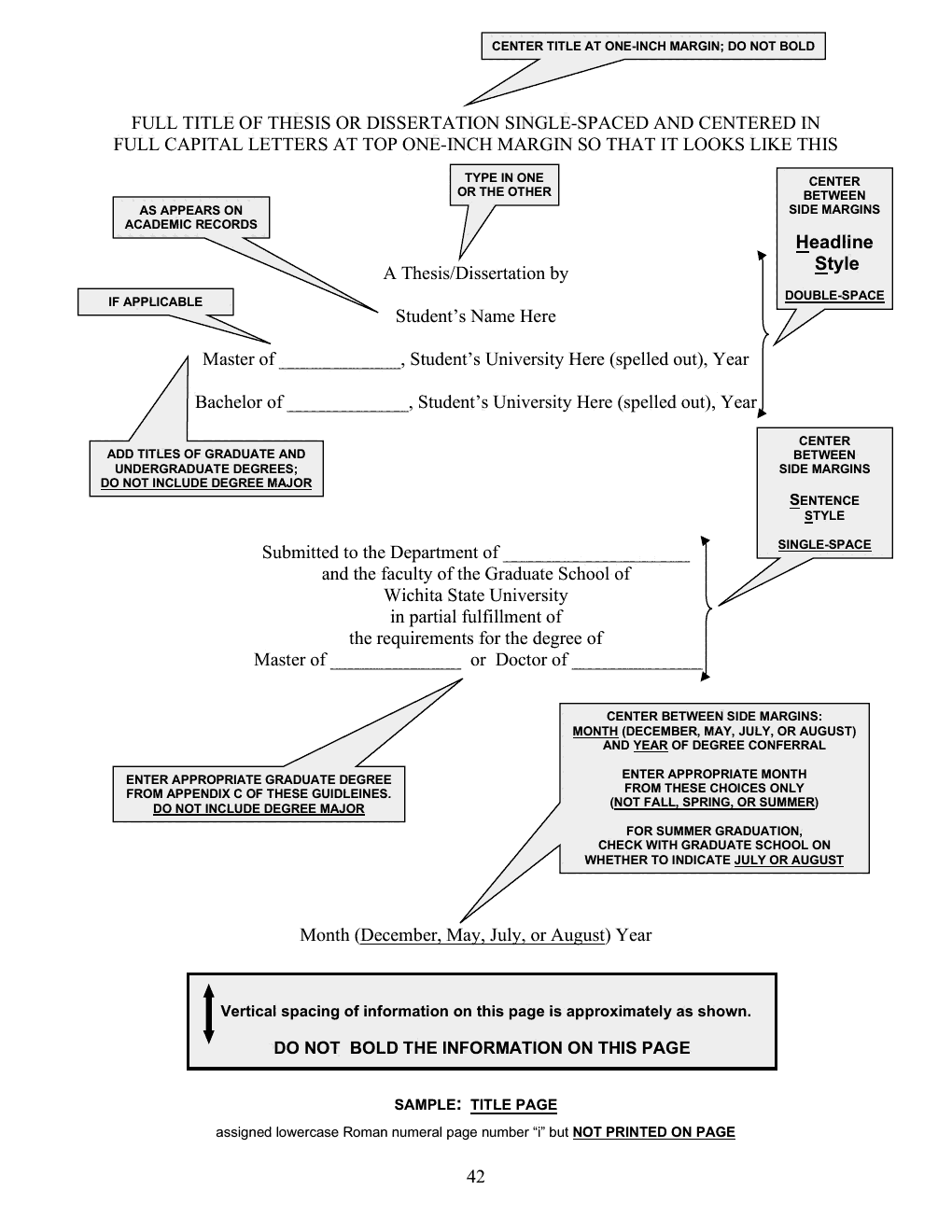
Formatting callouts on this sample
- Center the title at the one-inch margin; do not bold.
- Type in one or the other: thesis or dissertation.
- Student’s name as it appears on academic records.
- Center between side margins; Headline Style; double-space.
- Previous degrees, if applicable: add titles of graduate and undergraduate degrees; do not include the degree major.
- Center between side margins; Sentence style; single-space.
- Enter the appropriate graduate degree from Appendix C of these guidelines. Do not include the degree major.
- Center between side margins: month (December, May, July, or August) and year of degree conferral.
- Enter the appropriate month from these choices only (not fall, spring, or summer). For summer graduation, check with the Graduate School on whether to indicate July or August.
- Vertical spacing of information on this page is approximately as shown.
- Do not bold the information on this page.
- Page number: assigned lowercase Roman numeral i, but not printed on the page.
Sample: Copyright Page
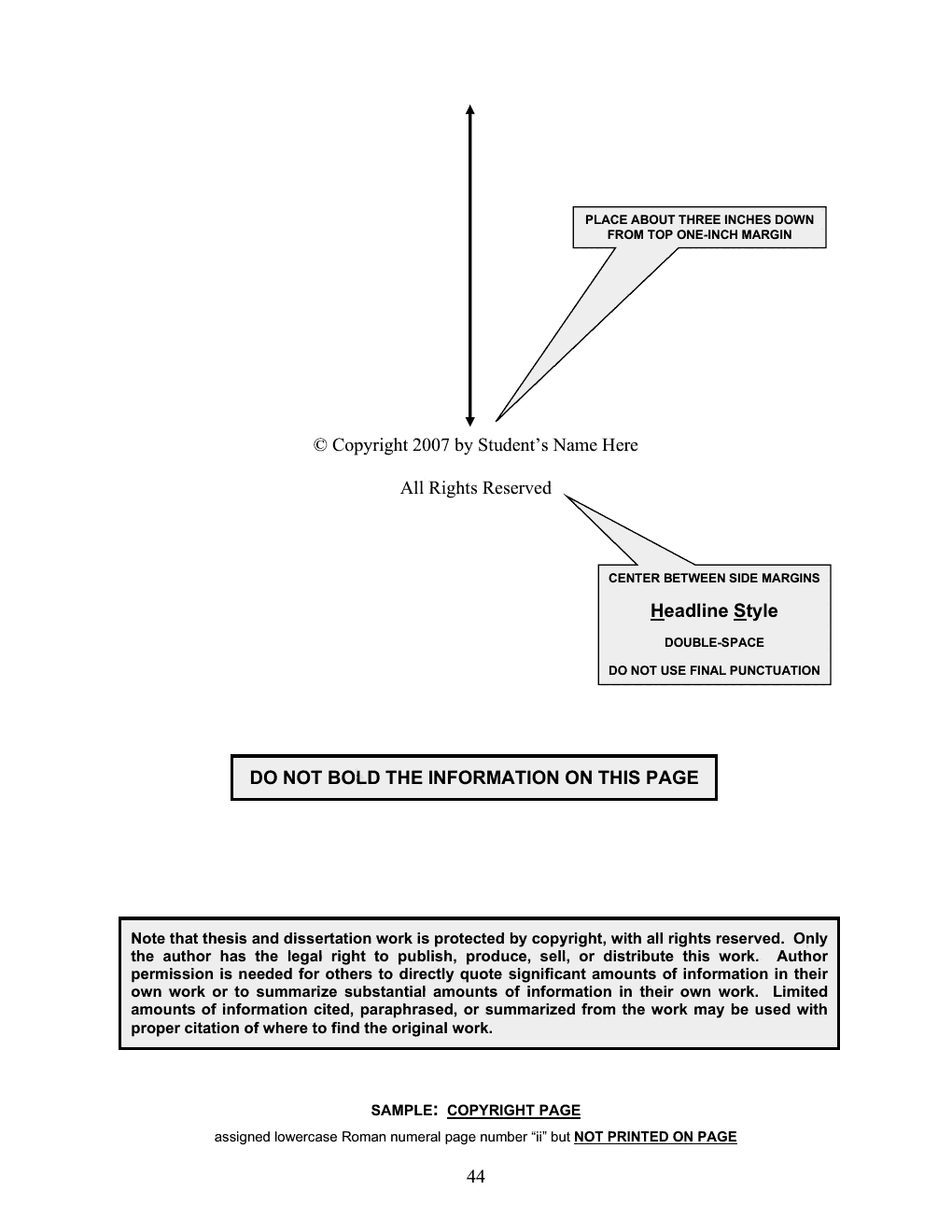
Formatting callouts on this sample
- Place about three inches down from the top one-inch margin.
- Center between side margins; Headline Style; double-space.
- Do not use final punctuation.
- Do not bold the information on this page.
- Note that thesis and dissertation work is protected by copyright, with all rights reserved. Only the author has the legal right to publish, produce, sell, or distribute this work. Author permission is needed for others to directly quote significant amounts of information in their own work or to summarize substantial amounts of information in their own work. Limited amounts of information cited, paraphrased, or summarized from the work may be used with proper citation of where to find the original work.
- Page number: assigned lowercase Roman numeral ii, but not printed on the page.
Sample: Committee Identification Page
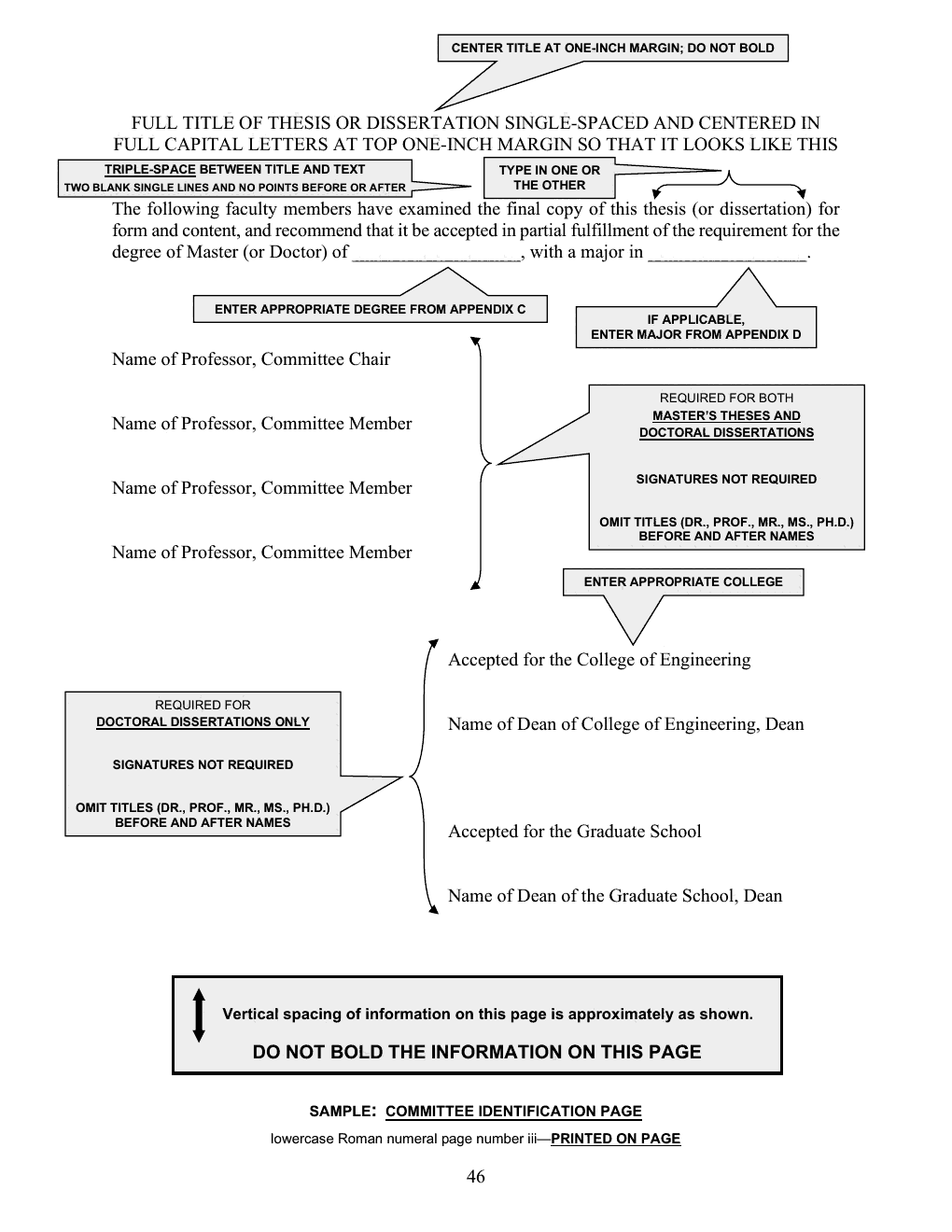
Formatting callouts on this sample
- Center the title at the one-inch margin; do not bold.
- Triple-space between title and text (two blank single lines and no points before or after).
- Type in one or the other: thesis or dissertation.
- Enter the appropriate degree from Appendix C; if applicable, enter the major from Appendix D.
- Committee section: required for both master’s theses and doctoral dissertations. Signatures not required. Omit titles (Dr., Prof., Mr., Ms., Ph.D.) before and after names.
- Dean section: required for doctoral dissertations only. Enter the appropriate college. Signatures not required. Omit titles before and after names.
- Vertical spacing of information on this page is approximately as shown.
- Do not bold the information on this page.
- Page number: lowercase Roman numeral iii, printed on the page (the first page number printed).
Sample: Dedication Page
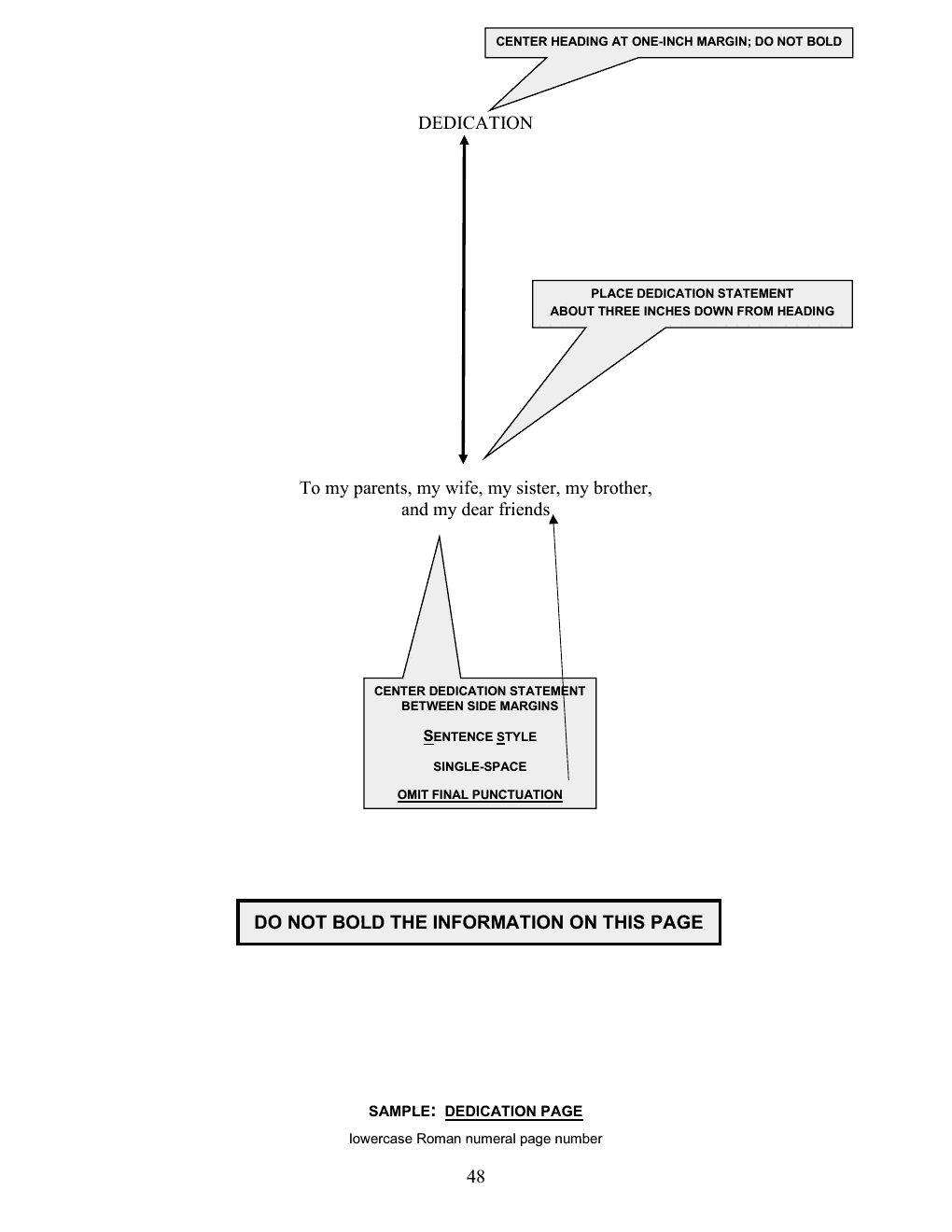
Formatting callouts on this sample
- Center the heading at the one-inch margin; do not bold.
- Place the dedication statement about three inches down from the heading.
- Center the dedication statement between side margins; Sentence style; single-space; omit final punctuation.
- Do not bold the information on this page.
- Page number: lowercase Roman numeral.
Sample: Epigraph Page
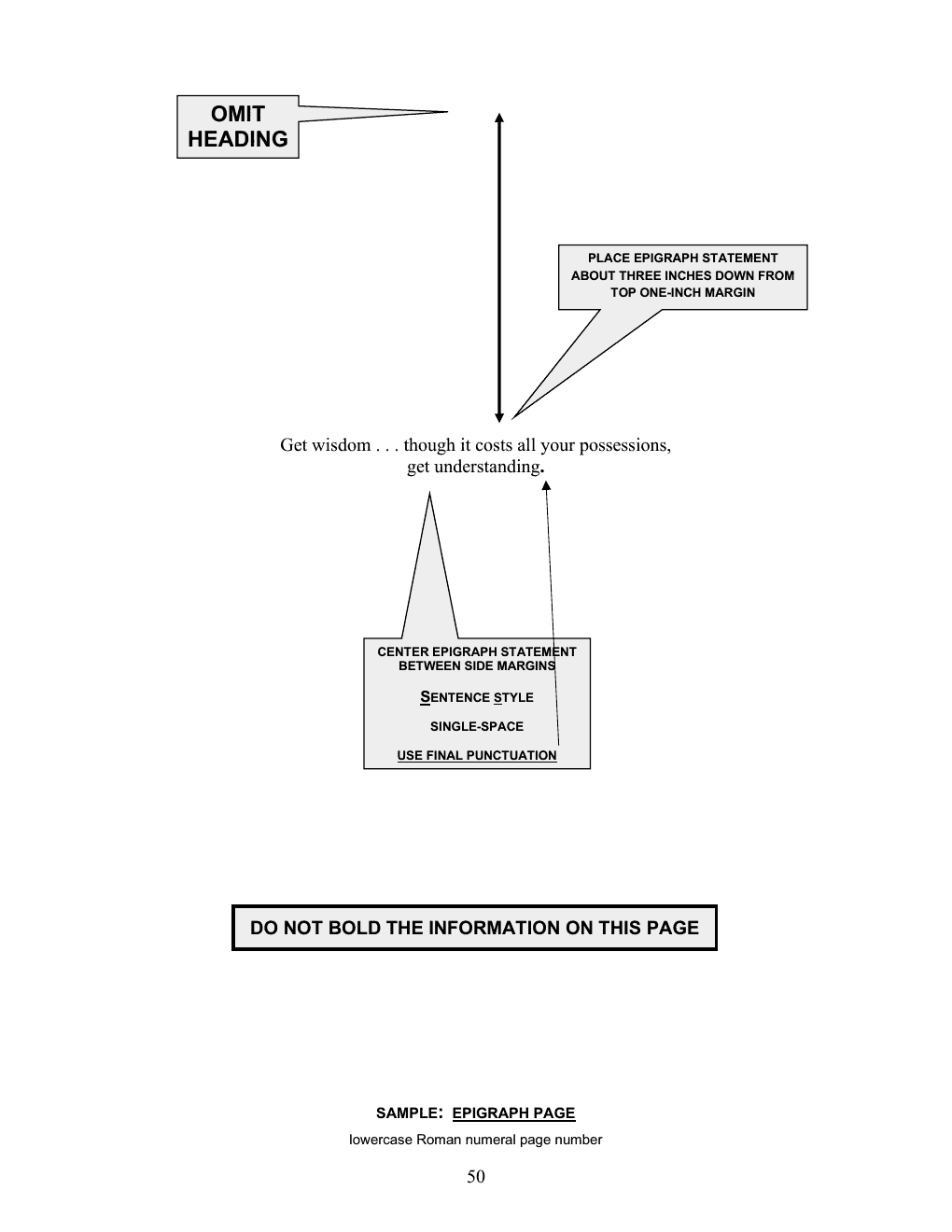
Formatting callouts on this sample
- Omit the heading “Epigraph.”
- Place the epigraph statement about three inches down from the top one-inch margin.
- Center the epigraph statement between side margins; Sentence style; single-space; use final punctuation.
- Do not bold the information on this page.
- Page number: lowercase Roman numeral.
Sample: Acknowledgments Page
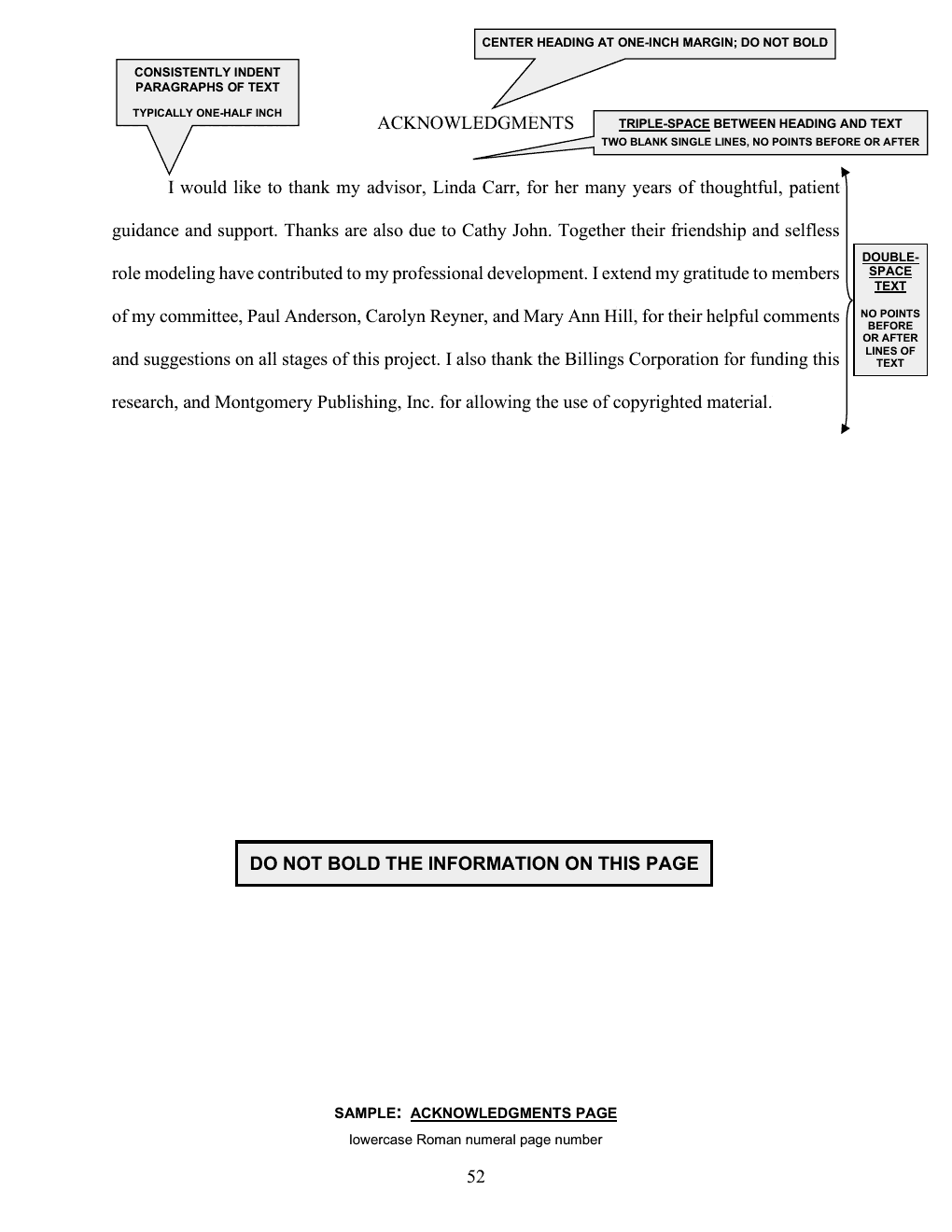
Formatting callouts on this sample
- Center the heading at the one-inch margin; do not bold.
- Triple-space between heading and text (two blank single lines, no points before or after).
- Consistently indent paragraphs of text, typically one-half inch.
- Double-space the text; no points before or after lines of text.
- Do not bold the information on this page.
- Page number: lowercase Roman numeral.
Sample: Abstract Page
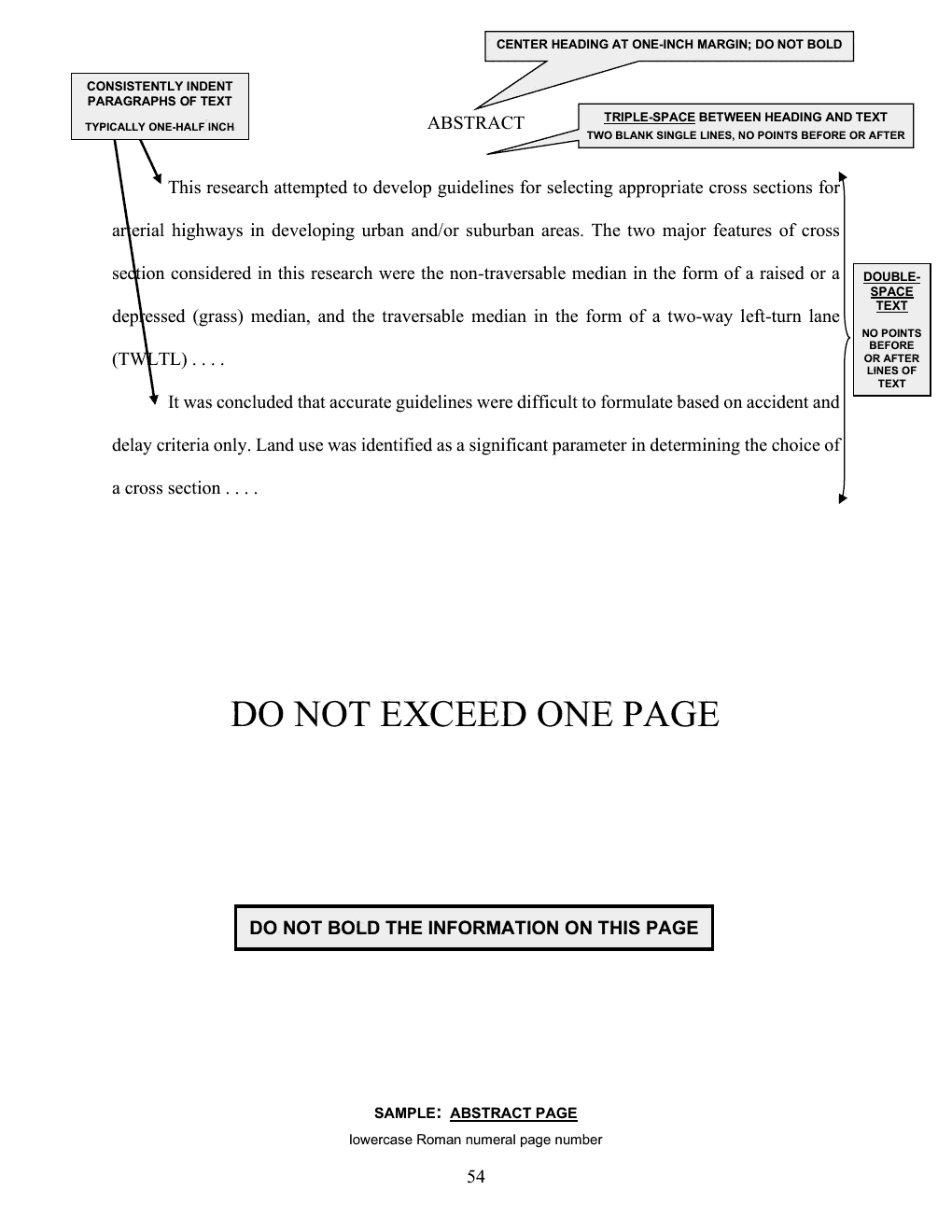
Formatting callouts on this sample
- Center the heading at the one-inch margin; do not bold.
- Triple-space between heading and text (two blank single lines, no points before or after).
- Consistently indent paragraphs of text, typically one-half inch.
- Double-space the text; no points before or after lines of text.
- Do not bold the information on this page.
- Page number: lowercase Roman numeral.
Sample: Preface Page
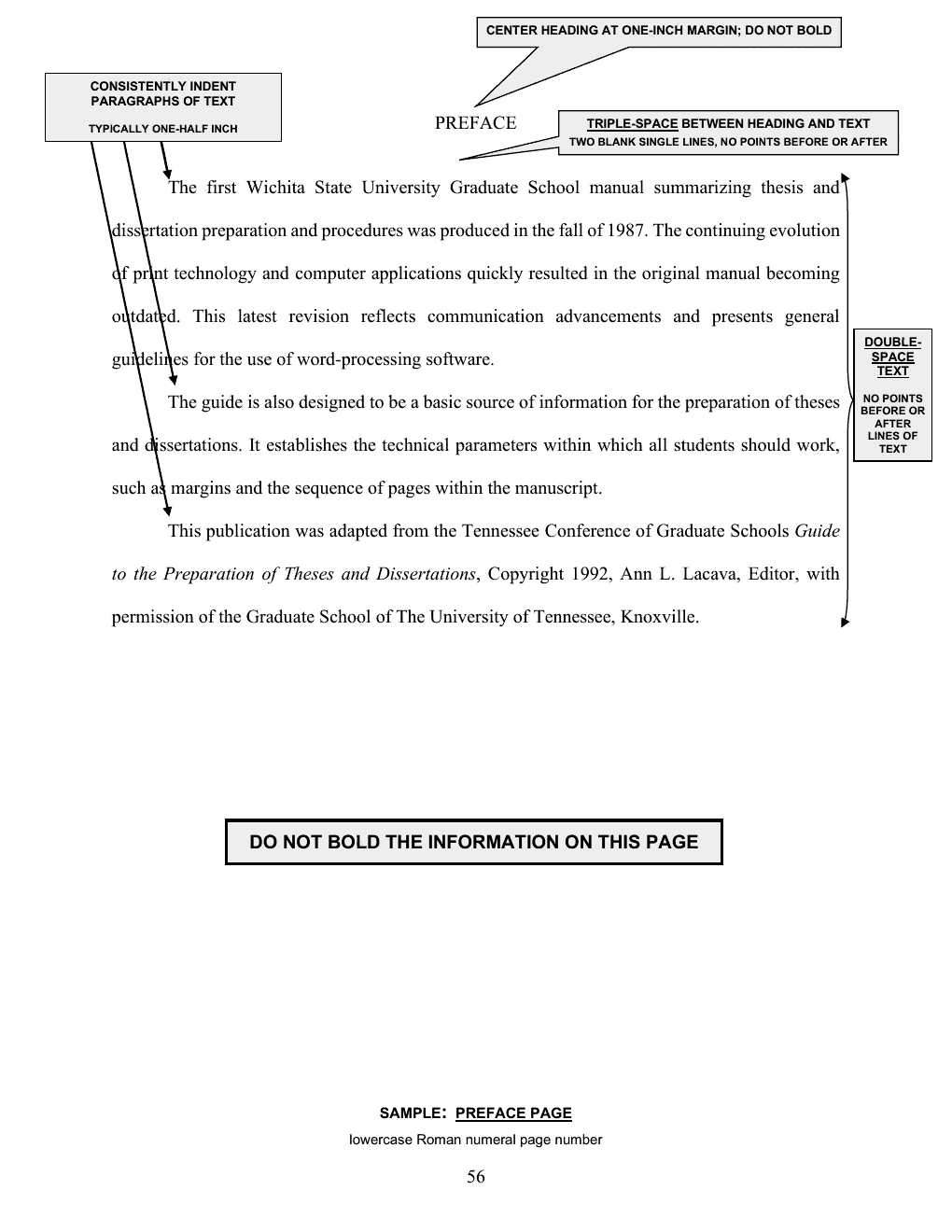
Formatting callouts on this sample
- Center the heading at the one-inch margin; do not bold.
- Triple-space between heading and text (two blank single lines, no points before or after).
- Consistently indent paragraphs of text, typically one-half inch.
- Double-space the text; no points before or after lines of text.
- Do not bold the information on this page.
- Page number: lowercase Roman numeral.
Sample: Table of Contents, first page of two (numbered Headline Style subheadings, more than one appendix, dot leaders)
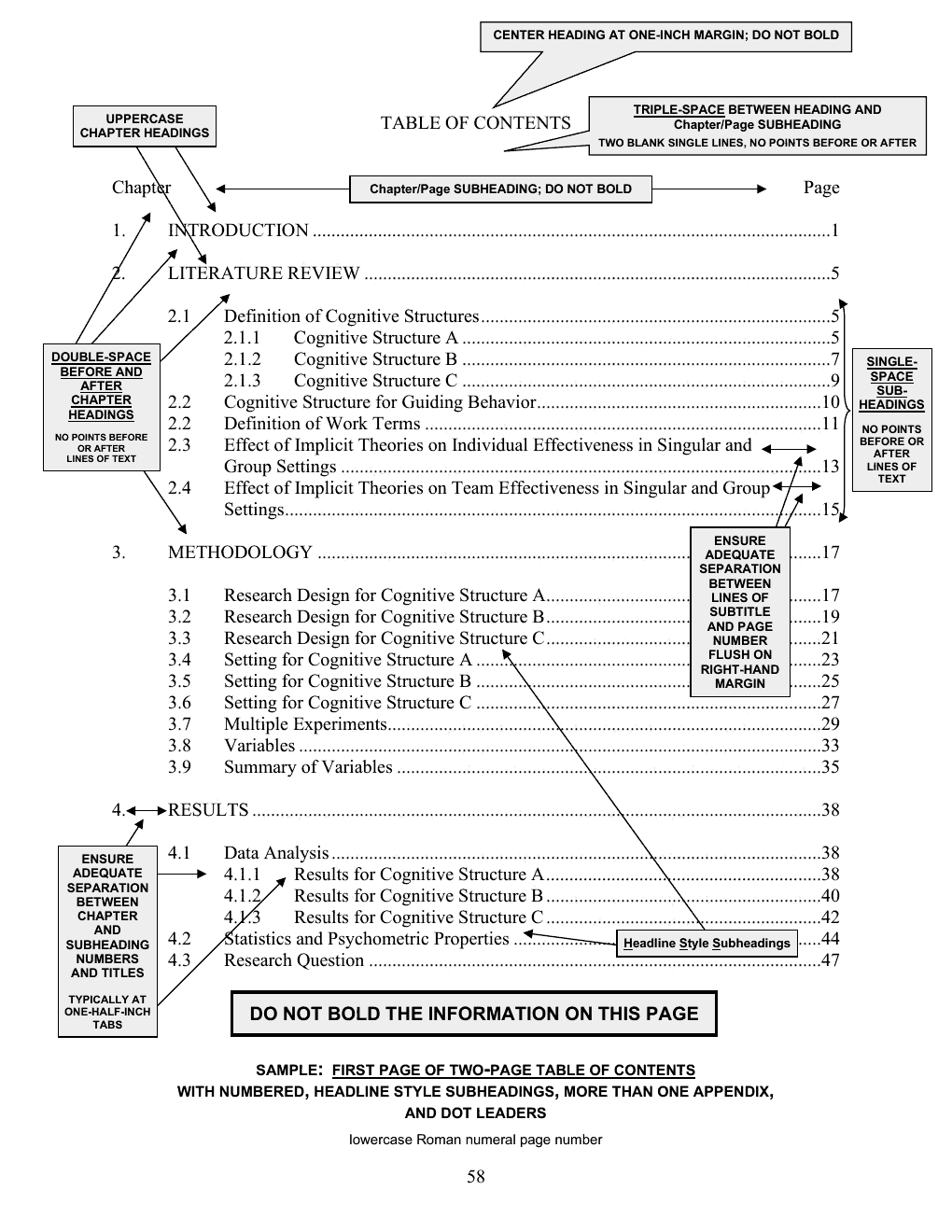
Formatting callouts on this sample
- Center the heading at the one-inch margin; do not bold.
- Triple-space between the heading and the Chapter/Page subheading (two blank single lines, no points before or after).
- Chapter/Page subheading: do not bold.
- Uppercase chapter headings.
- Double-space before and after chapter headings; no points before or after lines of text.
- Single-space subheadings; no points before or after lines of text.
- Headline Style subheadings.
- Ensure adequate separation between chapter and subheading numbers and their titles, typically at one-half-inch tabs.
- Ensure adequate separation between lines of a subtitle and the page number flush on the right-hand margin.
- Do not bold the information on this page.
- Page number: lowercase Roman numeral.
Sample: Table of Contents, second page of two (numbered Headline Style subheadings, more than one appendix, dot leaders)
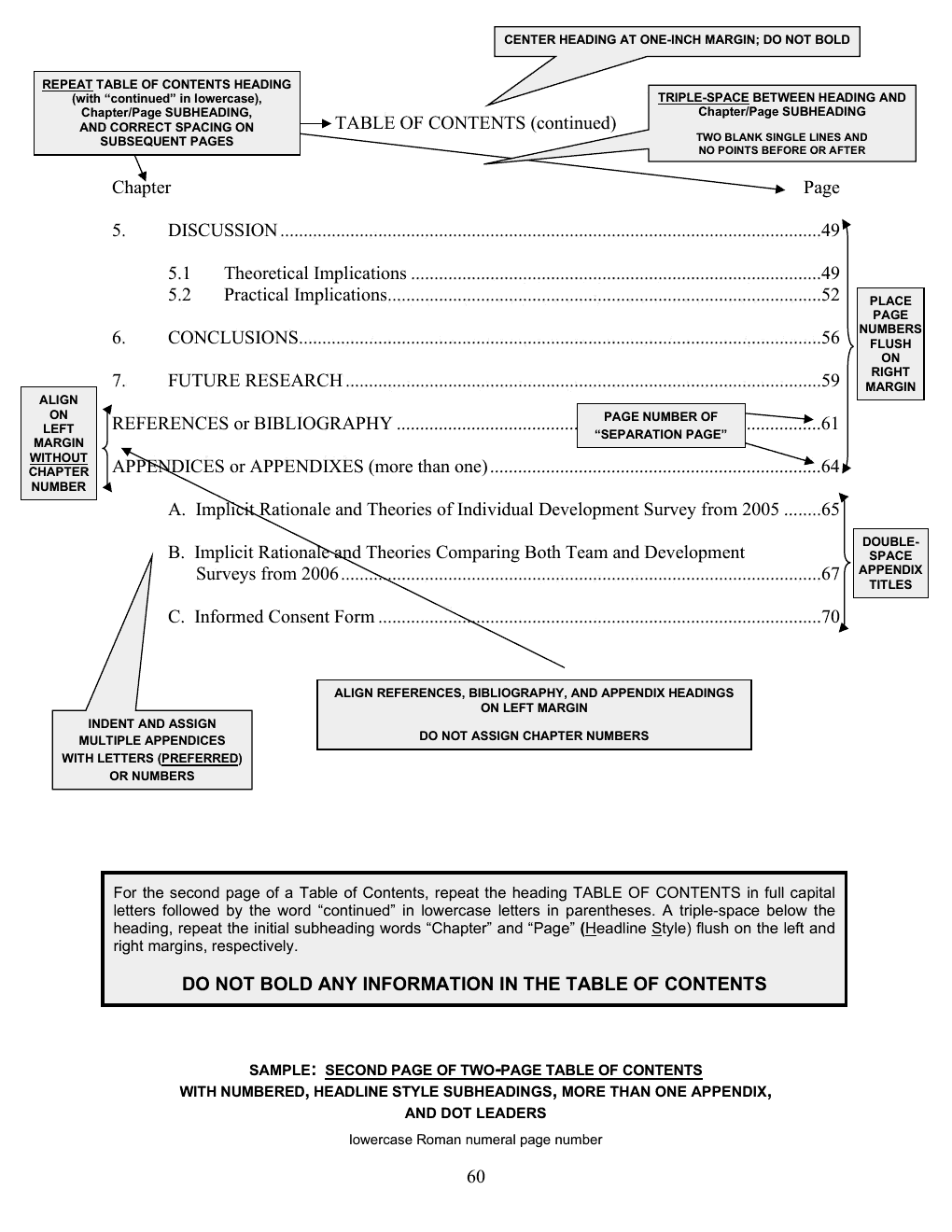
Formatting callouts on this sample
- Center the heading at the one-inch margin; do not bold.
- Repeat the Table of Contents heading (with “continued” in lowercase), the Chapter/Page subheading, and the correct spacing on subsequent pages.
- Triple-space between the heading and the Chapter/Page subheading (two blank single lines and no points before or after).
- Place page numbers flush on the right margin.
- Align References, Bibliography, and Appendix headings on the left margin without a chapter number; do not assign chapter numbers.
- Use the page number of the “separation page” for the References and Appendices headings.
- Indent and assign multiple appendices with letters (preferred) or numbers; double-space appendix titles.
- For the second page of a Table of Contents, repeat the heading TABLE OF CONTENTS in full capital letters followed by the word “continued” in lowercase letters in parentheses. A triple-space below the heading, repeat the initial subheading words “Chapter” and “Page” (Headline Style) flush on the left and right margins, respectively.
- Do not bold any information in the Table of Contents.
- Page number: lowercase Roman numeral.
Sample: Table of Contents, one page (unnumbered Sentence style subheadings, only one appendix, no dot leaders)
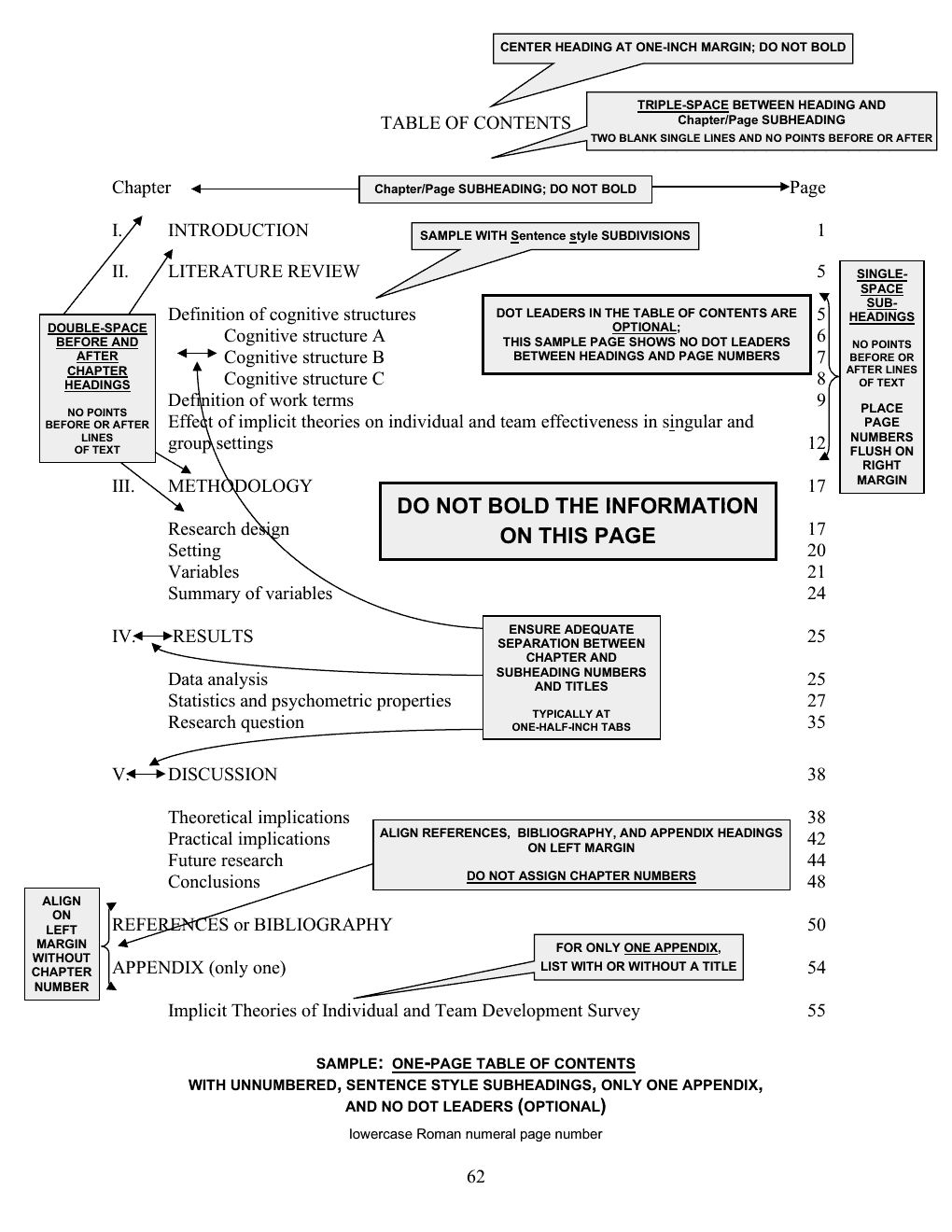
Formatting callouts on this sample
- Center the heading at the one-inch margin; do not bold.
- Triple-space between the heading and the Chapter/Page subheading (two blank single lines and no points before or after).
- Chapter/Page subheading: do not bold.
- This sample uses Sentence style subdivisions.
- Dot leaders in the Table of Contents are optional; this sample page shows no dot leaders between headings and page numbers.
- Double-space before and after chapter headings; no points before or after lines of text.
- Single-space subheadings; no points before or after lines of text.
- Place page numbers flush on the right margin.
- Ensure adequate separation between chapter and subheading numbers and their titles, typically at one-half-inch tabs.
- Align References, Bibliography, and Appendix headings on the left margin without a chapter number; do not assign chapter numbers.
- For only one appendix, list it with or without a title.
- Do not bold the information on this page.
- Page number: lowercase Roman numeral.
Sample: List of Tables Page (numbered consecutively from beginning of document, multiline caption, dot leaders)
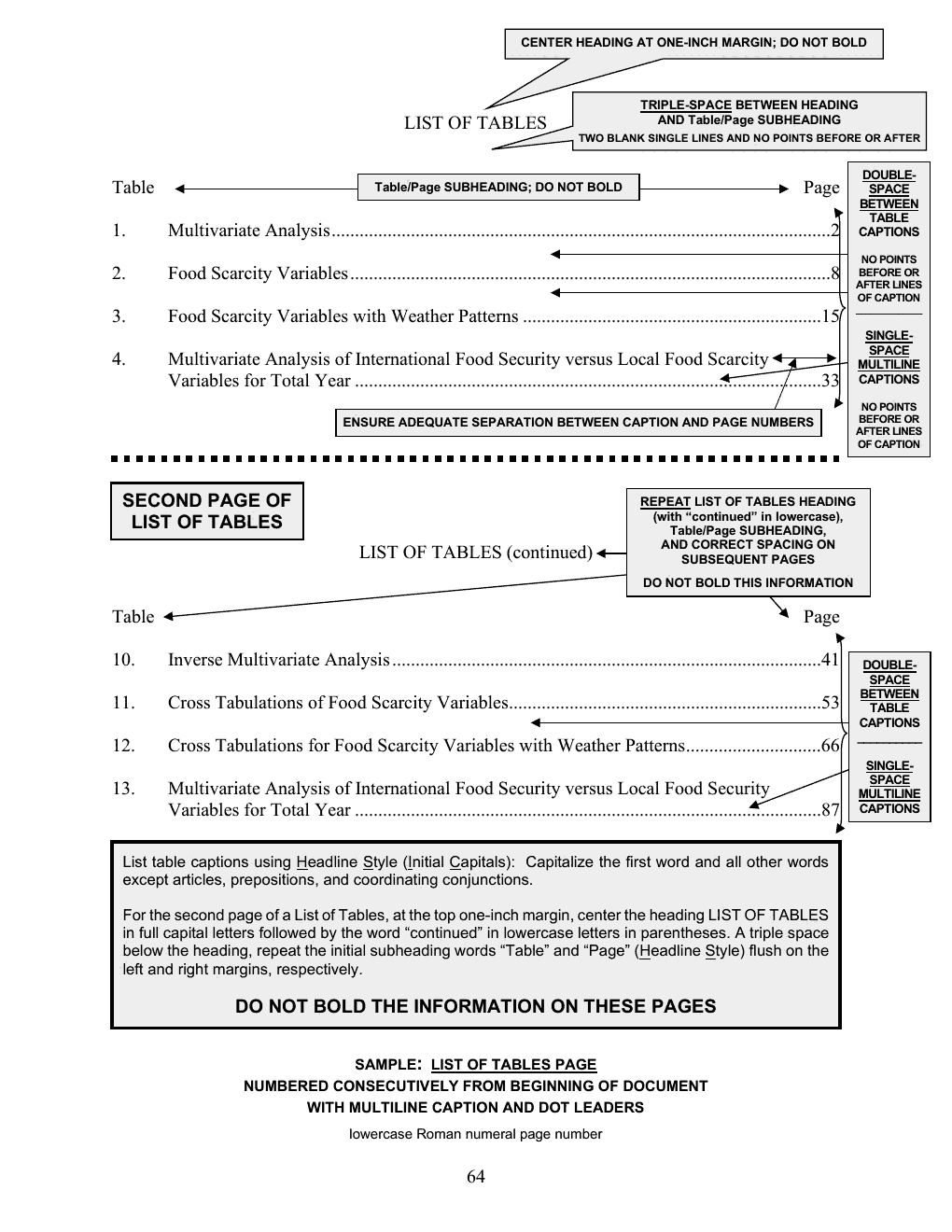
Formatting callouts on this sample
- Center the heading at the one-inch margin; do not bold.
- Triple-space between the heading and the Table/Page subheading (two blank single lines and no points before or after).
- Table/Page subheading: do not bold.
- Double-space between table captions; no points before or after lines of a caption.
- Single-space multiline captions; no points before or after lines of a caption.
- Ensure adequate separation between the caption and the page number.
- Second page of a List of Tables: repeat the List of Tables heading (with “continued” in lowercase), the Table/Page subheading, and the correct spacing on subsequent pages. Do not bold this information.
- List table captions using Headline Style (Initial Capitals): capitalize the first word and all other words except articles, prepositions, and coordinating conjunctions.
- For the second page of a List of Tables, at the top one-inch margin, center the heading LIST OF TABLES in full capital letters followed by the word “continued” in lowercase letters in parentheses. A triple space below the heading, repeat the initial subheading words “Table” and “Page” (Headline Style) flush on the left and right margins, respectively.
- Do not bold the information on these pages.
- Page number: lowercase Roman numeral.
Sample: List of Figures Page (numbered consecutively within chapters, multiline caption, dot leaders)
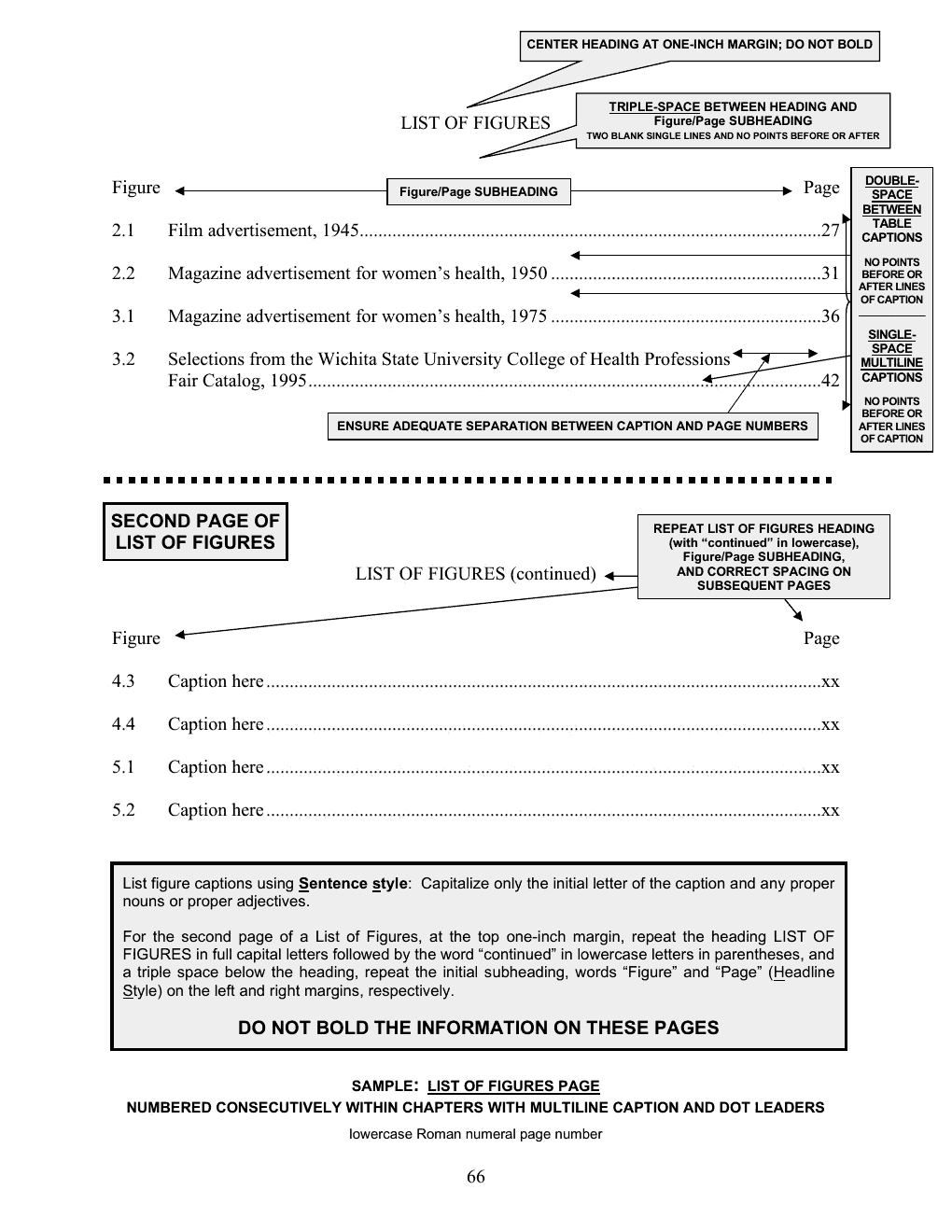
Formatting callouts on this sample
- Center the heading at the one-inch margin; do not bold.
- Triple-space between the heading and the Figure/Page subheading (two blank single lines and no points before or after).
- Figure/Page subheading.
- Double-space between captions; no points before or after lines of a caption.
- Single-space multiline captions; no points before or after lines of a caption.
- Ensure adequate separation between the caption and the page number.
- Second page of a List of Figures: repeat the List of Figures heading (with “continued” in lowercase), the Figure/Page subheading, and the correct spacing on subsequent pages.
- List figure captions using Sentence style: capitalize only the initial letter of the caption and any proper nouns or proper adjectives.
- For the second page of a List of Figures, at the top one-inch margin, repeat the heading LIST OF FIGURES in full capital letters followed by the word “continued” in lowercase letters in parentheses, and a triple space below the heading, repeat the initial subheading words “Figure” and “Page” (Headline Style) on the left and right margins, respectively.
- Do not bold the information on these pages.
- Page number: lowercase Roman numeral.
Sample: List of Plates Page (numbered consecutively within chapters, multiline caption, dot leaders)
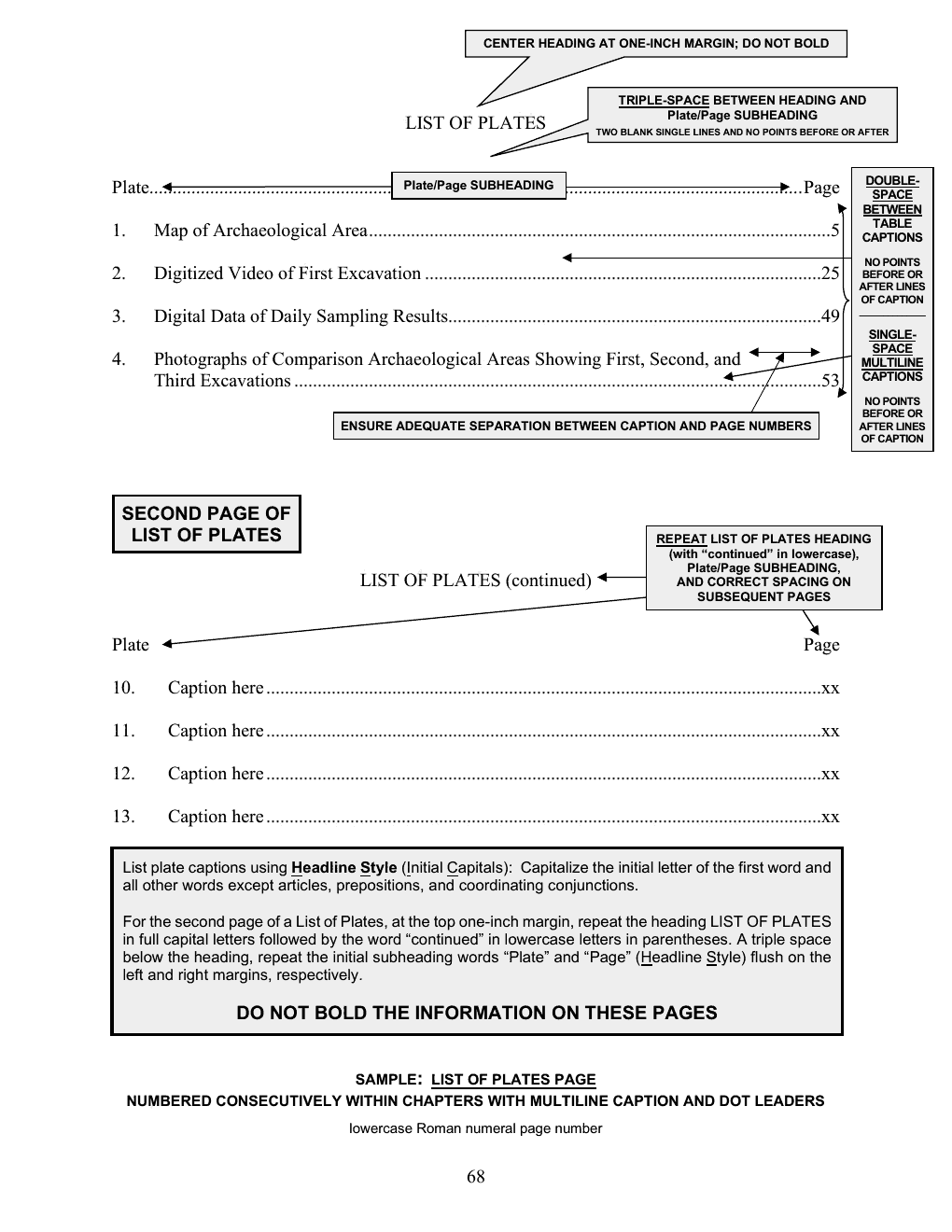
Formatting callouts on this sample
- Center the heading at the one-inch margin; do not bold.
- Triple-space between the heading and the Plate/Page subheading (two blank single lines and no points before or after).
- Plate/Page subheading.
- Double-space between captions; no points before or after lines of a caption.
- Single-space multiline captions; no points before or after lines of a caption.
- Ensure adequate separation between the caption and the page number.
- Second page of a List of Plates: repeat the List of Plates heading (with “continued” in lowercase), the Plate/Page subheading, and the correct spacing on subsequent pages.
- List plate captions using Headline Style (Initial Capitals): capitalize the initial letter of the first word and all other words except articles, prepositions, and coordinating conjunctions.
- For the second page of a List of Plates, at the top one-inch margin, repeat the heading LIST OF PLATES in full capital letters followed by the word “continued” in lowercase letters in parentheses. A triple space below the heading, repeat the initial subheading words “Plate” and “Page” (Headline Style) flush on the left and right margins, respectively.
- Do not bold the information on these pages.
- Page number: lowercase Roman numeral.
Sample: List of Abbreviations Page (placed flush on left margin or centered on longest line)
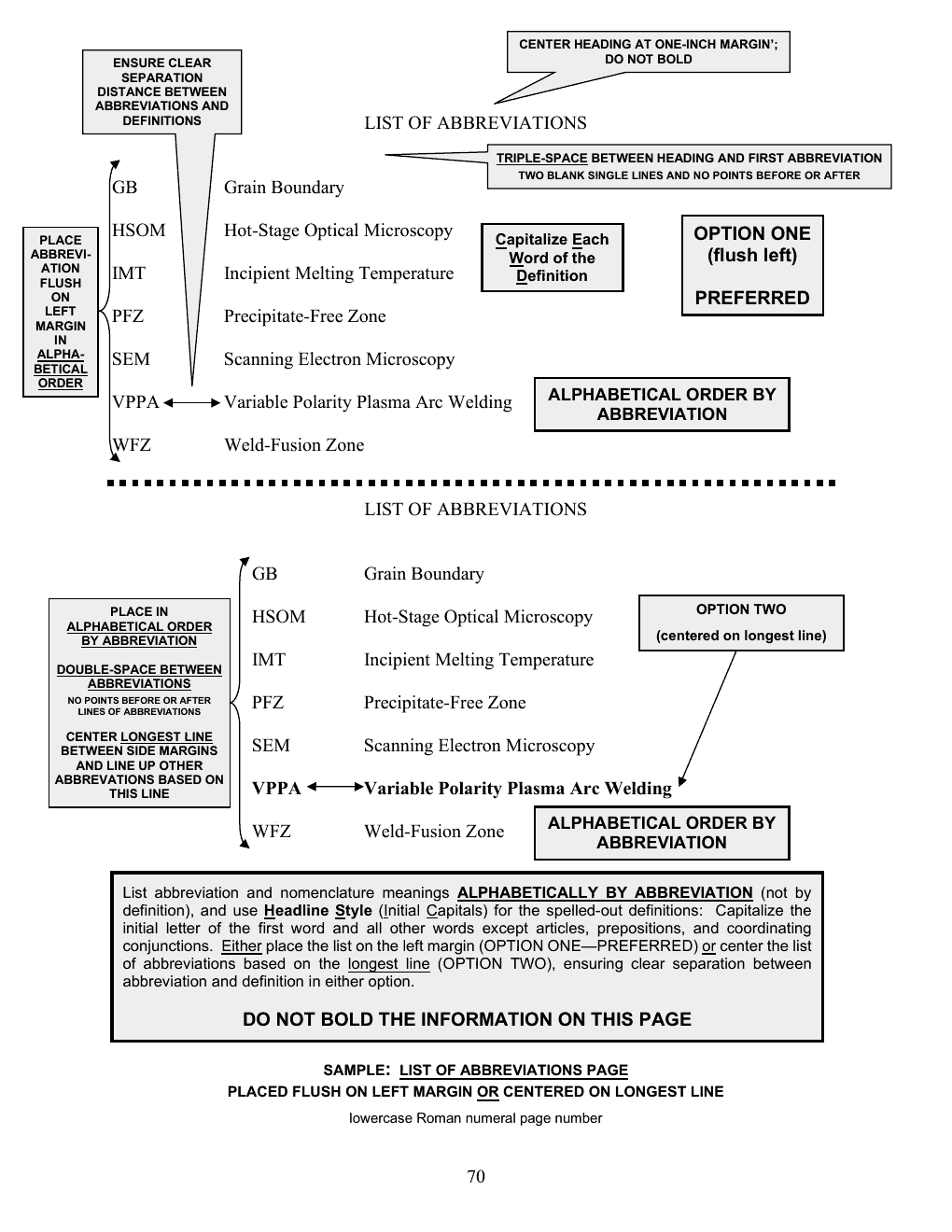
Formatting callouts on this sample
- Center the heading at the one-inch margin; do not bold.
- Triple-space between the heading and the first abbreviation (two blank single lines and no points before or after).
- Ensure a clear separation distance between abbreviations and definitions.
- Capitalize each word of the definition.
- Option one (flush left), preferred: place each abbreviation flush on the left margin in alphabetical order by abbreviation.
- Option two (centered on the longest line): place in alphabetical order by abbreviation; double-space between abbreviations; no points before or after lines of abbreviations; center the longest line between the side margins and line up the other abbreviations based on this line.
- List abbreviation and nomenclature meanings alphabetically by abbreviation (not by definition), and use Headline Style (Initial Capitals) for the spelled-out definitions: capitalize the initial letter of the first word and all other words except articles, prepositions, and coordinating conjunctions. Either place the list on the left margin (option one, preferred) or center the list of abbreviations based on the longest line (option two), ensuring clear separation between abbreviation and definition in either option.
- Do not bold the information on this page.
- Page number: lowercase Roman numeral.
Sample: List of Symbols Page (placed flush on left margin or centered on longest line)
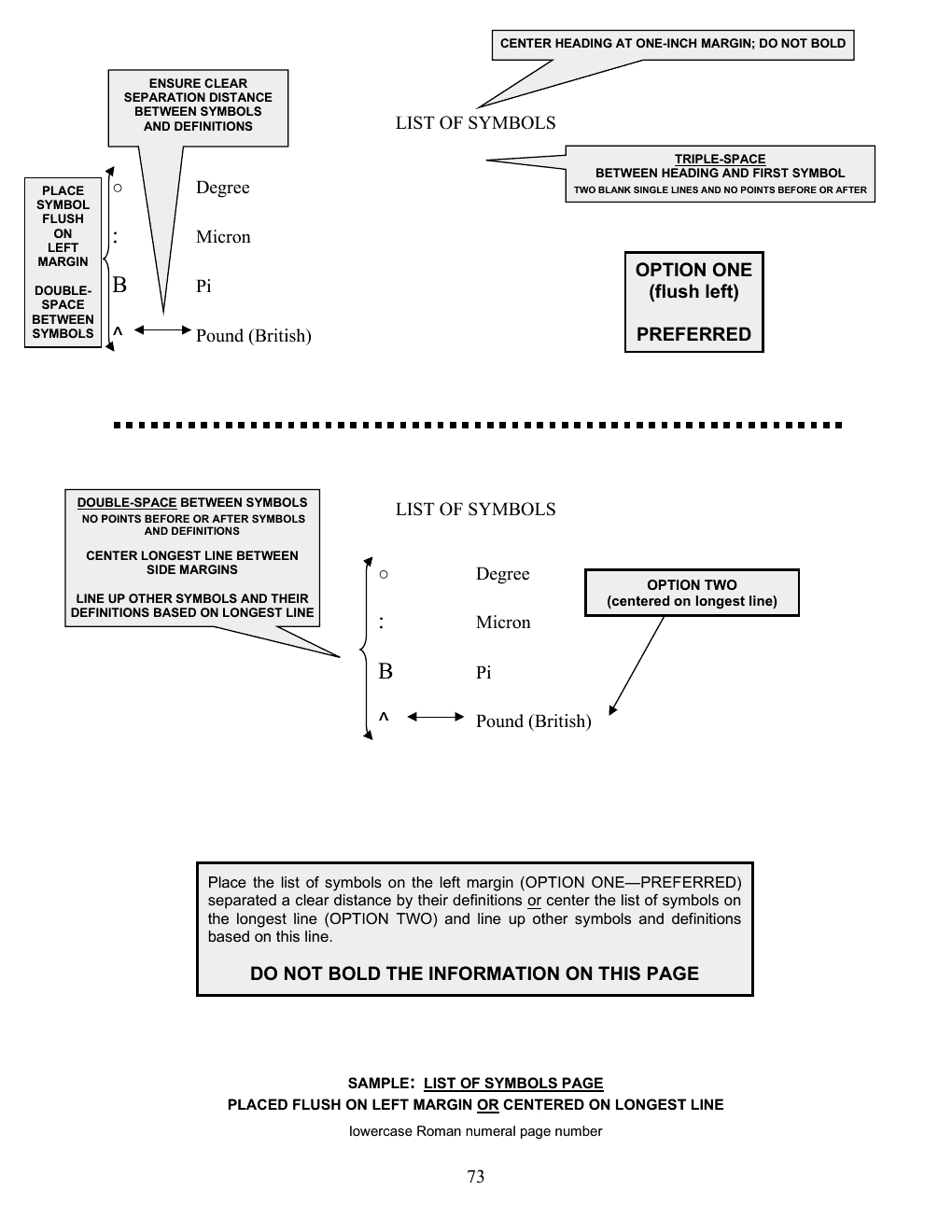
Formatting callouts on this sample
- Center the heading at the one-inch margin; do not bold.
- Triple-space between the heading and the first symbol (two blank single lines and no points before or after).
- Ensure a clear separation distance between symbols and definitions.
- Option one (flush left), preferred: place each symbol flush on the left margin; double-space between symbols.
- Option two (centered on the longest line): double-space between symbols; no points before or after symbols and definitions; center the longest line between the side margins and line up the other symbols and their definitions based on the longest line.
- Place the list of symbols on the left margin (option one, preferred) separated a clear distance from their definitions, or center the list of symbols on the longest line (option two) and line up other symbols and definitions based on this line.
- Do not bold the information on this page.
- Page number: lowercase Roman numeral.
Sample: Text Page (bolded chapter heading and title centered; bolded and numbered subheadings flush on left margin; consistent double-spacing; numbered citations in brackets)
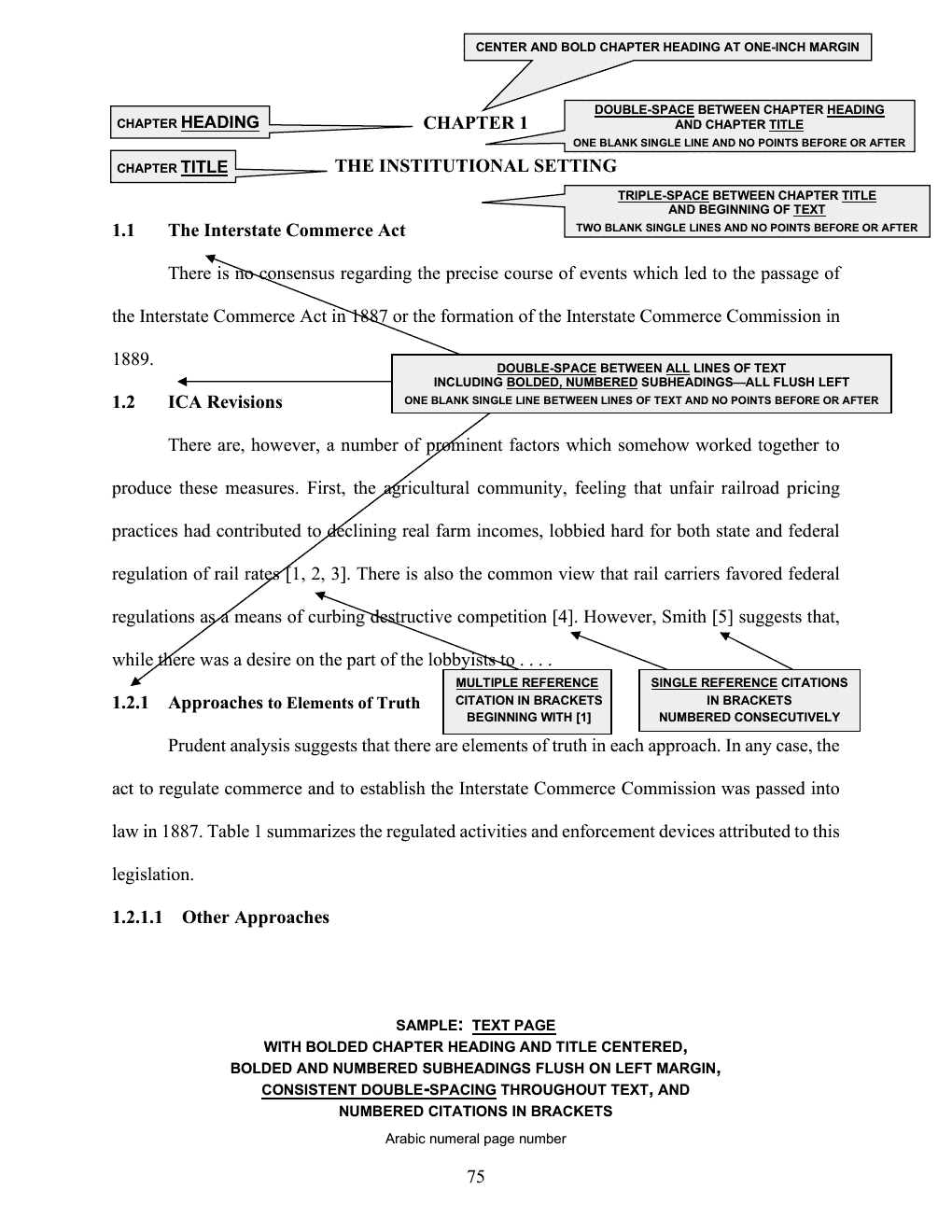
Formatting callouts on this sample
- Center and bold the chapter heading at the one-inch margin.
- Double-space between the chapter heading and the chapter title (one blank single line and no points before or after).
- Triple-space between the chapter title and the beginning of the text (two blank single lines and no points before or after).
- Double-space between all lines of text, including bolded, numbered subheadings, all flush left (one blank single line between lines of text and no points before or after).
- Multiple-reference citation in brackets, beginning with [1].
- Single-reference citations in brackets, numbered consecutively.
- Page number: Arabic numeral.
Sample: Text Page (unbolded chapter heading and title centered; unbolded and unnumbered subheadings; varying spacing between subheadings; author/date citations in parentheses)
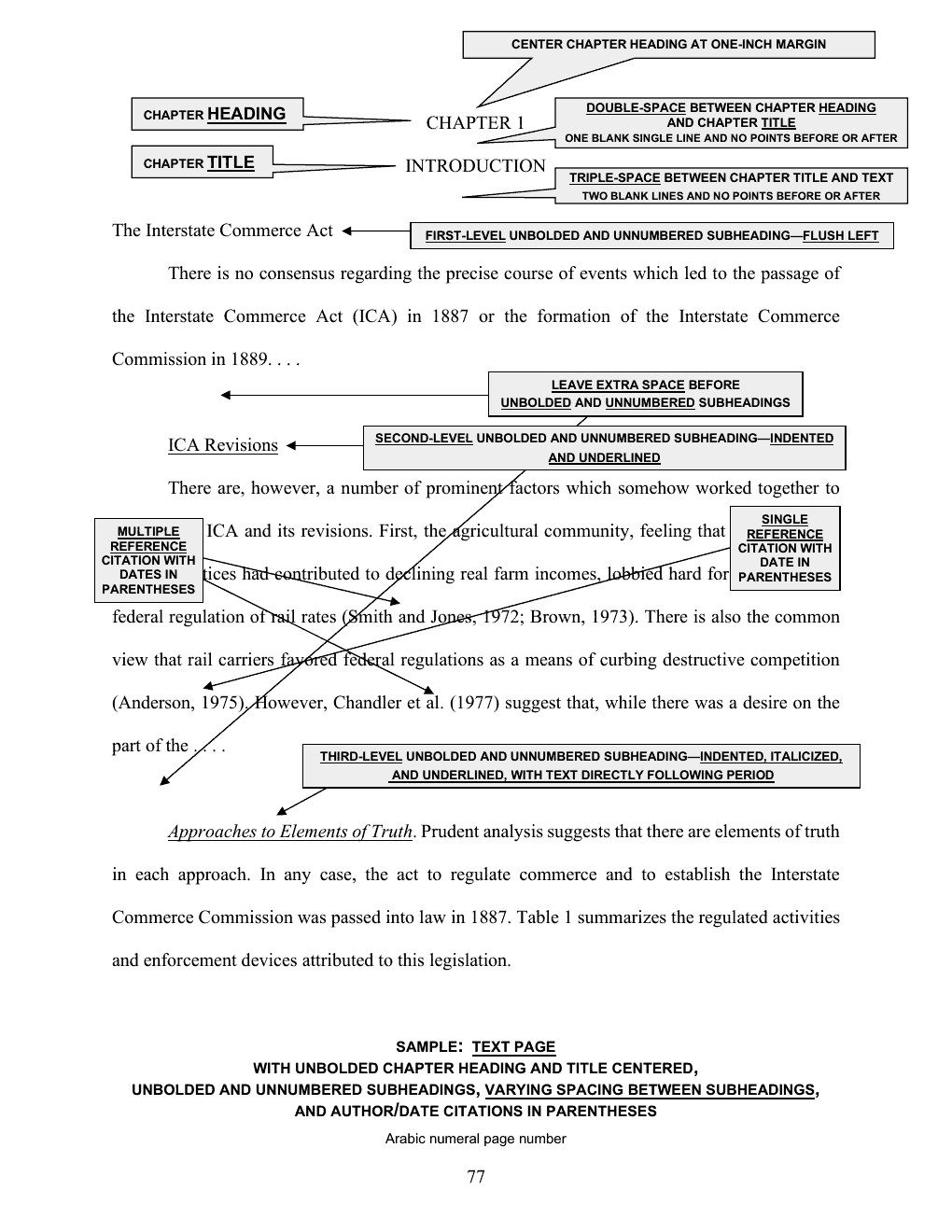
Formatting callouts on this sample
- Center the chapter heading at the one-inch margin.
- Double-space between the chapter heading and the chapter title (one blank single line and no points before or after).
- Triple-space between the chapter title and the text (two blank lines and no points before or after).
- First-level unbolded and unnumbered subheading: flush left.
- Leave extra space before unbolded and unnumbered subheadings.
- Second-level unbolded and unnumbered subheading: indented and underlined.
- Third-level unbolded and unnumbered subheading: indented, italicized, and underlined, with the text directly following the period.
- Single-reference citation with the date in parentheses; multiple-reference citation with dates in parentheses.
- Page number: Arabic numeral.
Sample: Table Page, first page of a two-page table (multiline caption, integrated within paragraph)
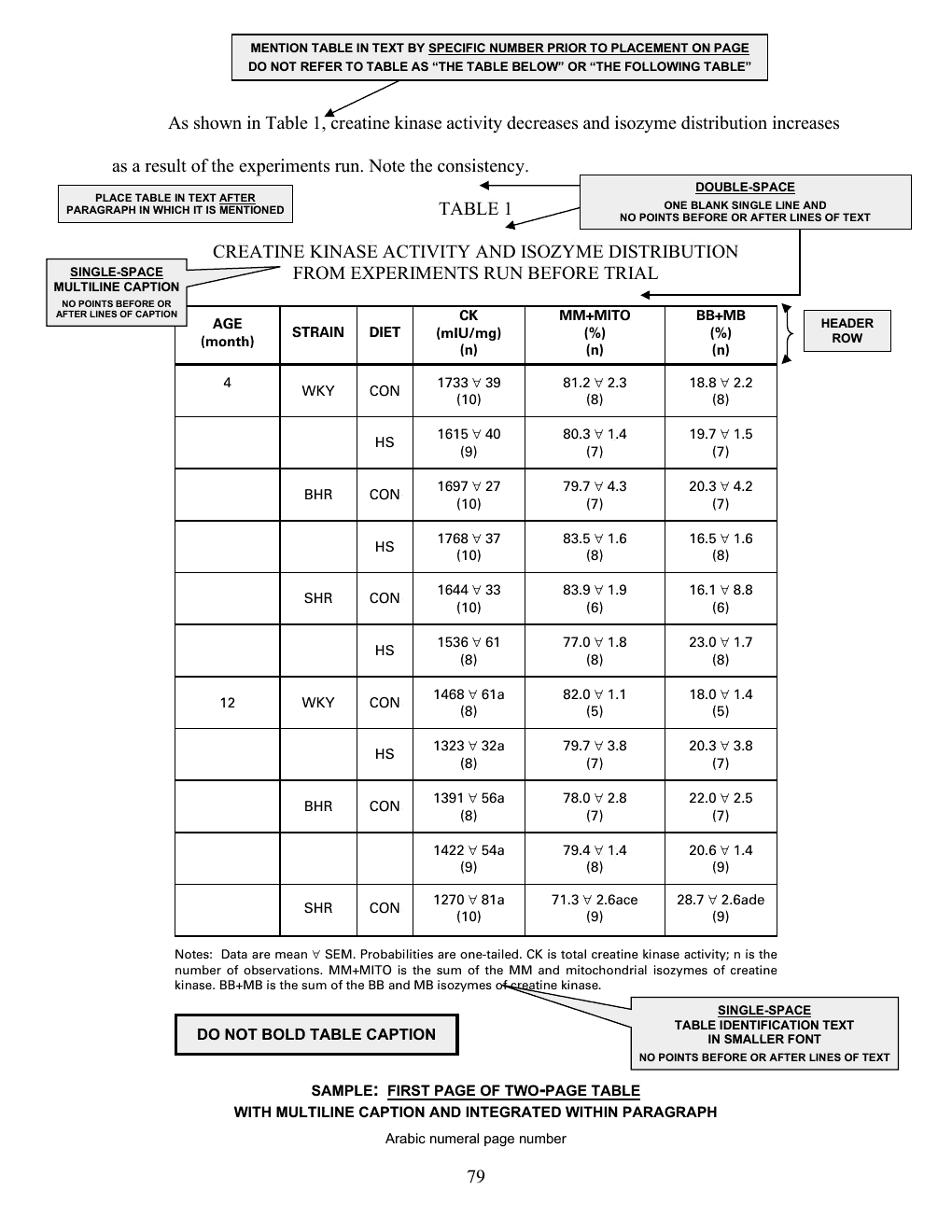
Formatting callouts on this sample
- Mention the table in the text by its specific number prior to its placement on the page. Do not refer to the table as “the table below” or “the following table.”
- Double-space the text (one blank single line and no points before or after lines of text).
- Place the table in the text after the paragraph in which it is mentioned.
- Single-space a multiline caption; no points before or after lines of the caption.
- Do not bold the table caption.
- Header row.
- Single-space the table identification text in a smaller font; no points before or after lines of text.
- Page number: Arabic numeral.
Sample: Table Page, second page of a two-page table (table heading only, integrated within paragraph)
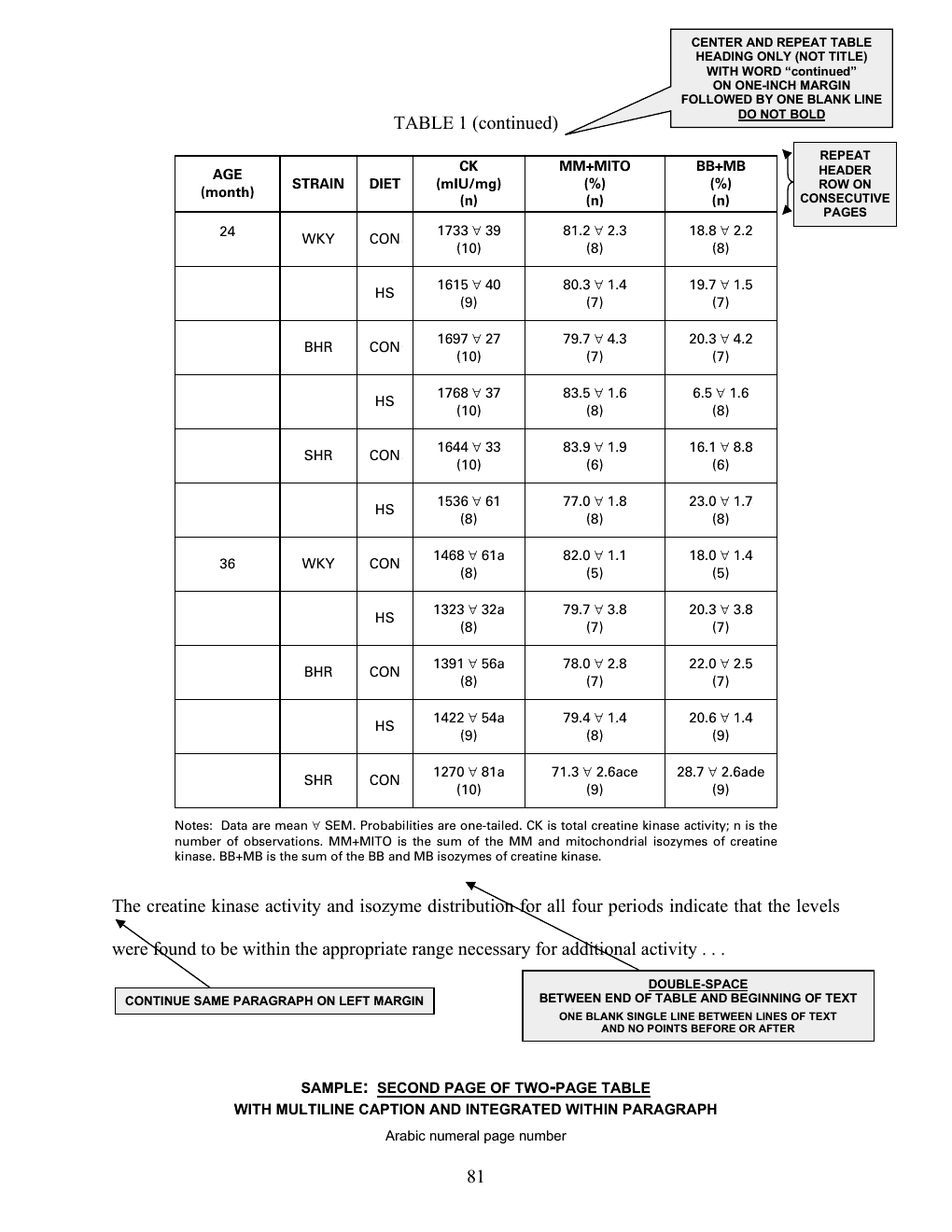
Formatting callouts on this sample
- Center and repeat the table heading only (not the title) with the word “continued” on the one-inch margin, followed by one blank line. Do not bold.
- Repeat the header row on consecutive pages.
- Double-space between the end of the table and the beginning of the text (one blank single line between lines of text and no points before or after).
- Continue the same paragraph on the left margin.
- Page number: Arabic numeral.
Sample: Table Page (single-line caption, integrated within paragraph)
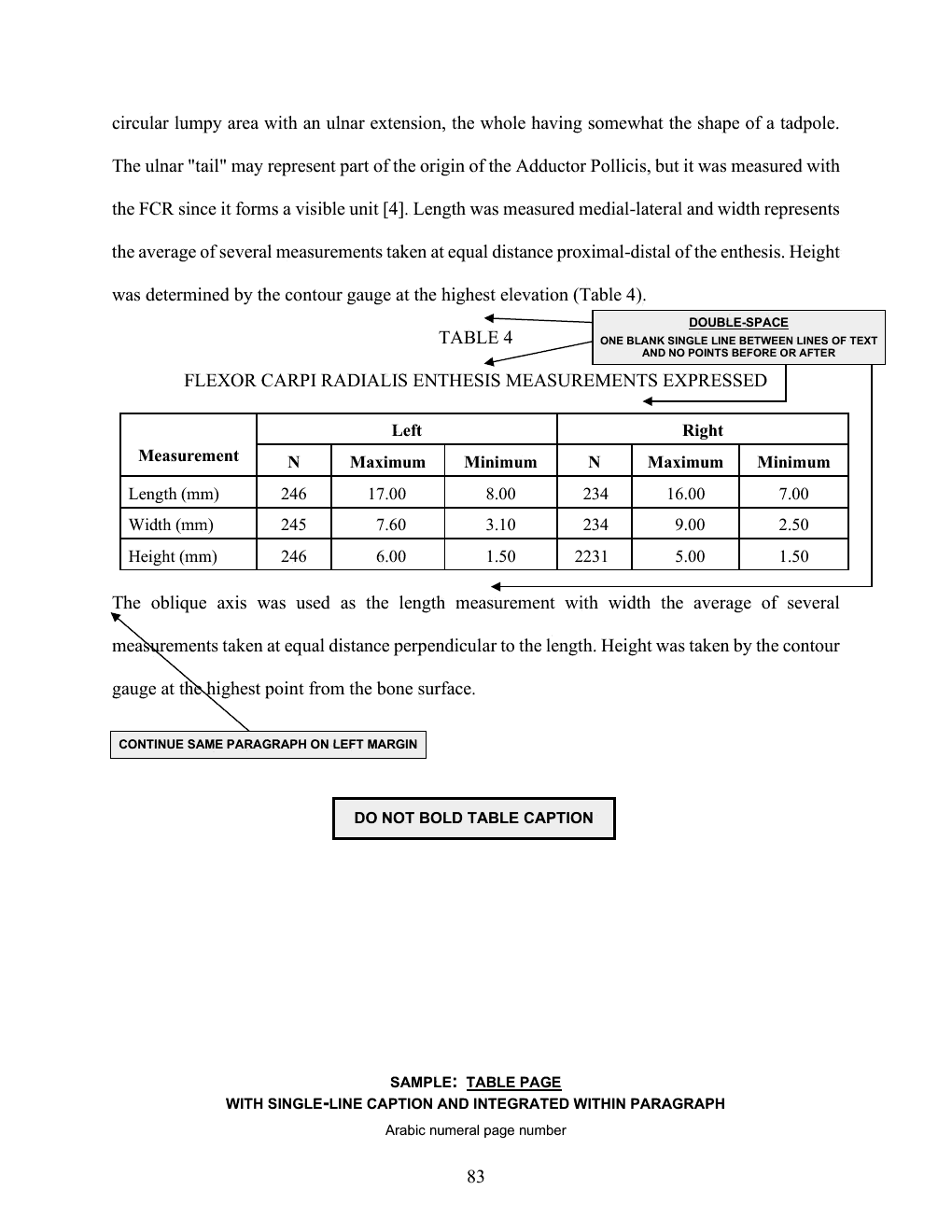
Formatting callouts on this sample
- Double-space the text (one blank single line between lines of text and no points before or after).
- Do not bold the table caption.
- Continue the same paragraph on the left margin.
- Page number: Arabic numeral.
Sample: Figure Page (multiline caption, integrated within paragraph)
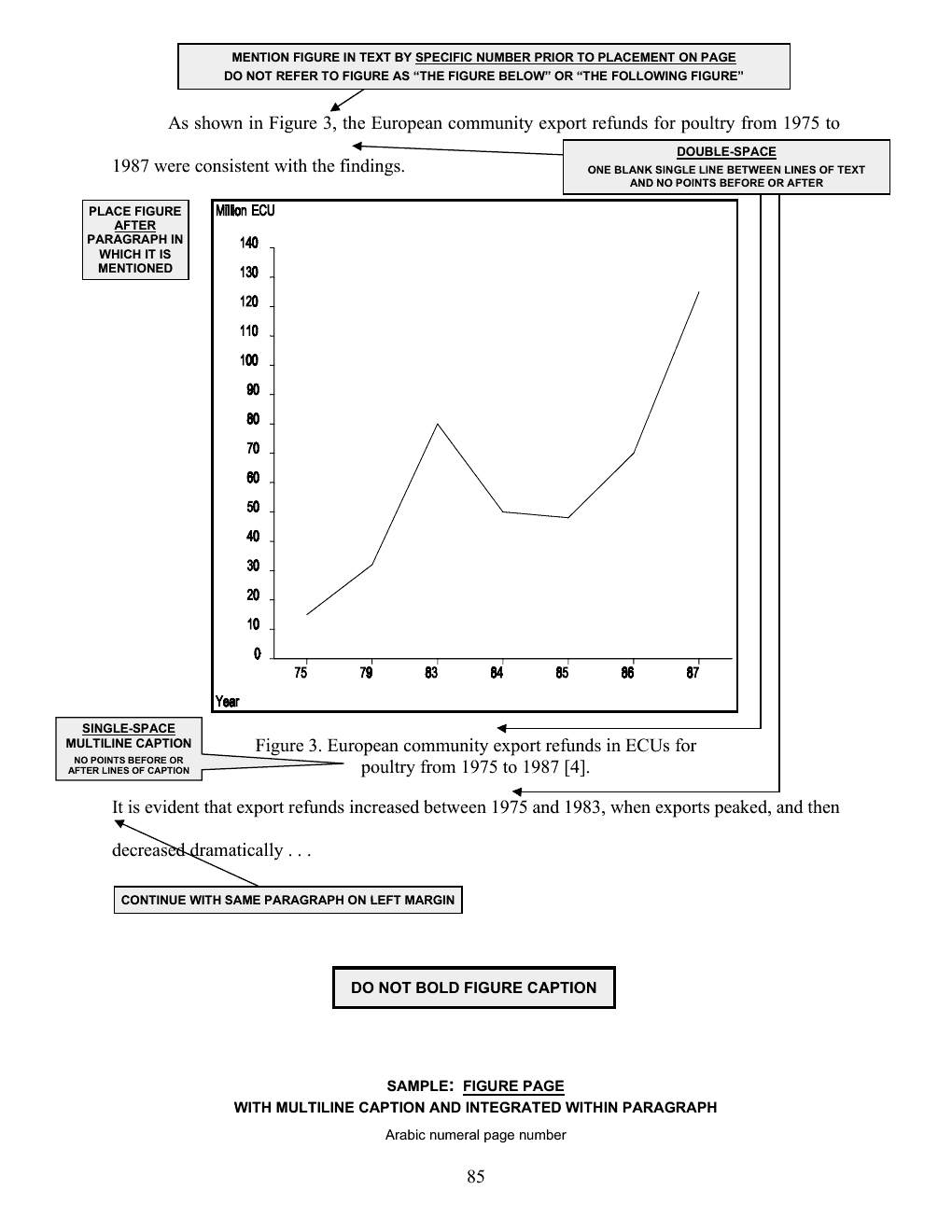
Formatting callouts on this sample
- Mention the figure in the text by its specific number prior to its placement on the page. Do not refer to the figure as “the figure below” or “the following figure.”
- Double-space the text (one blank single line between lines of text and no points before or after).
- Place the figure after the paragraph in which it is mentioned.
- Single-space a multiline caption; no points before or after lines of the caption.
- Do not bold the figure caption.
- Continue with the same paragraph on the left margin.
- Page number: Arabic numeral.
Sample: Equations Page (equations centered between margins, numbers flush on right margin)
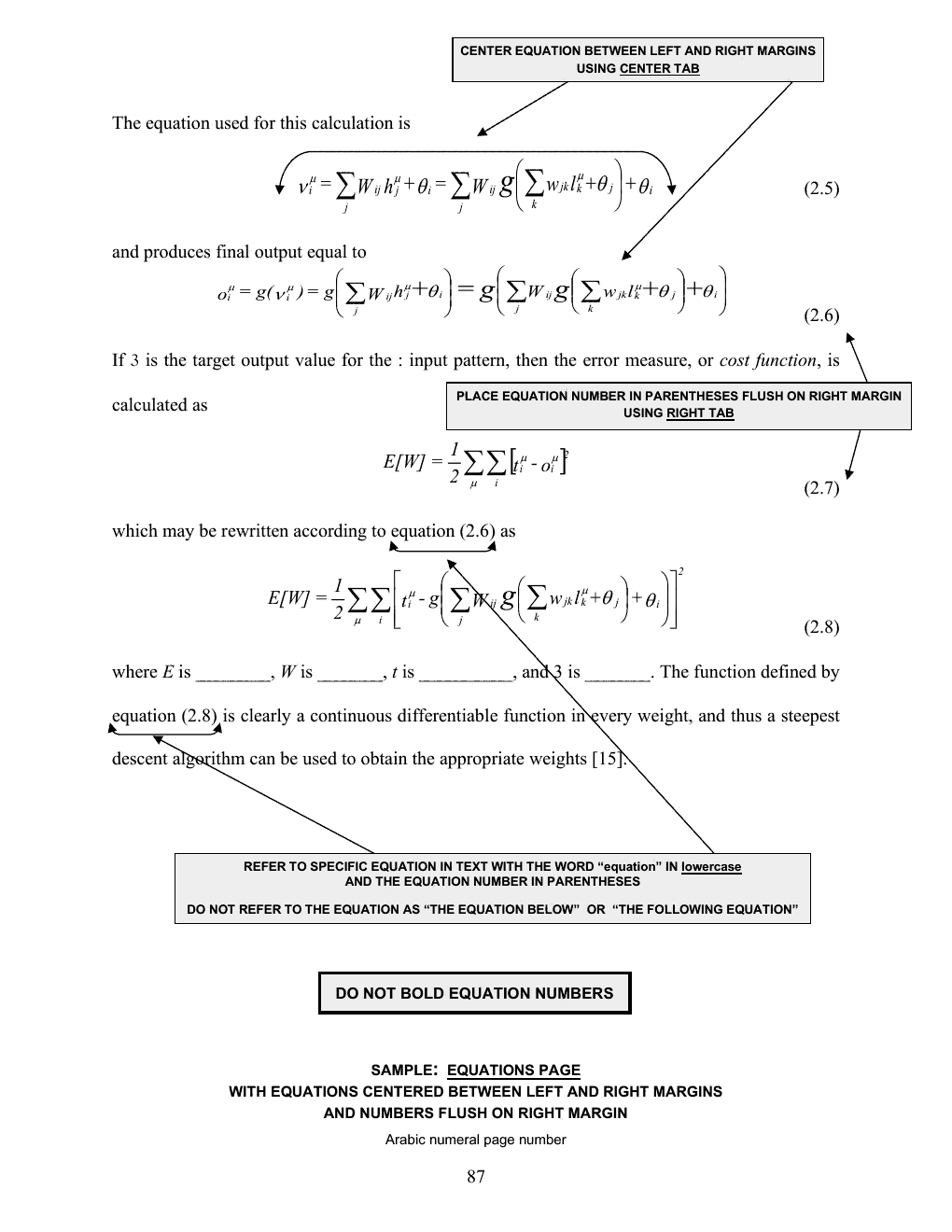
Formatting callouts on this sample
- Center the equation between the left and right margins using a center tab.
- Place the equation number in parentheses flush on the right margin using a right tab.
- Refer to a specific equation in the text with the word “equation” in lowercase and the equation number in parentheses.
- Do not refer to the equation as “the equation below” or “the following equation.”
- Do not bold equation numbers.
- Page number: Arabic numeral.
Sample: References Separation Page
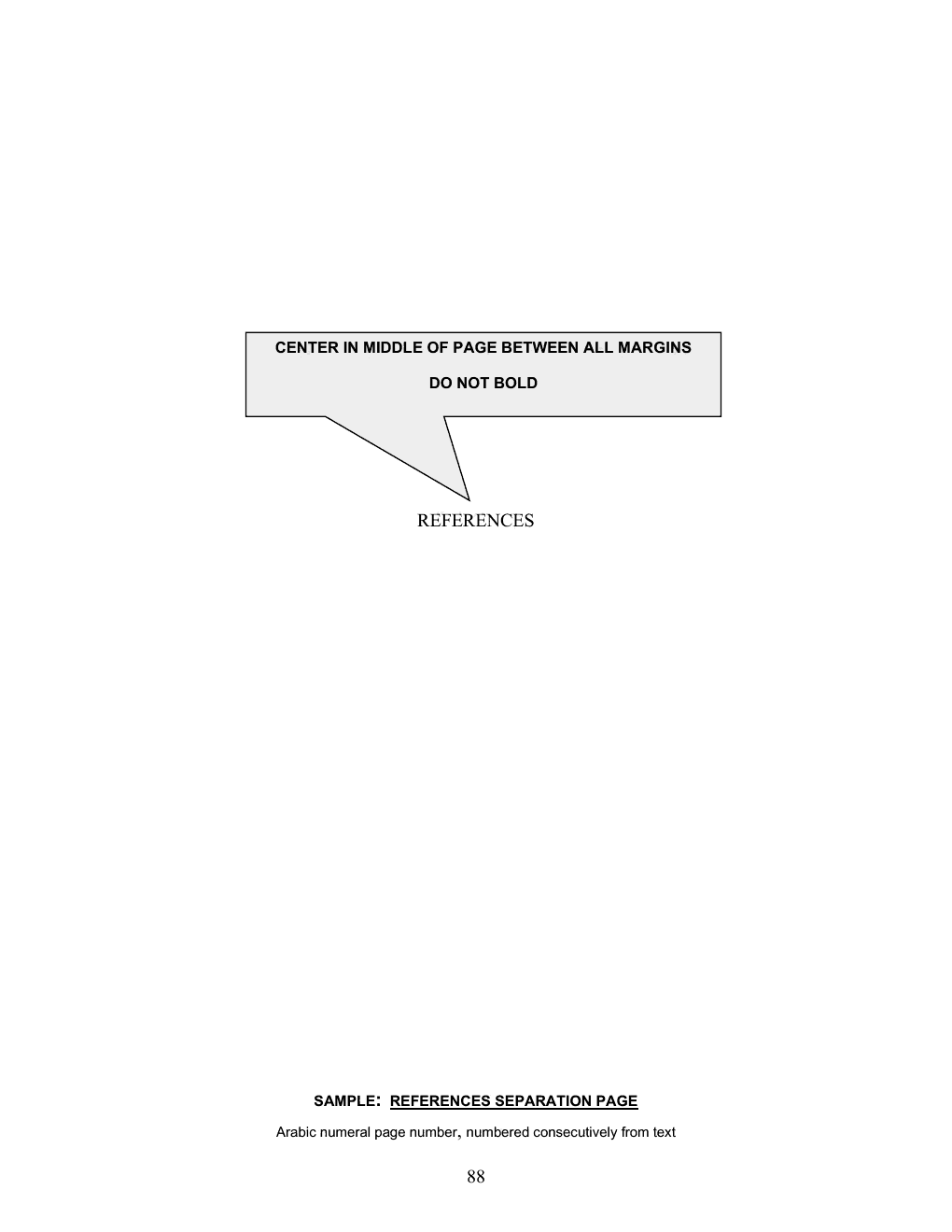
Formatting callouts on this sample
- Center in the middle of the page between all margins.
- Do not bold.
- Page number: Arabic numeral, numbered consecutively from the text.
Sample: References Page (references with numbers in brackets)
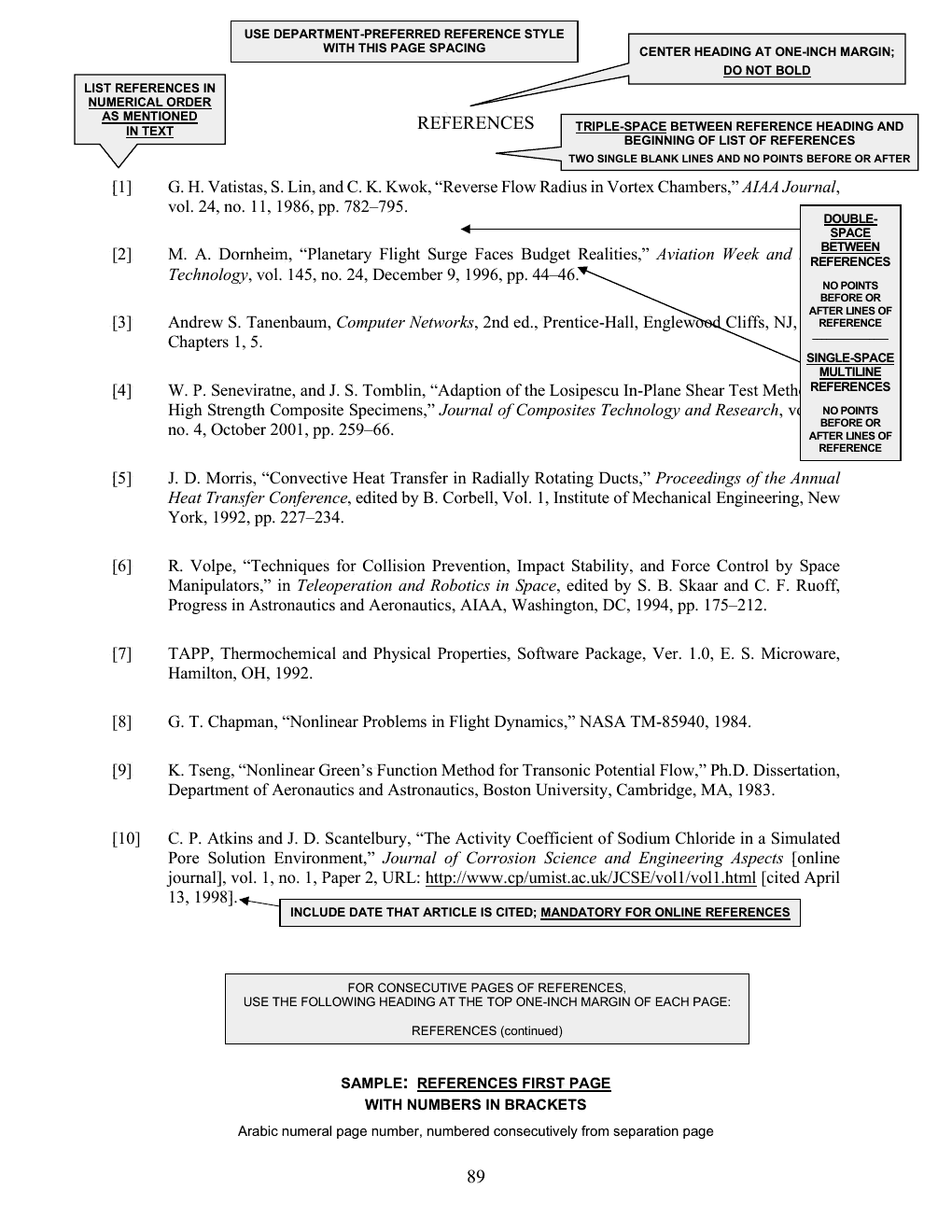
Formatting callouts on this sample
- Use the department-preferred reference style with this page spacing.
- Center the heading at the one-inch margin; do not bold.
- List references in numerical order as mentioned in the text.
- Triple-space between the References heading and the beginning of the list of references (two single blank lines and no points before or after).
- Double-space between references; no points before or after lines of a reference.
- Single-space multiline references; no points before or after lines of a reference.
- Include the date that an article is cited; mandatory for online references.
- For consecutive pages of references, use the heading REFERENCES (continued) at the top one-inch margin of each page.
- Page number: Arabic numeral, numbered consecutively from the separation page.
Sample: Bibliography Separation Page
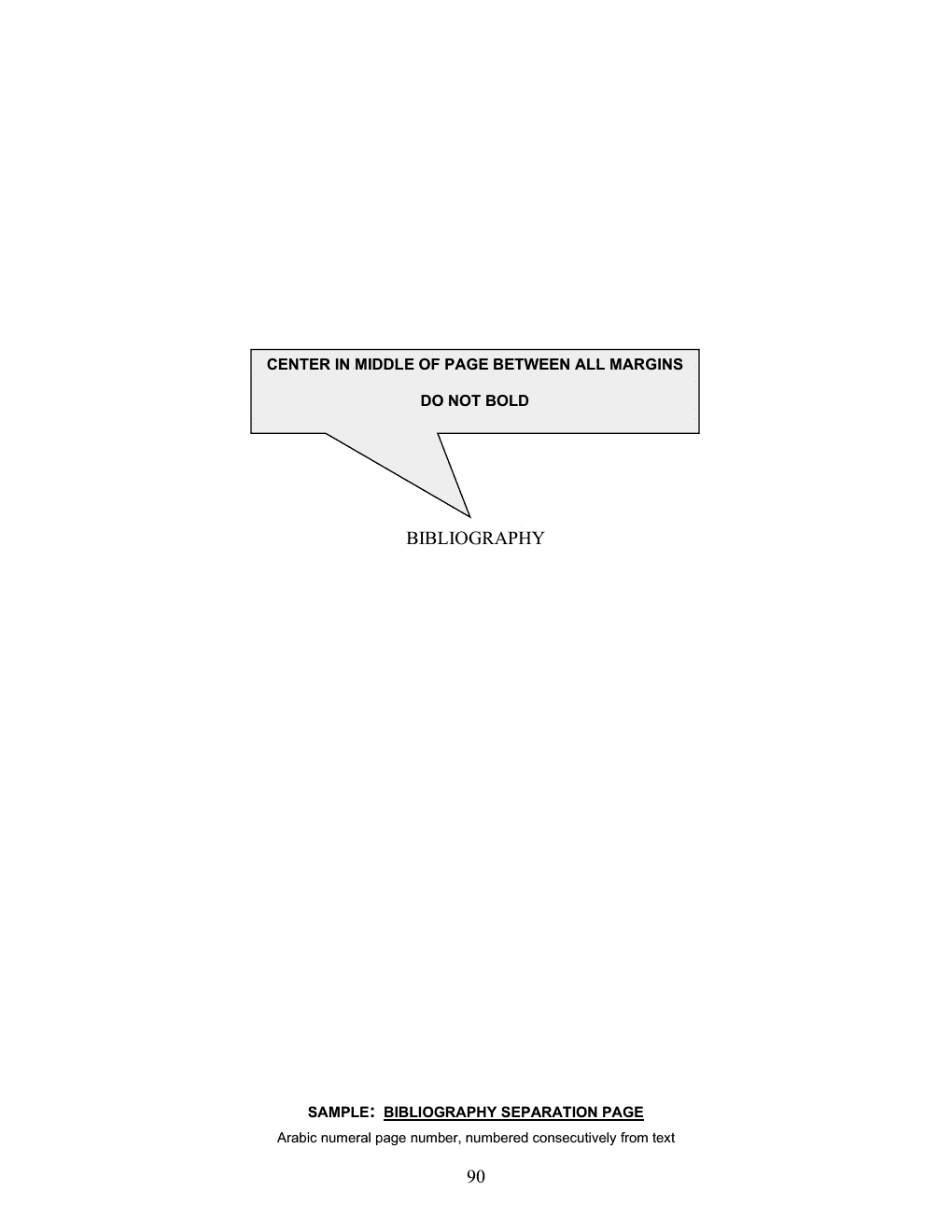
Formatting callouts on this sample
- Center in the middle of the page between all margins.
- Do not bold.
- Page number: Arabic numeral, numbered consecutively from the text.
Sample: Bibliography Page (references in alphabetical order)
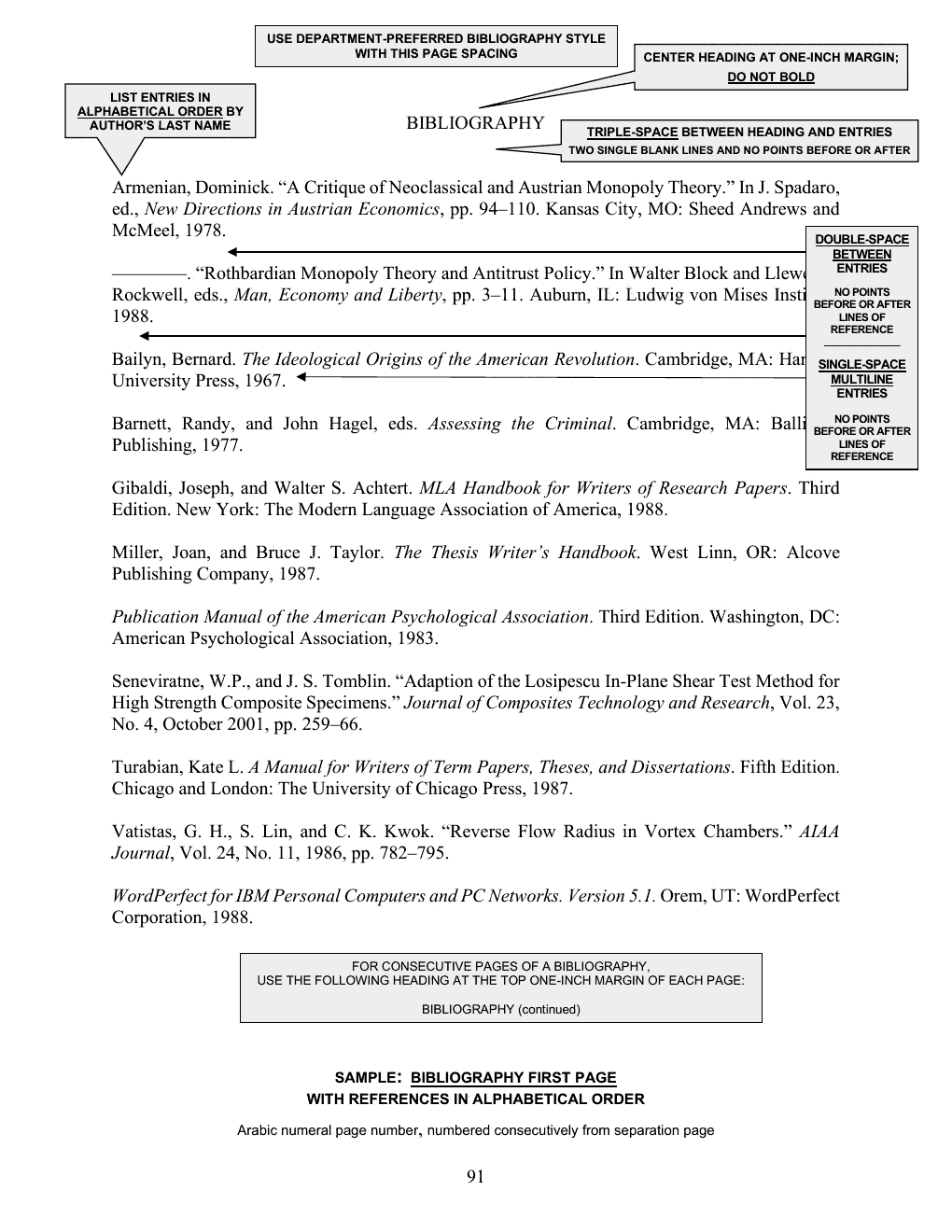
Formatting callouts on this sample
- Use the department-preferred bibliography style with this page spacing.
- Center the heading at the one-inch margin; do not bold.
- List entries in alphabetical order by author’s last name.
- Triple-space between the heading and the entries (two single blank lines and no points before or after).
- Double-space between entries; no points before or after lines of a reference.
- Single-space multiline entries; no points before or after lines of a reference.
- For consecutive pages of a bibliography, use the heading BIBLIOGRAPHY (continued) at the top one-inch margin of each page.
- Page number: Arabic numeral, numbered consecutively from the separation page.
Sample: Appendix/Appendices Separation Page
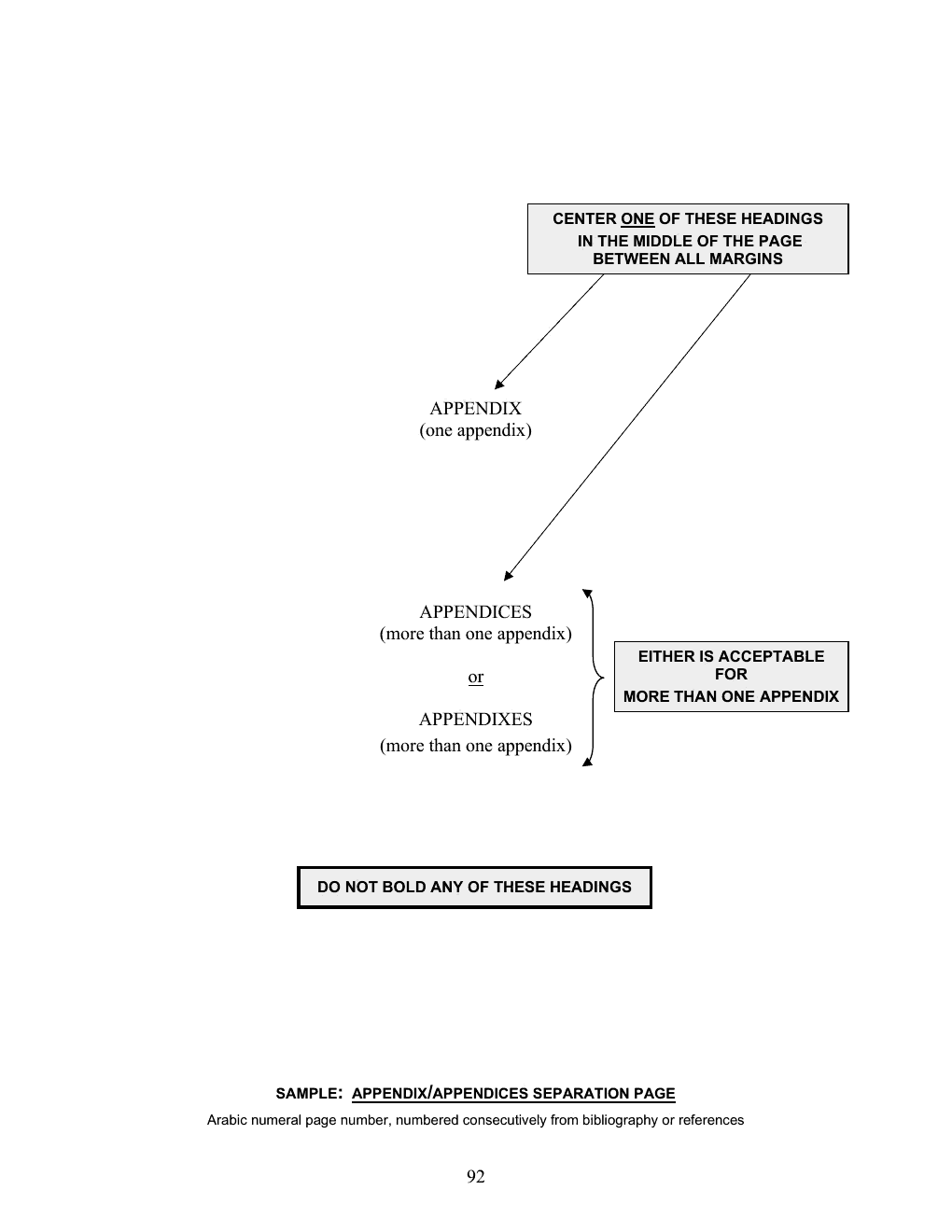
Formatting callouts on this sample
- Center one of these headings in the middle of the page between all margins: APPENDIX (one appendix), or APPENDICES or APPENDIXES (more than one appendix; either is acceptable).
- Do not bold any of these headings.
- Page number: Arabic numeral, numbered consecutively from the bibliography or references.
Sample: Appendix First Page
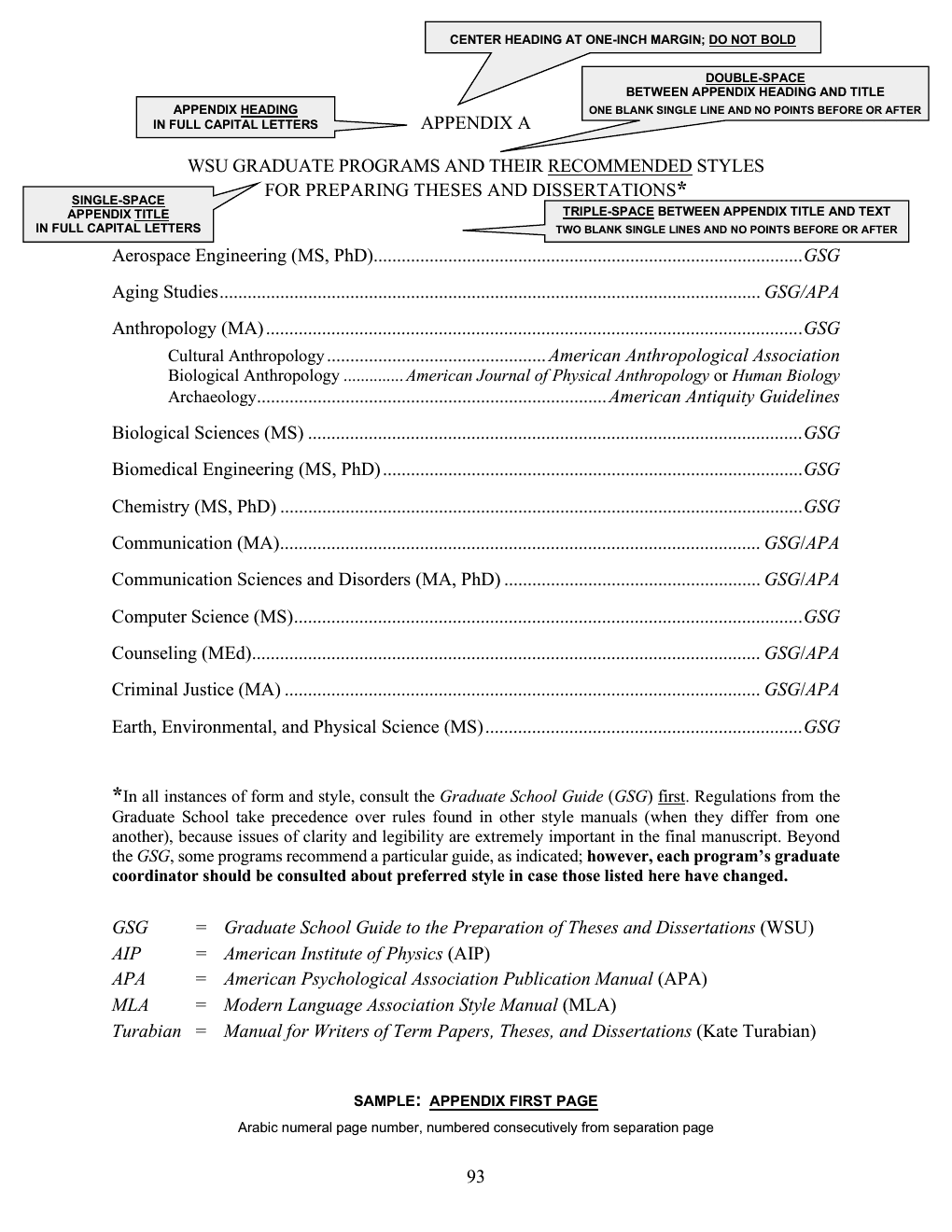
Formatting callouts on this sample
- Center the heading at the one-inch margin; do not bold.
- Appendix heading in full capital letters.
- Double-space between the appendix heading and the title (one blank single line and no points before or after).
- Single-space the appendix title in full capital letters.
- Triple-space between the appendix title and the text (two blank single lines and no points before or after).
- Page number: Arabic numeral, numbered consecutively from the separation page.
Sample: Appendix Second Page
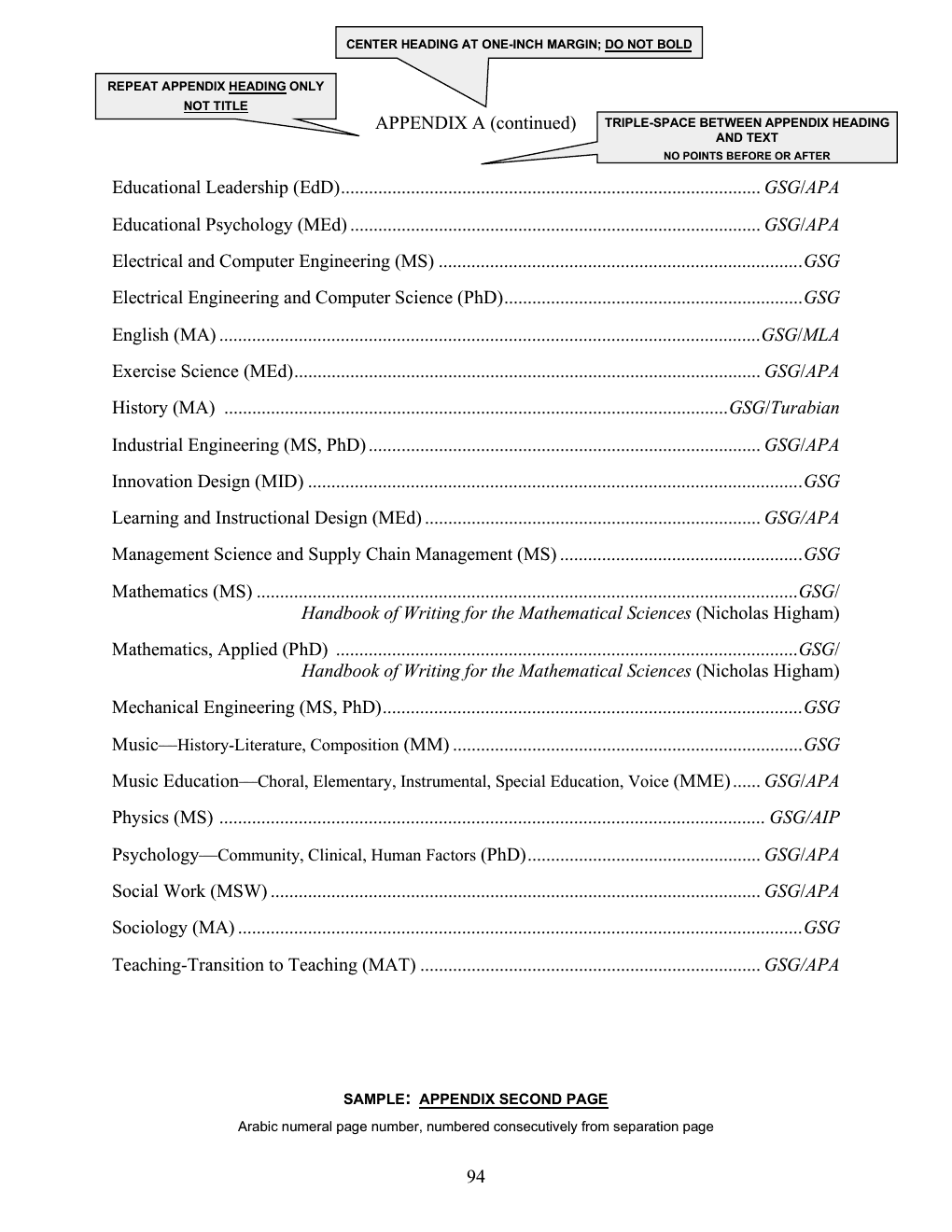
Formatting callouts on this sample
- Center the heading at the one-inch margin; do not bold.
- Repeat the appendix heading only, not the title.
- Triple-space between the appendix heading and the text; no points before or after.
- Page number: Arabic numeral, numbered consecutively from the separation page.
Appendices
Appendix A. WSU Graduate Programs and Their Recommended Styles for Preparing Theses and Dissertations
In all instances of form and style, consult the Graduate School Guide (GSG) first. Regulations from the Graduate School take precedence over rules found in other style manuals (when they differ from one another), because issues of clarity and legibility are extremely important in the final manuscript. Beyond the GSG, some programs recommend a particular guide, as indicated; however, each program’s graduate coordinator should be consulted about preferred style in case those listed here have changed.
| Program (degree) | Recommended style |
|---|---|
| Aerospace Engineering (MS, PhD) | GSG |
| Aging Studies | GSG/APA |
| Anthropology (MA) | GSG |
| Cultural Anthropology | American Anthropological Association |
| Biological Anthropology | American Journal of Physical Anthropology or Human Biology |
| Archaeology | American Antiquity Guidelines |
| Biological Sciences (MS) | GSG |
| Biomedical Engineering (MS, PhD) | GSG |
| Chemistry (MS, PhD) | GSG |
| Communication (MA) | GSG/APA |
| Communication Sciences and Disorders (MA, PhD) | GSG/APA |
| Computer Science (MS) | GSG |
| Counseling (MEd) | GSG/APA |
| Criminal Justice (MA) | GSG/APA |
| Earth, Environmental, and Physical Science (MS) | GSG |
| Educational Leadership (EdD) | GSG/APA |
| Educational Psychology (MEd) | GSG/APA |
| Electrical and Computer Engineering (MS) | GSG |
| Electrical Engineering and Computer Science (PhD) | GSG |
| English (MA) | GSG/MLA |
| Exercise Science (MEd) | GSG/APA |
| History (MA) | GSG/Turabian |
| Industrial Engineering (MS, PhD) | GSG/APA |
| Innovation Design (MID) | GSG |
| Learning and Instructional Design (MEd) | GSG/APA |
| Management Science and Supply Chain Management (MS) | GSG |
| Mathematics (MS) | GSG/Handbook of Writing for the Mathematical Sciences (Nicholas Higham) |
| Mathematics, Applied (PhD) | GSG/Handbook of Writing for the Mathematical Sciences (Nicholas Higham) |
| Mechanical Engineering (MS, PhD) | GSG |
| Music—History-Literature, Composition (MM) | GSG |
| Music Education—Choral, Elementary, Instrumental, Special Education, Voice (MME) | GSG/APA |
| Physics (MS) | GSG/AIP |
| Psychology—Community, Clinical, Human Factors (PhD) | GSG/APA |
| Social Work (MSW) | GSG/APA |
| Sociology (MA) | GSG |
| Teaching—Transition to Teaching (MAT) | GSG/APA |
- GSG
- Graduate School Guide to the Preparation of Theses and Dissertations (WSU)
- AIP
- American Institute of Physics (AIP)
- APA
- American Psychological Association Publication Manual (APA)
- MLA
- Modern Language Association Style Manual (MLA)
- Turabian
- Manual for Writers of Term Papers, Theses, and Dissertations (Kate Turabian)
Appendix B. Particular WSU Programs and Appropriate Area to Submit Manuscript
- Aging Studies: submit thesis manuscripts to the Department of Public Health Sciences.
- Criminal Justice: submit thesis manuscripts to the School of Criminal Justice.
Appendix C. Graduate Degrees Awarded at Wichita State University
- Doctor of Audiology (AuD)
- Doctor of Education (EdD)
- Doctor of Nursing Practice (DNP)
- Doctor of Philosophy (PhD)
- Doctor of Physical Therapy (DPT)
- Specialist in Education (EdS)
- Executive Master of Business Administration (EMBA)
- Master of Accountancy (MACC)
- Master of Arts (MA)
- Master of Arts in Teaching (MAT)
- Master of Business Administration (MBA)
- Master of Education (MEd)
- Master of Engineering Management (MEM)
- Master of Fine Arts (MFA)
- Master of Health Administration (MHA)
- Master of Human Resource Management (MHRM)
- Master of Innovation Design (MID)
- Master of Music (MM)
- Master of Music Education (MME)
- Master of Physician Associate (MPA)
- Master of Public Administration (MPA)
- Master of Science (MS)
- Master of Science in Nursing (MSN)
- Master of Social Work (MSW)
Appendix D. Graduate Majors at Wichita State University
Doctoral
- Aerospace Engineering
- Applied Mathematics
- Audiology
- Biomedical Engineering
- Chemistry
- Communication Sciences and Disorders
- Educational Leadership
- Electrical Engineering and Computer Science
- Industrial Engineering
- Mechanical Engineering
- Nursing Practice
- Physical Therapy
- Psychology
Specialist (in Education)
- School Psychology (EdS)
Master
- Accountancy (MACC)
- Arts (MA)
- Aging Studies
- Anthropology
- Arts Leadership and Management
- Communication
- Communication Sciences and Disorders
- Criminal Justice
- Economics and Quantitative Analysis
- English
- History
- Sociology
- Spanish
- Business Administration (MBA)
- Education (MEd)
- Counseling
- Educational Leadership
- Educational Psychology
- Exercise Science
- Learning and Instructional Design
- Special Education
- Sport Management
- Executive Business Administration (EMBA)
- Engineering Management (MEM)
- Fine Arts (MFA)
- Creative Writing
- Studio Art
- Health Administration (MHA)
- Human Resource Management (MHRM)
- Innovation Design (MID)
- Music (MM)
- Chamber Music
- Composition
- Conducting
- History-Literature
- Opera Performance
- Performance
- Piano Accompanying
- Piano Pedagogy
- Music Education (MME)
- Choral
- Elementary
- Instrumental
- Instrumental Conducting
- Special Education
- Voice
- Nursing (MSN)
- Physician Associate (MPA)
- Public Administration (MPA)
- Science (MS)
- Aerospace Engineering
- Athletic Training
- Biological Sciences
- Biomedical Engineering
- Business Analytics
- Chemistry
- Computer Science
- Computing
- Data Science
- Earth, Environmental, and Physical Science
- Electrical and Computer Engineering
- Industrial Engineering
- Management Science and Supply Chain Management
- Materials Science
- Mathematical Data Science
- Mathematics
- Mechanical Engineering
- Physics
- Social Work (MSW)
- Teaching (MAT)